
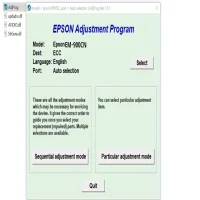

Latest Version
More About Epson EM-900CN Adjustment Program
Epson EM-900CN Adjustment Program: A Comprehensive Guide
The Epson EM-900CN is a high-performance printer known for its reliability and superior print quality. Like any printer, regular maintenance is key to keeping it in top shape. One of the tools that play a pivotal role in the maintenance and troubleshooting of Epson printers is the Adjustment Program. In this article, we delve into the unique aspects of the Epson EM-900CN Adjustment Program, its uses, and best practices for implementation.
What is the Epson EM-900CN Adjustment Program?
The Adjustment Program is a utility software specifically designed to manage and calibrate Epson printers. It enables users to reset certain printer settings, clear error messages, and perform maintenance tasks that standard printer software may not address. This program is tailored to the EM-900CN model, ensuring precise adjustments for optimal performance.
Why Use the Adjustment Program?
Over time, your Epson EM-900CN may encounter issues such as:
- Waste Ink Pad Counter Overflow: The printer may stop working when the waste ink pad counter reaches its limit.
- Misaligned Prints: Repeated use can lead to minor misalignments, affecting print quality.
- Error Messages: Persistent error messages that standard troubleshooting cannot resolve.
- Component Calibration: Ensures that all mechanical parts are synchronized for efficient operation.
The Adjustment Program offers a structured way to address these issues without requiring professional assistance, saving time and money.
Features of the Epson EM-900CN Adjustment Program
- Reset Waste Ink Pad Counter: Extends the lifespan of the printer by resetting the counter.
- Print Head Alignment: Fine-tunes the alignment for crisp and accurate prints.
- EEPROM Initialization: Restores factory settings in cases of severe software glitches.
- Ink Charge: Ensures consistent ink flow after replacing cartridges.
- Component Testing: Allows users to test individual printer components like the scanner or paper feed mechanism.
Steps to Use the Adjustment Program
- Download and Install: Ensure that you download the official Epson Adjustment Program compatible with the EM-900CN model.
- Run the Program: Open the software on a Windows PC. Note that administrator privileges may be required.
- Select Printer Model: Choose "Epson EM-900CN" from the list of available models.
- Perform Desired Task: Navigate to the appropriate section for the task you wish to perform, such as resetting the waste ink pad counter or aligning the print head.
- Follow On-Screen Instructions: The program will guide you through the process step-by-step.
Precautions and Best Practices
- Backup Important Data: If your printer is connected to a network, ensure that all print jobs are backed up before performing any adjustments.
- Use Genuine Software: Always download the Adjustment Program from a trusted source to avoid malware or corrupted files.
- Follow Manufacturer Guidelines: Refer to the Epson EM-900CN manual for any specific instructions related to maintenance.
- Do Not Overuse: The Adjustment Program is a powerful tool; use it only when necessary to avoid unnecessary wear on the printer.
Troubleshooting Common Issues
- Program Not Recognizing the Printer: Ensure that the printer is connected via USB, as the Adjustment Program often does not support wireless connections.
- Error Codes Persist After Reset: Restart the printer and run the program again. If the issue persists, check for hardware malfunctions.
- Incomplete Process: If the program freezes, close it and restart your computer before trying again.
Final Thoughts
The Epson EM-900CN Adjustment Program is an invaluable tool for maintaining and troubleshooting your printer. By using it judiciously and following best practices, you can extend the life of your printer and ensure consistent performance. Remember, while the program offers advanced features, it is essential to approach it with caution to avoid unintended issues.
Maintain your Epson EM-900CN with confidence and enjoy hassle-free printing for years to come!
Rate the App
User Reviews

Popular Apps








