
Latest Version
Download NowMore About Epson L800 Adjustment Program ( Resetter )
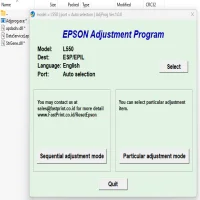
Epson L800 Adjustment Program (Resetter): A Complete Guide
The Epson L800 printer is widely known for its high-quality photo printing capabilities and cost-effective ink tank system. However, like any other printer, it may encounter certain technical issues over time. One common problem with the Epson L800 is the "Waste Ink Pad" error, which can occur when the ink pads, responsible for absorbing excess ink, reach their maximum capacity. In such cases, the Epson L800 Adjustment Program (also known as the Resetter) can be used to reset the printer’s internal counter and clear this error.
What is the Epson L800 Adjustment Program?
The Epson L800 Adjustment Program is a software tool that is designed to help reset various printer functions. It’s a powerful utility used by technicians and experienced users to address issues related to ink pads, waste ink counters, print head cleaning, and other internal settings. This program works by interacting directly with the printer’s firmware, allowing users to reset various operational counters without needing to replace the ink pads or take the printer to a service center.
Why Do You Need the Epson L800 Adjustment Program?
Over time, printers accumulate excess ink in their waste ink pads. These pads are designed to absorb any excess ink that is produced during the printing process. However, once the ink pads fill up to their capacity, the printer will trigger a warning or error message indicating that the waste ink counter has reached its limit. This is a safety feature built into the printer to prevent ink from leaking inside and damaging internal components.
While the waste ink pads may still have some capacity left, the printer will prevent further use until the waste ink counter is reset. This is where the Epson L800 Adjustment Program comes in. By using the program, users can reset the ink pad counter, allowing the printer to resume normal operation without the need for immediate maintenance.
Features of the Epson L800 Adjustment Program
The Epson L800 Adjustment Program comes with several features that can help improve the printer's performance and resolve specific issues:
-
Waste Ink Counter Reset: The main function of the Adjustment Program is to reset the waste ink counter. This clears the error message and allows the printer to continue printing without interruptions.
-
Print Head Cleaning: The software allows users to clean the print head to resolve ink flow issues, reduce clogging, and improve print quality.
-
Ink Pad Initialization: The program can initialize the ink pads to clear excess ink and prevent potential damage.
-
General Maintenance: It provides options for various maintenance functions, such as nozzle checks and print head alignment.
-
Error Code Reset: The program can reset various error codes and issues related to the printer's internal mechanics.
How to Use the Epson L800 Adjustment Program
Here’s a step-by-step guide to using the Epson L800 Adjustment Program:
Step 1: Download and Install the Adjustment Program
The Epson L800 Adjustment Program is not officially provided by Epson, so users often need to download it from third-party websites. Make sure to download the program from a reliable source to avoid malware or viruses.
After downloading the software, extract the files and install the program on your computer. It’s important to follow the installation instructions provided by the source of the software.
Step 2: Connect the Printer to Your Computer
Ensure that your Epson L800 printer is connected to the computer via USB cable or Wi-Fi. Make sure the printer is powered on.
Step 3: Open the Adjustment Program
Once the program is installed, open the software. You may need to run it as an administrator for the program to access the printer’s settings.
Step 4: Select the Printer Model
The program will prompt you to select the printer model from a list. Choose the Epson L800 from the available options.
Step 5: Choose the Waste Ink Reset Function
Navigate to the "Waste Ink Pad Counter" or similar option in the software interface. Click on the reset function to initiate the reset process. The program will communicate with the printer and reset the waste ink counter.
Step 6: Complete the Reset Process
After the reset is complete, the program will notify you. You may need to restart the printer to ensure the changes take effect.
Step 7: Test the Printer
Once the reset is done, print a test page to check if the error has been cleared and the printer is working correctly.
Precautions When Using the Adjustment Program
-
Backup Data: Before using any adjustment tool, it’s a good idea to back up important printer settings and configurations.
-
Follow Instructions Carefully: Ensure that you follow each step of the program carefully. Incorrect usage of the software can lead to other technical issues with the printer.
-
Use the Program Sparingly: The Adjustment Program is meant to be used for specific issues, particularly waste ink counter resets. Don’t use it for every maintenance task unless necessary.
-
Waste Ink Pads: While the reset can clear the error message, the ink pads themselves may still be full. It’s a good idea to replace the waste ink pads after several resets to avoid damaging the printer.
-
Download from Trusted Sources: Since the Epson L800 Adjustment Program is not officially released by Epson, it’s crucial to download it from a trusted website to ensure you’re getting the correct and safe version.
Conclusion
The Epson L800 Adjustment Program is an invaluable tool for users experiencing issues with the printer’s waste ink counter or other maintenance-related problems. While it offers a convenient solution to reset the printer and continue printing, it’s important to use it wisely and not over-rely on it without considering the physical condition of the printer’s ink pads. Regular maintenance and occasional service by a professional technician will help keep the Epson L800 in optimal condition for long-lasting performance.
Rate the App
User Reviews
"studio"
Balajisingh
7 months ago
A printer's ink pad is at the end of its service life. Please contact Epson Support.





Popular Apps








