

Latest Version
Download NowMore About Epson L475 Adjustment Program ( Resetter )
Epson L475 Adjustment Program (Resetter): A Complete Guide
The Epson L475 is a multifunctional printer that is commonly used for home and office purposes. It offers efficient printing, scanning, and copying capabilities, and is particularly favored for its cost-effectiveness and high-quality performance. However, like any other printer, the Epson L475 may encounter certain issues over time, such as waste ink pad counter errors. When such issues arise, users may need to reset the printer to restore its full functionality.
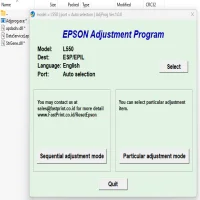
This is where the Epson L475 Adjustment Program (also known as a Resetter) comes in. The adjustment program helps reset the printer’s waste ink pad counter and clear other potential software-related issues, allowing users to continue using the printer without any hindrances.
What is the Epson L475 Adjustment Program?
The Epson L475 Adjustment Program, also referred to as the Resetter, is a software tool specifically designed to reset certain components of Epson printers. It is used primarily for troubleshooting issues such as the waste ink pad counter, which can cause a "printer is in an error state" message to appear.
This software is typically not available for free from official Epson channels but can be found from third-party sources. It’s essential to use caution when downloading the Adjustment Program from unofficial websites, as it may come with malware or other unwanted software.
Why Do You Need the Epson L475 Adjustment Program?
The Adjustment Program is necessary when your Epson L475 printer starts experiencing one or more of the following symptoms:
-
Waste Ink Pad Error: The printer's waste ink pads collect excess ink, and when they reach their capacity, the printer will stop functioning. The Adjustment Program helps to reset the waste ink counter and prevent this issue.
-
Ink Absorber Reset: Over time, the printer’s ink absorber pads accumulate ink during normal operations, and the printer may display an error once the pads are full. The Adjustment Program allows you to reset the ink absorber counter.
-
Resetting Printer Settings: The Adjustment Program is also useful for resetting various printer settings to default values. This can help if you've experienced configuration errors or other issues.
How Does the Epson L475 Adjustment Program Work?
The Epson L475 Adjustment Program works by communicating with the printer’s internal system. Here’s how it functions:
-
Waste Ink Pad Counter Reset: The software resets the counter that tracks the ink absorbed by the printer’s waste pads. Once reset, the printer no longer shows error messages related to ink overflow.
-
Performing Print Head Alignment and Cleaning: The Adjustment Program also allows users to perform maintenance tasks, such as head alignment and cleaning, to ensure the printer’s quality remains high.
-
Printer Status Reset: The tool resets the printer’s internal status indicators to default values, making it seem like the printer is fresh from the factory.
How to Use the Epson L475 Adjustment Program
Using the Epson L475 Adjustment Program is relatively simple, but it does require caution, as incorrect usage may cause more harm than good. Here’s a step-by-step guide on how to use the Adjustment Program:
Step 1: Download the Adjustment Program
Search for a reliable and trusted source for the Epson L475 Adjustment Program. It’s crucial to ensure the download is from a secure website to avoid malware.
Step 2: Install the Software
Once the software has been downloaded, follow the installation instructions. You may need to disable your antivirus temporarily, as some antivirus programs may mistakenly flag the tool as a potential threat.
Step 3: Connect Your Printer
Make sure the Epson L475 printer is turned on and connected to your computer via USB or network connection.
Step 4: Open the Adjustment Program
Run the Adjustment Program, and a list of available options will appear on your screen.
Step 5: Select the Required Adjustment
Choose the appropriate option, such as resetting the waste ink pad counter or performing maintenance tasks. Select "Waste Ink Pad Counter" for the specific reset.
Step 6: Follow the On-Screen Instructions
The program will guide you through the reset process. Follow the on-screen prompts carefully. In most cases, you’ll need to click a “Reset” button, and the program will automatically do the rest.
Step 7: Restart the Printer
Once the adjustment has been made, restart the printer. The error should be resolved, and the printer should be back to normal.
Precautions While Using the Epson L475 Adjustment Program
While the Epson L475 Adjustment Program is a handy tool, it’s important to exercise caution during use:
-
Backup Your Data: Before using the program, back up any important data from your printer, such as scanned files or settings, as the program may reset certain configurations.
-
Use Trusted Sources: Download the Adjustment Program only from trusted sources to avoid malware. Be wary of websites offering the software for free, as they might not be safe.
-
Be Cautious with Resetting: Avoid resetting the printer unnecessarily, as doing so repeatedly may affect the printer’s performance or longevity.
-
Check Ink Levels: Before using the reset tool, ensure that your ink levels are sufficient, as the reset will not address issues related to low ink.
Alternatives to the Epson L475 Adjustment Program
If you're not comfortable using third-party software or can't find a reliable Adjustment Program for the Epson L475, there are a few alternatives you can try:
-
Official Epson Support: Contact Epson customer support to inquire about solutions or if your printer is under warranty.
-
Firmware Updates: Sometimes, Epson releases firmware updates that may resolve issues with waste ink pads and other related problems.
-
Service Centers: Take the printer to an authorized Epson service center where technicians can perform the reset and any other necessary repairs.
Conclusion
The Epson L475 Adjustment Program (Resetter) is a valuable tool for solving common printer issues, particularly related to the waste ink pad counter. However, it’s essential to use it responsibly, ensuring you download it from reliable sources and follow the necessary precautions. By resetting the printer’s error counters, you can extend its useful life and enjoy consistent performance for a longer period.
Rate the App
User Reviews




Popular Apps








