
Latest Version
Download NowMore About Epson L550 Adjustment Program ( Resetter )
Epson L550 Adjustment Program (Resetter): A Comprehensive Guide
The Epson L550 printer, part of the L-series, is well-regarded for its efficiency and cost-effective printing capabilities. However, like all printers, it requires periodic maintenance to ensure optimal performance. One crucial aspect of maintaining the Epson L550 is resetting its internal counter, which can sometimes reach its limit, causing error messages like "Service Required" or "Waste Ink Pad Overflow." In such cases, the Epson L550 Adjustment Program (or Resetter) becomes an essential tool for restoring your printer to its full functionality.
What is the Epson L550 Adjustment Program?
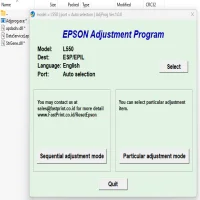
The Epson L550 Adjustment Program, often referred to as the Resetter, is a software tool designed to reset various internal counters within the printer, allowing it to function as if it were newly set up. The program is commonly used when certain errors related to ink waste or maintenance counters are triggered. It is not a universal tool for all Epson printers but specifically designed for models like the L550 that have certain maintenance functions that need resetting after a set number of prints or ink use.
Why You Need the Adjustment Program
One of the most common issues with the Epson L550 printer is the accumulation of waste ink, which can trigger error messages when the waste ink pad reaches its limit. This is an intentional feature to prevent ink from spilling inside the printer. However, once the waste ink pad counter is full, it can prevent you from printing further unless the counter is reset. The Adjustment Program helps you reset these counters and continue using the printer without needing to replace internal parts prematurely.
Key Features of the Epson L550 Adjustment Program
-
Waste Ink Pad Reset: The primary function of the Adjustment Program is to reset the waste ink pad counter. This allows you to avoid costly repairs or service calls.
-
Ink Absorber Reset: It can also help in resetting the ink absorber counter, ensuring that your printer continues to work after it has reached its ink capacity limit.
-
Printer Maintenance: The program provides you with detailed printer maintenance options, which can help prolong the life of your Epson L550 by managing its various internal counters.
-
Easy-to-Use Interface: While the program is designed for advanced users, it offers a relatively simple interface. With a few steps, you can reset the necessary counters without requiring professional assistance.
How to Use the Epson L550 Adjustment Program
Before using the Adjustment Program, ensure that your printer is properly connected to your computer and powered on. Follow these steps to perform a reset:
-
Download the Adjustment Program: Find a trustworthy website that offers the Epson L550 Adjustment Program. It is essential to avoid downloading files from unreliable sources to prevent malware.
-
Install the Software: Once downloaded, extract the ZIP file and run the installer. Follow the installation instructions.
-
Run the Program: After installation, launch the program on your computer. Select the model of your printer (Epson L550) from the available list.
-
Select the Reset Option: From the main interface, select the “Waste Ink Pad Counter” reset option. This will clear the internal counter that tracks the waste ink.
-
Reset and Test: Follow the prompts to reset the counter. Once completed, test the printer by performing a print job. If successful, the error message should no longer appear, and the printer will resume normal operation.
Precautions and Considerations
While the Epson L550 Adjustment Program is a powerful tool, there are a few important considerations to keep in mind:
-
Warranty: Using the resetter may void your warranty, so be sure to check the terms of your warranty agreement before proceeding.
-
Ink Pad Replacement: Although resetting the waste ink pad counter may resolve error messages temporarily, it does not physically clean or replace the ink pads inside the printer. Over time, these pads can become saturated with ink, leading to further issues. It's advisable to replace or clean the ink pads as needed.
-
Use Responsibly: The Adjustment Program should be used carefully and responsibly. Constantly resetting the waste ink pad counter without addressing the underlying issue (i.e., ink pad saturation) could result in ink spills or damage to your printer.
Conclusion
The Epson L550 Adjustment Program is a valuable tool for any Epson printer owner facing waste ink pad issues. By resetting internal counters, it allows users to extend the life of their printer and avoid costly repairs. However, it's important to balance convenience with proper maintenance to ensure long-term printer health. Always use the program responsibly and consider consulting a professional if you’re unsure about performing the reset yourself.
This tool is a must-have for users looking to maintain the functionality of their Epson L550 printer and avoid unnecessary downtime.
Rate the App
User Reviews





Popular Apps








