

Latest Version
Download NowMore About Epson L555 Adjustment Program ( Resetter )
Epson L555 Adjustment Program (Resetter): A Comprehensive Guide
The Epson L555, known for its high-quality printing and reliable performance, is a popular model among both home and office users. However, like many inkjet printers, it comes with certain maintenance challenges that may require an adjustment program or a "resetter" to resolve. The Epson L555 Adjustment Program is a specialized tool designed to reset certain counters in the printer, particularly those related to the ink pads and waste ink. This program helps users maintain their printer's functionality and prolong its life.
What is an Epson L555 Adjustment Program?
An Epson L555 Adjustment Program (also called a resetter) is a software tool that allows users to reset the printer's internal counters. Printers like the Epson L555 have an ink pad counter that tracks the amount of waste ink absorbed by the printer’s sponge. Over time, this counter reaches its limit, and the printer might display error messages like "Service required" or stop functioning altogether. The adjustment program helps to clear these counters, essentially resetting the printer to a state where it can continue operating without issues.
This tool is not officially provided by Epson, but it is widely used in the printer repair community for resolving specific errors and maintenance issues.
Why Use an Adjustment Program?
The Epson L555, like many Epson inkjet printers, has an internal counter that tracks the usage of ink pads. These pads collect excess ink during cleaning cycles and other maintenance procedures. When the printer’s waste ink counter reaches a certain limit, it may display an error message indicating that the ink pads are full or near full. At this point, the printer can no longer function until the error is cleared, which typically requires either replacing the ink pads or resetting the counter.
By using the Epson L555 Adjustment Program, users can:
-
Reset the Waste Ink Counter: This counter tracks the amount of ink absorbed by the printer’s ink pads. Resetting it clears the warning and restores the printer's functionality.
-
Clear Printer Errors: The program can fix error messages such as "Service Required," allowing the printer to resume normal operation.
-
Extend Printer Life: Regularly using the adjustment program can help prevent costly repairs or premature replacement of the printer due to full waste ink pads.
-
Perform Other Maintenance Tasks: In addition to waste ink counter reset, the adjustment program allows users to perform various maintenance tasks, such as head cleaning, nozzle checks, and alignment.
How to Use the Epson L555 Adjustment Program
Step 1: Download the Adjustment Program First, you need to obtain the Epson L555 Adjustment Program. While Epson does not provide this tool directly, it is available from third-party websites that specialize in printer maintenance. Be cautious when downloading software from the internet to avoid malicious files. Make sure to use reputable sources.
Step 2: Install the Program Once downloaded, install the program on your computer. Follow the on-screen instructions to complete the installation. It is recommended to use a Windows-based system for compatibility, as the adjustment program is often not supported on macOS.
Step 3: Connect Your Epson L555 Printer Ensure that your Epson L555 printer is connected to the computer via USB or network connection and powered on.
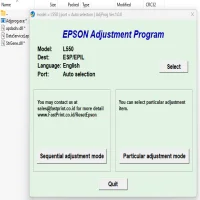
Step 4: Run the Adjustment Program Open the adjustment program on your computer. You will likely need to select your printer model (Epson L555) from a list of available devices. After selecting your printer, the program will provide options for various tasks.
Step 5: Reset the Waste Ink Counter To reset the waste ink counter, choose the option labeled "Waste Ink Pad Counter" or similar. Follow the on-screen instructions to reset the counter. The program will guide you through the process and will notify you once the reset is complete.
Step 6: Perform Additional Maintenance If needed, you can also perform other maintenance tasks, such as cleaning the printhead, adjusting the print alignment, and performing a nozzle check. These tasks can help improve print quality and prevent other errors.
Step 7: Exit the Program After completing the reset and any other necessary maintenance, exit the program and restart your printer. Your Epson L555 should now be free from the waste ink counter error and ready to resume printing.
Precautions When Using the Epson L555 Adjustment Program
-
Backup Your Printer Settings: Before using the adjustment program, it is wise to back up your printer settings. Although the program is generally safe, making a backup can help avoid any issues if something goes wrong.
-
Avoid Overuse: The adjustment program should not be used too frequently. Resetting the waste ink counter without addressing the root cause (such as replacing the ink pads) can cause ink to overflow and damage the printer over time.
-
Understand Legal Implications: The use of the Epson L555 Adjustment Program is not officially endorsed by Epson. In some regions, using third-party software might void your warranty. Always be aware of the legal implications before using the program.
-
Regular Maintenance: While the adjustment program can help resolve temporary issues, it is important to perform regular maintenance on your printer. Replacing ink pads when necessary and cleaning the printer periodically will ensure it continues to perform at its best.
Conclusion
The Epson L555 Adjustment Program is a valuable tool for maintaining and troubleshooting your printer, especially when dealing with waste ink counter errors. While it can help reset certain functions, it should be used responsibly, and regular printer maintenance should not be neglected. By understanding the program’s functions and following best practices, you can extend the life of your Epson L555 printer and ensure it continues to deliver high-quality prints.
Rate the App
User Reviews




Popular Apps








