
Latest Version
Download NowMore About Epson L563 Adjustment Program Software ( Resetter )
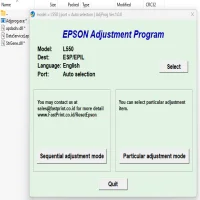
Epson L563 Adjustment Program Software (Resetter)
The Epson L563 is a highly reliable all-in-one inkjet printer, well-known for its efficiency in printing, scanning, copying, and faxing. However, like many printers, it may encounter certain operational errors over time. These errors often include waste ink pad counter overflow, maintenance errors, or issues with printing alignment. To resolve these problems, Epson provides a specialized tool called the Epson L563 Adjustment Program Software, commonly referred to as the Resetter Tool.
What is the Epson L563 Adjustment Program?
The Epson L563 Adjustment Program is a diagnostic and utility tool designed to reset and recalibrate specific internal printer settings. It primarily addresses errors related to the waste ink pad counter, which keeps track of ink absorbed during cleaning cycles. Once this counter exceeds its predefined limit, the printer may stop functioning until reset.
Key Features of the Epson L563 Adjustment Program
- Waste Ink Pad Counter Reset: Clears the error message indicating waste ink pad overflow.
- EEPROM Initialization: Resets the printer's internal memory settings.
- Head Cleaning Utility: Enables deep cleaning of print heads.
- Ink Charge Initialization: Restores ink flow for better print quality.
- Paper Feed Adjustment: Ensures accurate paper feeding alignment.
- Port Configuration: Identifies and configures the correct printer connection.
Why Do You Need the Adjustment Program?
When your Epson L563 printer displays error messages such as 'Service Required' or 'Waste Ink Pad Counter Overflow', it indicates that the internal waste ink counter has reached its limit. Simply changing the ink pads will not resolve the error. The resetter tool is essential to clear these error codes and restore printer functionality.
How to Use the Epson L563 Adjustment Program
- Download the Software: Obtain the Epson L563 Adjustment Program from a reliable source.
- Extract and Run the Tool: Unzip the downloaded file and run the executable file.
- Select Printer Model: Choose 'Epson L563' from the list of supported models.
- Select Maintenance Mode: Choose 'Waste Ink Pad Counter Reset.'
- Reset Counter: Click 'Initialize' and follow the on-screen instructions.
- Restart Printer: Turn off and on your printer to complete the reset process.
Precautions While Using the Adjustment Program
- Ensure you download the resetter tool from a trusted source to avoid malware.
- Use the software on a compatible operating system.
- Follow the instructions carefully to prevent damage to the printer's internal firmware.
- Backup important printer settings before proceeding.
Conclusion
The Epson L563 Adjustment Program Software is a powerful tool for troubleshooting and maintaining your printer. It helps extend the life of your printer, reduces unnecessary downtime, and saves costs on professional servicing. Always ensure that the tool is used responsibly and follow the manufacturer's guidelines for optimal results.
Rate the App
User Reviews





Popular Apps








