
Latest Version
Download NowMore About Epson L655 Adjustment Program ( Resetter )
Epson L655 Adjustment Program (Resetter): A Comprehensive Guide
The Epson L655 printer is known for its excellent print quality, cost-efficiency, and robust features, especially its ability to handle large print volumes. However, like any device, it can experience some wear and tear over time, leading to certain malfunctions, such as the "Waste Ink Pad Full" error. In such cases, the Epson L655 Adjustment Program (also known as a resetter) comes in handy to fix the issue without the need for professional repair.
This article explores the Epson L655 Adjustment Program in detail, how it works, and why it’s an essential tool for users.
What is the Epson L655 Adjustment Program (Resetter)?
The Epson L655 Adjustment Program is a specialized software tool designed to reset the printer’s internal settings. It specifically targets errors related to the waste ink pad, which is a common problem in Epson printers after prolonged use. The resetter clears the counter of the waste ink pad, enabling the printer to continue functioning without the need for physically replacing the pads.
This software essentially "resets" the printer’s waste ink memory, allowing it to avoid errors related to ink overflow or pad saturation. It’s important to note that while this software helps fix certain errors, it does not solve mechanical or hardware issues that may occur in the printer.
How the Epson L655 Adjustment Program Works
When the Epson L655 printer is in use for an extended period, ink begins to accumulate in the waste ink pad, which helps collect excess ink during the printing process. As this pad fills up, the printer tracks the amount of waste ink and triggers a warning message to alert the user. Once the counter reaches a certain level, the printer may stop printing entirely to prevent ink overflow, leading to the "Waste Ink Pad Full" error.
The Epson L655 Adjustment Program works by resetting this counter, allowing the printer to continue working without requiring the immediate replacement of the waste ink pad. However, it is a temporary fix and should not be relied upon indefinitely. Eventually, the waste ink pads should be replaced to maintain the printer’s efficiency.
Steps to Use the Epson L655 Adjustment Program
-
Download the Program: First, you need to download the Epson L655 Adjustment Program from a trusted source. Be cautious, as many websites offering this software are not official and could potentially provide malicious versions of the tool. Ensure the software is compatible with your operating system.
-
Install the Program: After downloading the resetter software, extract the files and install it on your computer. The installation process is straightforward, but make sure you disable any antivirus or firewall temporarily, as they may interfere with the installation.
-
Connect the Printer: Connect your Epson L655 printer to your computer using a USB cable. Ensure the printer is turned on and recognized by the system.
-
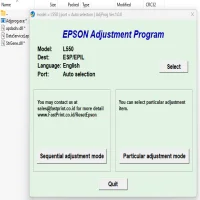
Run the Program: Launch the Epson L655 Adjustment Program. You may need to run the program as an administrator to ensure full access to the printer’s internal settings.
-
Select Your Printer: In the program’s interface, select your printer model from the list of connected devices. Once selected, click on the "Waste Ink Pad" option.
-
Reset the Counter: The program will display various options for resetting the waste ink pad counter. Select the "Reset Waste Ink Pad" option and confirm your choice. The software will now reset the counter, and you should see a message indicating the successful completion of the reset.
-
Test the Printer: After resetting the counter, run a test print to ensure that the error message no longer appears, and the printer is working as expected.
Important Considerations When Using the Epson L655 Adjustment Program
-
Temporary Solution: The adjustment program provides a temporary solution to the waste ink pad issue. It is essential to replace the waste ink pads eventually to prevent long-term damage to the printer.
-
Frequent Use: If you find yourself using the adjustment program frequently, it could be an indication that the waste ink pads are nearing their capacity and need replacement. Relying on the software may lead to further complications down the road.
-
Legal and Warranty Concerns: Using third-party resetter programs can void your warranty, especially if the printer is still under the manufacturer’s service coverage. Always check your warranty terms before proceeding with the adjustment program.
-
Backup Your Data: Before using the resetter software, it's advisable to back up any important data or settings from the printer, as the resetter program may reset other settings besides the waste ink pad counter.
-
Avoid Overuse: Excessive reliance on the adjustment program could eventually cause long-term issues with the printer’s performance. Regular maintenance and cleaning of the waste ink pads are crucial to keeping the printer in optimal condition.
Conclusion
The Epson L655 Adjustment Program (Resetter) is an effective tool to manage waste ink pad errors and extend the lifespan of your printer. However, it’s important to use this program as a temporary fix and follow up with proper maintenance, such as replacing the waste ink pads when needed. With proper care, you can continue enjoying the impressive performance of your Epson L655 printer for years to come.
Rate the App
User Reviews





Popular Apps








