
Latest Version
Download NowMore About Epson L805 Adjustment Program ( Resetter )
Epson L805 Adjustment Program (Resetter): A Complete Guide
The Epson L805 printer is a high-quality inkjet printer designed for home and small business use. Its compact size, sleek design, and cost-effective ink system make it an ideal choice for those seeking professional-quality prints without breaking the bank. However, like all printers, the Epson L805 may occasionally face issues that require maintenance and repairs. One of the most common problems faced by users is when the printer’s waste ink pads become full, triggering an error message or preventing further printing.
In these cases, using the Epson L805 Adjustment Program (also known as the Resetter) can be a lifesaver. This tool is designed to help reset the printer’s internal counter, allowing users to continue printing without needing to replace the waste ink pads immediately. This article will guide you through the Epson L805 Adjustment Program and provide important tips to keep your printer running smoothly.
What is the Epson L805 Adjustment Program (Resetter)?
The Epson L805 Adjustment Program is a utility tool that allows users to reset various internal counters on the printer, including the waste ink pad counter. The waste ink pads are responsible for absorbing excess ink during cleaning cycles and print jobs, and they can eventually become full. When this happens, the printer will display an error message indicating that the waste ink pads are full and that service is required.
The Adjustment Program works by clearing the waste ink counter, tricking the printer into thinking that the pads are still empty. This allows the user to continue printing without needing to take the printer for professional repairs. While this tool can be incredibly useful, it is important to note that it only provides a temporary solution. Eventually, the waste ink pads will need to be replaced to ensure that the printer continues to function properly.
How Does the Epson L805 Adjustment Program Work?
The Epson L805 Adjustment Program interacts with the printer’s firmware to reset certain maintenance counters. These counters track various aspects of the printer’s performance, such as print cycles, ink levels, and waste ink pad usage. When the waste ink pads become full, the printer will automatically stop printing and display an error message. By running the Adjustment Program, users can reset these counters and resume normal printing.
It is important to follow the instructions carefully when using the Adjustment Program, as improper use can lead to further issues with the printer. Additionally, while this program allows you to bypass the full waste ink pad warning, it is crucial to address the underlying issue of the pads being full. Continuing to use the printer without proper maintenance may lead to ink leakage or damage to the printer.
Steps to Use the Epson L805 Adjustment Program
Before using the Epson L805 Adjustment Program, make sure that your printer is properly connected to your computer and turned on. Follow these steps to reset the waste ink pad counter:
1. Download the Epson L805 Adjustment Program
- The first step is to find a reliable source to download the Epson L805 Adjustment Program. It is important to download the program from a trustworthy website to avoid any potential malware or corrupted files.
- The program is typically available as a compressed file (e.g., ZIP format). Once downloaded, extract the files to a location on your computer.
2. Install the Program
- Open the extracted folder and locate the setup file (usually named something like
Epson_L805_AdjProg.exe). Double-click to begin the installation process. - Follow the on-screen instructions to complete the installation. You may need to grant administrator permissions to proceed.
3. Connect the Printer
- Ensure that your Epson L805 printer is turned on and properly connected to the computer via USB. It is essential that the printer is recognized by the computer before running the program.
4. Run the Adjustment Program
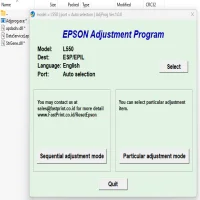
- Open the installed Epson L805 Adjustment Program. You may be prompted to select the printer model from a drop-down list. Make sure to choose “Epson L805” from the options.
- Click on the “Particular Adjustment Mode” button to access the available reset functions.
5. Select the Waste Ink Pad Reset Option
- In the adjustment mode menu, find the option labeled “Waste Ink Pad Counter” or similar. This is the setting that resets the counter for the waste ink pads.
- Select this option and click the “Reset” or “Initialize” button. The program will begin the reset process and prompt you when it is complete.
6. Complete the Reset
- Once the reset is finished, the printer will no longer show the full waste ink pad error. You should be able to resume printing as normal.
7. Test the Printer
- After the reset, it is a good idea to run a test print to ensure that everything is functioning correctly. If there are no issues, your printer is ready for use.
Precautions to Take When Using the Epson L805 Adjustment Program
While the Epson L805 Adjustment Program is a useful tool, it should not be used recklessly. Here are some important precautions to keep in mind:
-
Temporary Fix: Resetting the waste ink pad counter only provides a temporary solution. It does not fix the physical issue of the waste ink pads being full. Be sure to replace the pads as soon as possible to avoid potential damage to the printer.
-
Proper Waste Ink Disposal: Be mindful of the waste ink pads. After using the Adjustment Program, you may want to replace or clean the pads to prevent ink leakage or clogging.
-
Use at Your Own Risk: The Epson L805 Adjustment Program is not officially supported by Epson. Using third-party software like this may void the warranty or cause damage to your printer if not used correctly. Always proceed with caution.
-
Backup Your Data: Before using the Adjustment Program, make sure to back up any important data or printer settings. Although the program is safe to use when done correctly, it’s always better to be cautious.
Conclusion
The Epson L805 Adjustment Program (Resetter) is a practical tool that helps users manage printer maintenance by resetting the waste ink pad counter. While it offers a quick fix for the error related to full waste ink pads, it should be used with care. Remember that this tool is a temporary solution, and it’s crucial to address the actual problem by replacing or cleaning the waste ink pads to avoid long-term damage.
By following the steps and taking appropriate precautions, users can extend the life of their Epson L805 printers and continue enjoying high-quality prints without interruption.
Rate the App
User Reviews
"5 star"
Abbos
8 months ago
5 star





Popular Apps








