

Latest Version
More About Epson EP-805AW Resetter
Epson EP-805AW Resetter: A Guide to Restoring Your Printer to Optimal Function
The Epson EP-805AW is a versatile all-in-one printer known for its high-quality printing, scanning, and copying capabilities. However, like many printers, it can encounter certain issues over time, especially related to its ink pad counter. When the printer’s internal ink pad reaches its maximum capacity, it can cause the printer to stop working, displaying an error message. This is where a resetter tool comes into play, allowing users to restore their Epson EP-805AW printer to factory settings and clear any counters that are preventing it from functioning properly.
What Is a Resetter Tool?
A resetter tool is a software utility designed to reset the waste ink pad counter on Epson printers. Over time, ink pads, which absorb excess ink during printing, become full. This can trigger an error message, signaling that maintenance is required. Without resetting, the printer may not continue printing. The resetter tool essentially resets the counter associated with these ink pads, allowing users to continue using the printer without worrying about the error.
How Does the Epson EP-805AW Resetter Work?
The resetter for the Epson EP-805AW works by interfacing with the printer’s firmware to clear the ink pad counter. Here’s a basic overview of the process:
Download the Resetter Tool: Find a reliable source to download the Epson EP-805AW resetter tool. Ensure that it’s compatible with your operating system (Windows or macOS).
Connect the Printer: Connect your Epson EP-805AW printer to your computer via USB cable. Ensure the printer is powered on and properly connected.
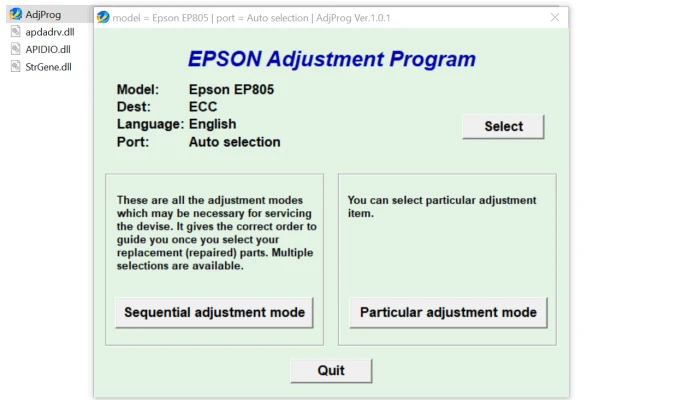
Run the Resetter Tool: Open the resetter software. The software will detect your printer and offer options to reset the ink pad counter.
Reset the Printer: Follow the on-screen instructions provided by the tool to reset the printer’s waste ink pad counter. This will effectively clear the error and restore the printer to working order.
Test the Printer: After the reset, it’s recommended to print a test page to ensure everything is functioning correctly.
Why You Might Need a Resetter Tool
Ink Pad Full Error: As previously mentioned, when the ink pads become saturated, the printer may display an error. This is the most common reason users turn to a resetter.
Frequent Paper Jams: A resetter can sometimes help resolve issues that stem from internal errors, including persistent paper jams.
Printer Won’t Print: If your printer stops working without a clear reason, resetting can help resolve any underlying software glitches.
Cost-Effective Solution: Instead of spending money on professional repair services, using a resetter tool provides a cost-effective way to extend the life of your Epson printer.
Safety Considerations When Using a Resetter Tool
While a resetter tool is highly effective, it’s important to exercise caution:
- Use Official Software: Always download the resetter tool from a reputable source to avoid potential malware or software compatibility issues.
- Don’t Overuse the Tool: While resetting the ink pad counter may solve the immediate problem, it’s crucial to check the actual condition of your printer’s ink pads. If the pads are too worn out, continuing to reset the counter may lead to more serious issues.
- Printer Maintenance: After using the resetter, ensure that your printer undergoes regular maintenance to prevent ink buildup and prolong its lifespan.
Conclusion
The Epson EP-805AW resetter is an essential tool for maintaining the functionality of your printer. It provides a simple solution to the common ink pad full error, allowing you to reset the waste ink counter and restore the printer to optimal performance. However, it’s important to use the tool carefully and ensure regular maintenance of your printer to avoid future issues. With the right care and occasional resets, your Epson EP-805AW can continue to deliver high-quality prints for years to come.
Rate the App
User Reviews


Popular Apps








