

Latest Version
Download NowMore About Epson K200 Adjustment Program
Epson K200 Adjustment Program: A Comprehensive Guide
The Epson K200 printer, known for its efficient and cost-effective printing, sometimes requires maintenance or adjustment to continue performing optimally. The Epson K200 Adjustment Program is a powerful tool designed to help users fix common printing issues, such as ink overflow, printhead clogging, and ink waste management. This program allows users to reset the printer’s internal counter, calibrate the printhead, and perform other essential maintenance tasks.
What is the Epson K200 Adjustment Program?
The Epson K200 Adjustment Program is a diagnostic software tool specifically developed for Epson K200 printers. It allows users to perform various adjustments, like resetting the ink counter, cleaning the printhead, or aligning the printhead to ensure consistent print quality. The program is essential for maintaining your printer’s performance and prolonging its lifespan.
Key Features of the Epson K200 Adjustment Program:
-
Ink Waste Counter Reset: One of the common issues with Epson printers is the ink waste counter, which tracks the amount of ink used by the printer. Over time, this counter can overflow, leading to poor performance or error messages. The adjustment program allows users to reset this counter, restoring the printer’s functionality.
-
Printhead Cleaning and Calibration: Printhead clogging is a common problem, especially if the printer has been unused for a long period. The Epson K200 Adjustment Program helps perform cleaning cycles on the printhead to ensure proper ink flow and restore print quality. Additionally, the program offers printhead alignment to eliminate misalignment issues that could lead to blurry or uneven prints.
-
Paper Feed and Alignment Adjustments: Proper paper feeding is crucial for consistent and accurate printing. The Epson K200 Adjustment Program includes paper feed adjustment tools that help resolve issues like paper jams or misfeeds. Additionally, users can adjust the paper alignment for better print output.
-
Resetting Printer Settings: Sometimes, the Epson K200 printer may encounter errors or malfunction due to misconfigured settings. With the adjustment program, users can reset the printer’s settings to the factory default values, providing a fresh start for troubleshooting.
-
Error Code Removal: The Epson K200 printer may display error codes due to issues with the ink system, printhead, or other internal components. The adjustment program allows users to clear these error codes, enabling the printer to resume its operations without errors.
How to Use the Epson K200 Adjustment Program?
The Epson K200 Adjustment Program is not officially available through Epson's website, but it can be found on various third-party websites. It’s important to download the software from a reputable source to avoid malware or viruses.
Here’s a step-by-step guide to using the Epson K200 Adjustment Program:
-
Download the Program: Download the Epson K200 Adjustment Program from a trusted source. Make sure to choose the correct version of the program for your operating system.
-
Install the Program: Once the software is downloaded, run the installation file and follow the on-screen instructions. It’s important to close all other programs before running the adjustment software to ensure no conflicts occur during the process.
-
Connect the Printer: Ensure your Epson K200 printer is properly connected to your computer via USB or network. The adjustment program will need to communicate with the printer to execute the necessary tasks.
-
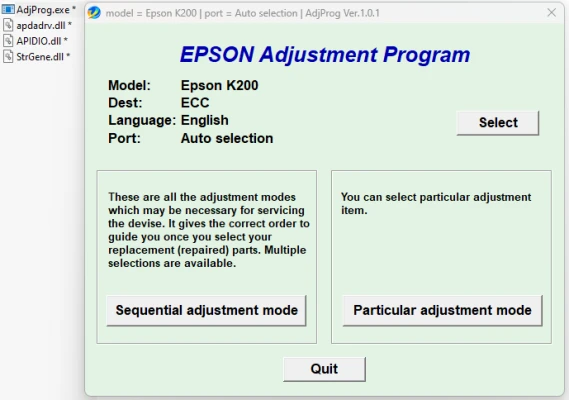
Launch the Program: After installation, open the Epson K200 Adjustment Program. A user-friendly interface will guide you through the available functions. Choose the specific function you want to perform, such as resetting the ink counter or cleaning the printhead.
-
Perform Adjustments: Follow the prompts in the program to perform the required adjustments. For example, if you are resetting the ink counter, click the appropriate button, and the software will reset the counter to zero. If you are cleaning the printhead, the program will instruct the printer to perform a cleaning cycle.
-
Reboot and Test: After completing the adjustments, restart your printer and test it by printing a test page. This will help you ensure that the problem has been fixed and that the printer is working correctly.
Important Considerations:
-
Software Compatibility: The Epson K200 Adjustment Program may not be compatible with all operating systems. Ensure that your operating system is supported by the program before installation.
-
Precautions During Adjustment: It’s important to follow the instructions carefully when using the program. Incorrect adjustments can cause further issues or damage to the printer. If you're unsure, it's recommended to seek assistance from a professional technician.
-
Third-Party Software: Since the Epson K200 Adjustment Program is not officially provided by Epson, be cautious when downloading it from third-party websites. Always ensure you are using reputable sources to avoid malware or other issues.
Conclusion:
The Epson K200 Adjustment Program is an invaluable tool for users experiencing issues with their printers. Whether it's resetting ink counters, cleaning the printhead, or performing paper feed adjustments, this program allows you to maintain your printer’s optimal performance without needing professional repair services. However, caution should be exercised when using third-party software, and it’s advisable to follow instructions carefully to avoid damaging the printer. Proper maintenance with the adjustment program can prolong the life of your Epson K200 printer and ensure high-quality printing results for years to come.
Rate the App
User Reviews


Popular Apps








