

Latest Version
Download NowMore About Epson PLQ-20M Adjustment Program
Epson PLQ-20M Adjustment Program: A Comprehensive Guide
The Epson PLQ-20M is a versatile dot matrix printer designed for use in environments where reliability and durability are crucial. This model is widely used for printing forms, receipts, and labels in industries such as banking, logistics, and retail. One of the key features of the Epson PLQ-20M is its adjustment program, which allows users to maintain, troubleshoot, and fine-tune the printer for optimal performance.
In this article, we will dive into the Epson PLQ-20M Adjustment Program, exploring its functions, benefits, and how to use it effectively.
What is the Epson PLQ-20M Adjustment Program?
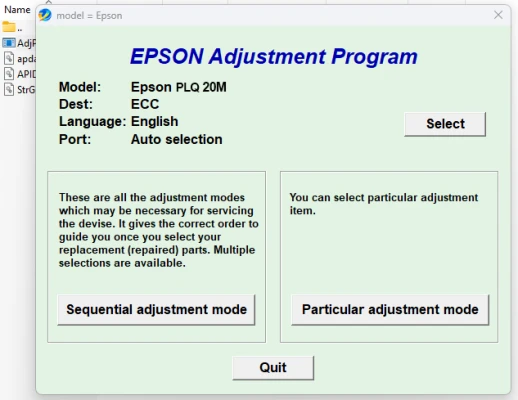
The Epson PLQ-20M Adjustment Program is a specialized software tool designed to help users manage and maintain their Epson PLQ-20M printers. It allows for various adjustments and settings that can enhance the printer's functionality. The program is primarily used for troubleshooting, calibration, and performing necessary adjustments when the printer experiences issues such as misalignment, ink smudging, or print quality degradation.
Key Features of the Adjustment Program
-
Print Head Alignment: One of the essential functions of the adjustment program is the ability to realign the print head. Over time, a print head may become misaligned, leading to poor print quality. The adjustment program helps users realign the print head to ensure accurate and clear printing.
-
Cleaning and Maintenance: The adjustment program provides options to clean the printer's components, including the print head, rollers, and other vital parts. Regular cleaning helps prevent clogging, which can degrade print quality and cause operational issues.
-
Ink and Ribbon Management: The Epson PLQ-20M typically uses ribbons for printing, and the adjustment program can monitor ribbon usage and provide recommendations on when to replace or adjust the ribbon to avoid print quality issues.
-
Print Quality Calibration: The program helps fine-tune print quality by adjusting factors such as print density, contrast, and dot alignment. This ensures that the printer delivers crisp and clear results every time.
-
Error Diagnosis: The adjustment program can help identify errors and problems within the printer. It provides error codes that can help users quickly identify specific issues, such as paper jams, print head malfunctions, or communication errors.
-
Firmware Updates: The software tool can also be used to update the printer's firmware, ensuring that the device operates with the latest features and performance improvements provided by Epson.
How to Use the Epson PLQ-20M Adjustment Program
Using the Epson PLQ-20M Adjustment Program is relatively straightforward. However, it is essential to follow the right steps to avoid causing any issues with the printer. Here’s how you can get started:
Step 1: Install the Adjustment Program
To begin, you will need to download the Epson PLQ-20M Adjustment Program from the official Epson website or from a trusted source. Make sure that the software is compatible with your operating system before proceeding.
Step 2: Connect the Printer to Your Computer
Ensure that your Epson PLQ-20M printer is properly connected to your computer using the correct USB or network connection. The program will require access to the printer to make adjustments.
Step 3: Launch the Program
Open the adjustment program after installation. You may need to enter the administrator password to grant the program necessary permissions to access the printer.
Step 4: Select the Desired Adjustment or Function
From the main interface of the adjustment program, you will have the option to choose different functions, such as print head alignment, cleaning, or ink management. Select the function you wish to perform, and follow the on-screen instructions carefully.
Step 5: Execute and Monitor the Adjustment Process
Once you select an adjustment, the program will execute the necessary actions. During this process, the printer may go through specific motions, such as cleaning or repositioning the print head. Monitor the progress and wait for the program to complete the task.
Step 6: Verify Results
After the adjustment process is complete, print a test page to verify that the printer is working correctly. Check for improvements in print quality, alignment, or any error codes that may have been cleared.
Benefits of Using the Epson PLQ-20M Adjustment Program
-
Enhanced Printer Longevity: Regular adjustments help maintain the printer’s components and prevent premature wear. This can extend the printer's lifespan, saving businesses money on replacements and repairs.
-
Improved Print Quality: By fine-tuning settings and recalibrating the print head, the adjustment program ensures that the printer consistently produces high-quality output, even after extensive use.
-
Easy Troubleshooting: With built-in error diagnosis and solutions, users can quickly identify and address issues, minimizing downtime and improving overall productivity.
-
Cost-Efficiency: Proper printer maintenance through the adjustment program reduces the likelihood of costly repairs and minimizes ink or ribbon waste.
-
User-Friendly Interface: The adjustment program is designed to be intuitive and easy to navigate, making it accessible even for users with limited technical experience.
Conclusion
The Epson PLQ-20M Adjustment Program is a powerful tool that can help users maintain, troubleshoot, and optimize their printer’s performance. By utilizing this software, businesses can ensure that their printers continue to operate efficiently, delivering high-quality prints and avoiding costly repairs. Whether you're dealing with print quality issues, misalignment, or simply performing routine maintenance, the adjustment program is an essential tool for any Epson PLQ-20M user.
Always ensure that you follow the manufacturer's guidelines and seek support if you encounter any complex issues. Regular use of the adjustment program will keep your printer in top shape, ensuring reliable performance for years to come.
Rate the App
User Reviews
Other Apps in This Category


Popular Apps








