

Latest Version
More About Epson Stylus E600 Adjustment Program
Epson Stylus E600 Adjustment Program: A Comprehensive Guide
The Epson Stylus E600 is a reliable printer recognized for its robust performance and high-quality outputs. However, like any sophisticated printing device, it occasionally requires maintenance to ensure smooth functionality. One essential tool for maintaining and troubleshooting this printer is the Epson Stylus E600 Adjustment Program. This article dives into the purpose, functionality, and best practices for using this indispensable utility.
What is the Epson Stylus E600 Adjustment Program?
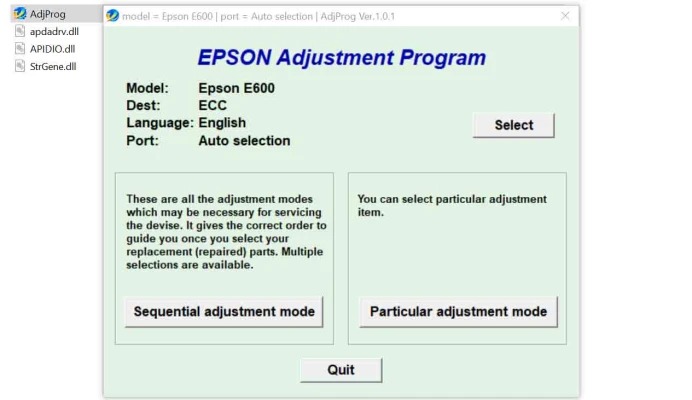
The Epson Stylus E600 Adjustment Program is a specialized utility designed to address printer-related issues that the default system settings or software may not resolve. It allows users to execute maintenance tasks, reset internal counters, and calibrate various printer components.
Key Features of the Adjustment Program
- Reset Waste Ink Pad CounterPrinters like the Epson Stylus E600 have an internal counter that tracks the amount of ink waste absorbed by the pad. Once this counter reaches its limit, the printer may display a "Service Required" message. The adjustment program resets this counter, enabling the printer to function again without physically replacing the ink pad.
- Head AlignmentMisaligned print heads can result in streaky or blurry prints. The adjustment program allows precise head alignment to ensure consistent output quality.
- EEPROM ResetThe EEPROM (Electrically Erasable Programmable Read-Only Memory) stores printer configurations and operational data. With the adjustment program, users can reset or fine-tune EEPROM settings, addressing errors caused by corrupted data.
- Nozzle Check and CleaningBlocked nozzles often result in poor-quality prints. The adjustment program includes advanced cleaning options to unclog nozzles effectively.
- Other Calibration FunctionsThe tool also supports paper feed adjustment, platen gap calibration, and voltage settings, ensuring the printer operates at optimal performance.
When Should You Use the Adjustment Program?
The Epson Stylus E600 Adjustment Program is ideal for resolving issues such as:
- Printer errors like "Parts inside your printer are at the end of their service life."
- Uneven or misaligned printing.
- Persistent error codes despite basic troubleshooting.
- Regular maintenance to extend printer lifespan.
How to Use the Adjustment Program?
- Download the SoftwareObtain the Epson Stylus E600 Adjustment Program from a reliable source. Ensure the file is virus-free and compatible with your operating system.
- Install the ProgramExtract the downloaded file and follow the installation instructions. Avoid running the program on unsupported operating systems, as it may cause errors.
- Connect Your PrinterUse a USB cable to connect your Epson Stylus E600 to your computer. Ensure the printer is powered on and ready.
- Select the Maintenance FunctionLaunch the program, select your printer model, and choose the specific function you wish to execute (e.g., waste ink pad reset).
- Follow On-Screen InstructionsCarefully follow the program’s prompts. Incorrect usage may lead to errors or further complications.
Precautions and Best Practices
- Use Only When Necessary: Overusing the adjustment program may negatively affect your printer's hardware or software.
- Backup Data: Before resetting configurations, back up essential settings in case you need to restore them.
- Verify Software Source: Only download the program from official or trusted sources to avoid malware.
- Adhere to Warranty Terms: Using third-party utilities may void your warranty, so check Epson’s guidelines first.
Final Thoughts
The Epson Stylus E600 Adjustment Program is an invaluable tool for users who want to maintain and troubleshoot their printers effectively. By understanding its features and following best practices, you can resolve common issues and prolong your printer’s life. Whether you're a professional technician or an everyday user, mastering this tool will make printer maintenance less daunting and more efficient.
Rate the App
User Reviews
Other Apps in This Category


Popular Apps








