
Latest Version
More About Epson EP-306 Resetter
Epson EP-306 Resetter: A Comprehensive Guide
The Epson EP-306 printer is a reliable and popular choice for home and small office use, known for its high-quality prints and efficient performance. However, like many inkjet printers, the Epson EP-306 can experience issues related to its internal counter, particularly the waste ink pad counter, which causes the printer to stop functioning once it reaches a certain threshold. This is where a "resetter" comes into play. In this article, we'll explore what the Epson EP-306 resetter is, why you might need it, and how to use it to resolve common printer problems.
What is an Epson EP-306 Resetter?
A resetter is a software tool that resets the waste ink pad counter in Epson printers. This counter tracks the amount of ink absorbed by the waste ink pads during the printing process. When the counter reaches its limit, the printer halts its operations as a safety measure to prevent ink from spilling inside the machine. The Epson EP-306 resetter clears this counter, allowing the printer to continue functioning normally.
The resetter essentially tricks the printer into thinking that the waste ink pads are empty, even if they aren’t. This can be helpful for extending the life of the printer and ensuring it continues to function properly.
Why Do You Need an Epson EP-306 Resetter?
There are several reasons you may encounter the need for a resetter:
Waste Ink Pad Counter Overflow: The most common reason for using a resetter is that the waste ink pad counter has reached its limit. When this happens, the printer will display an error message such as "Parts inside your printer are at the end of their service life." Resetting the counter will allow the printer to resume operation.
Printer Stopped Working: If your printer unexpectedly stops working without any other clear reason, the waste ink pad counter could be the culprit. Resetting it may restore functionality.
Cost Efficiency: Instead of sending your printer for servicing or replacing it prematurely, using a resetter can save you money and effort. It’s a temporary fix that buys time before a more permanent solution, such as replacing the waste ink pads.
Preventative Maintenance: If you are getting ready for a high-volume printing task, resetting the waste ink pad counter can be part of your printer’s maintenance routine, avoiding unexpected failures during critical times.
How to Use the Epson EP-306 Resetter
Using the Epson EP-306 resetter requires a bit of technical knowledge and caution, but the process is straightforward. Here are the general steps to follow:
Step 1: Download the Resetter Software
To use the Epson EP-306 resetter, you first need to download the software. There are many third-party websites where you can find it. Be sure to choose a reputable source to avoid downloading malicious software.
Step 2: Install the Resetter
Once you’ve downloaded the resetter file, extract it (if necessary) and run the installer. Follow the on-screen instructions to install the software on your computer.
Step 3: Connect Your Printer
Make sure your Epson EP-306 is connected to your computer and powered on. This is important for the resetter to communicate with the printer.
Step 4: Run the Resetter Software
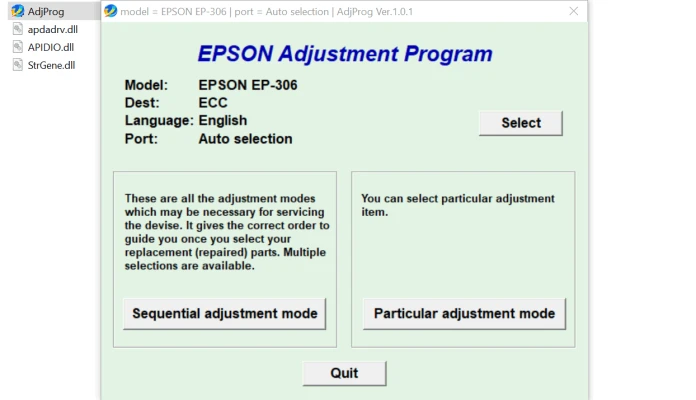
Launch the Epson EP-306 resetter software. The interface should be simple, with a button that says something like "Reset Waste Ink Pad Counter."
Step 5: Select Your Printer Model
In the software, select your Epson EP-306 from the list of available printers. If you don’t see it, ensure that the printer is properly connected to your computer.
Step 6: Start the Reset Process
Click on the button to reset the waste ink pad counter. The software will guide you through the process, which usually takes just a few seconds. Once completed, the waste ink pad counter will be cleared, and your printer should start working again.
Step 7: Test the Printer
After the reset, it’s a good idea to test your printer by printing a test page. This will ensure that everything is working as expected and that the reset was successful.
Precautions and Considerations
While using the Epson EP-306 resetter can be a quick fix, there are a few things to keep in mind:
Temporary Solution: The resetter only clears the counter; it does not address the actual problem of the waste ink pads being full. Eventually, you will need to replace the waste ink pads to avoid potential ink spillage or further issues.
Warranty: Using a resetter may void your printer’s warranty, especially if you’re using third-party software. It’s always a good idea to check your warranty terms before proceeding with a reset.
Accuracy: Ensure that the reset is performed correctly to avoid causing damage to the printer. If you're unsure, consult the printer manual or a professional technician.
Software Safety: Only download the resetter from trusted sources. Poorly designed software may cause system instability or further damage to your printer.
Conclusion
The Epson EP-306 resetter is a handy tool for resolving issues related to the waste ink pad counter and keeping your printer in working order. While it offers a quick and cost-effective solution, it’s important to remember that this is just a temporary fix. Eventually, you’ll need to address the underlying issue of full waste ink pads, but in the meantime, the resetter can buy you valuable time and prevent unnecessary printer replacements. Always use the resetter with caution and consult professional help if needed.
Rate the App
User Reviews


Popular Apps








