
Latest Version
More About Epson EP-4004 Adjustment Program
Epson EP-4004 Adjustment Program: A Comprehensive Guide
The Epson EP-4004 is a versatile and efficient printer known for its high-quality output and reliable performance. However, like any other electronic device, it may require periodic maintenance to continue functioning optimally. One of the most essential tools for maintaining the Epson EP-4004 is the Epson EP-4004 Adjustment Program. This program allows users to troubleshoot and resolve common printer issues, perform cleaning and alignment tasks, and reset the printer’s internal counters. In this article, we’ll explore the Epson EP-4004 Adjustment Program, its key features, and how you can use it to ensure your printer continues running smoothly.
What is the Epson EP-4004 Adjustment Program?
The Epson EP-4004 Adjustment Program is a specialized software designed for Epson printers. It enables users to perform a range of maintenance tasks, from resetting the ink counter to cleaning printheads and performing alignment. These functions are crucial when dealing with issues such as ink smudging, misalignment, or error messages indicating that the printer has reached its maximum page count.
Unlike standard printer software or drivers, the Epson Adjustment Program provides more in-depth access to the printer’s internal settings. This makes it an indispensable tool for both home users and businesses relying on the Epson EP-4004 for daily printing tasks.
Key Features of the Epson EP-4004 Adjustment Program
Ink Waste Reset: One of the most useful features of the Adjustment Program is the ability to reset the ink waste counter. Epson printers use an ink pad to absorb excess ink during the printing process. Over time, this pad fills up, and when it reaches its maximum capacity, an error message appears. The Epson Adjustment Program allows users to reset this counter, preventing the printer from stopping abruptly.
Printhead Cleaning: Printhead clogging is a common issue in inkjet printers. The Adjustment Program enables users to initiate cleaning cycles for the printheads, helping to improve print quality by removing dried ink or debris from the nozzles.
Head Alignment: Misalignment of the printhead can lead to blurry or uneven prints. The Epson Adjustment Program allows users to perform precise alignment of the printhead, ensuring sharp and accurate prints.
Resetting Printer Data: The software enables the reset of various printer parameters, such as the page counter, which can help maintain the printer’s performance and extend its lifespan.
Paper Jam Detection: Although not a direct feature of the Adjustment Program itself, this tool can help troubleshoot and resolve issues stemming from paper jams or misfeeds by resetting specific components within the printer.
How to Use the Epson EP-4004 Adjustment Program
To get started with the Epson EP-4004 Adjustment Program, follow these steps:
Step 1: Download and Install the Program
The Epson EP-4004 Adjustment Program is not typically available through the official Epson website but can be found through third-party websites. Before downloading, ensure that the website is reputable and safe.
Once downloaded, extract the program files and install the software on your computer. The installation process is usually straightforward, but make sure to follow any on-screen instructions provided.
Step 2: Connect Your Printer
Connect the Epson EP-4004 to your computer using a USB cable or via a network connection (depending on your printer setup). Ensure that the printer is powered on before proceeding.
Step 3: Run the Program
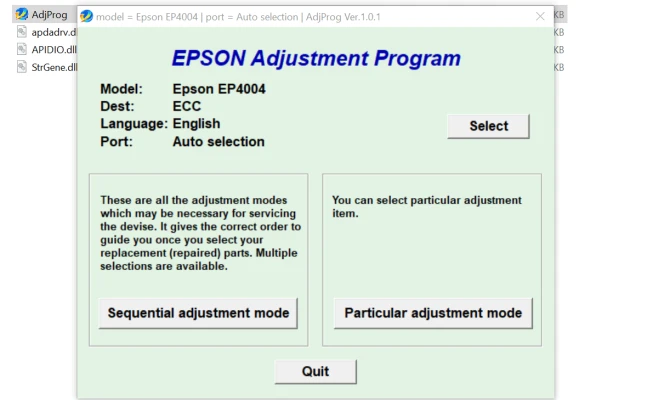
Launch the Epson EP-4004 Adjustment Program from your desktop or Start menu. The program may ask for administrative privileges, so grant it the necessary permissions to proceed.
Step 4: Select the Desired Function
Once the software is open, you’ll be presented with a variety of options. Choose the specific function you want to perform, such as printhead cleaning, ink waste reset, or head alignment.
Step 5: Follow On-Screen Instructions
Each function in the program will provide clear on-screen instructions. Follow these carefully to ensure the task is completed successfully. For example, if you are resetting the ink waste counter, the software may prompt you to enter a specific code or confirm the action before proceeding.
Step 6: Reboot the Printer
Once the task is completed, restart your Epson EP-4004 printer to apply the changes. You should now notice an improvement in the printer’s performance, whether it’s clearer prints, fewer error messages, or smoother operation.
Precautions When Using the Epson EP-4004 Adjustment Program
While the Epson EP-4004 Adjustment Program can help maintain your printer and address common issues, there are a few precautions to keep in mind:
- Avoid Overuse of Reset Functions: Resetting counters and performing cleaning cycles too often can strain your printer’s components, leading to potential malfunctions. Use these features sparingly and only when necessary.
- Download Software from Reliable Sources: Ensure that the Adjustment Program is downloaded from a trustworthy website. Unofficial or malicious versions of the software could harm your printer or computer.
- Follow Instructions Carefully: Some tasks in the program, such as head alignment or ink waste resets, require precise actions. Always follow the instructions carefully to avoid damaging your printer.
Conclusion
The Epson EP-4004 Adjustment Program is a powerful tool that helps maintain the performance of your printer. It provides advanced features like ink waste reset, printhead cleaning, and alignment, which can significantly improve your printer's output and longevity. By using this program responsibly and following the provided instructions, you can resolve common printer issues and keep your Epson EP-4004 running at peak efficiency.
Rate the App
User Reviews


Popular Apps








