
Latest Version
More About Epson EP-706A Resetter
Epson EP-706A Resetter: A Comprehensive Guide
The Epson EP-706A is a versatile and reliable printer known for delivering high-quality prints with advanced features. However, like many inkjet printers, it can occasionally experience issues such as a "waste ink pad" error or other maintenance-related problems. In these cases, the printer may stop functioning, and users are often faced with frustration. This is where the Epson EP-706A Resetter comes in. In this guide, we’ll discuss what an Epson Resetter is, its purpose, how to use it effectively, and the benefits it brings to your printer maintenance.
What is an Epson EP-706A Resetter?
The Epson EP-706A Resetter is a software tool designed to reset the internal counters of Epson printers, particularly those that are blocked due to full waste ink pads or similar issues. Waste ink pads collect excess ink during cleaning cycles, and when these pads are full, the printer typically triggers an error message to prevent further printing. The Resetter tool allows users to reset the ink pad counter, enabling the printer to resume normal operation without the need for physically replacing the ink pads.
Why You Need the Epson EP-706A Resetter
Over time, printers undergo numerous cleaning cycles, and ink accumulates in the waste ink pads. When these pads reach their capacity, the printer automatically halts operations and displays an error message, such as "Waste Ink Pad Full." This is a built-in feature to prevent ink spillage or damage to the internal components. However, it’s not always necessary to replace the pads immediately, and the Epson Resetter tool offers a quick solution by resetting the counter.
Additionally, resetting the printer can be a cost-effective alternative to sending the printer for servicing or purchasing a new device. It can save both time and money, as it helps users address a common issue without requiring professional assistance.
How Does the Epson EP-706A Resetter Work?
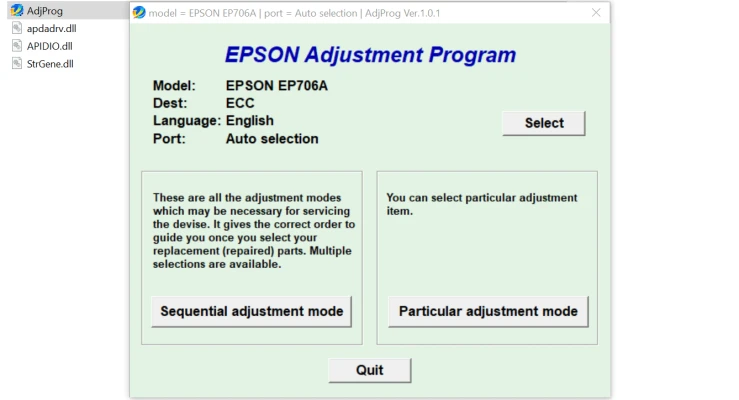
The Epson EP-706A Resetter works by accessing the printer’s internal software and resetting the counters related to waste ink pads. Here’s a step-by-step guide to using the Resetter tool:
Download the Resetter Software: First, you’ll need to download a compatible version of the Epson EP-706A Resetter software. Ensure that you download it from a trusted source to avoid malicious software.
Install the Resetter Software: After downloading the file, extract and install the software on your computer. Make sure your printer is connected to the computer via USB or Wi-Fi.
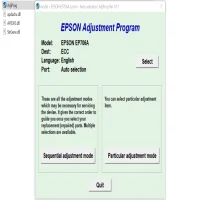
Run the Software: Open the Resetter tool and select your printer model from the list of supported devices.
Reset the Waste Ink Counter: Follow the on-screen instructions to reset the waste ink counter. The software will communicate with your printer, instructing it to reset the ink pad status. This process usually takes a few minutes.
Test Your Printer: After the reset is complete, restart the printer and perform a test print. This will help ensure that the reset was successful and that your printer is back in working condition.
Monitor Regular Maintenance: While the Resetter tool helps resolve the immediate issue, it’s essential to monitor your printer for any recurring problems. Regular cleaning and proper printer maintenance can extend the lifespan of your device.
Benefits of Using an Epson EP-706A Resetter
Cost Savings: Instead of paying for costly repairs or replacing parts, resetting your printer allows you to continue using it without the need for a service technician.
Convenience: The Resetter tool provides an easy and quick solution for resolving waste ink pad issues. It saves you time by allowing you to perform the reset at home.
Printer Longevity: Regular resets can help keep your printer functioning properly by ensuring that the waste ink counter stays up to date. This reduces the likelihood of unexpected errors and helps the printer perform more efficiently.
Eco-Friendly: By avoiding unnecessary replacement parts and repairs, you are contributing to a more eco-friendly approach by reducing e-waste.
Important Considerations
While the Epson EP-706A Resetter can be a powerful tool, there are a few important considerations:
Temporary Solution: The Resetter tool is not a permanent fix for all printer issues. It’s primarily intended for resetting the waste ink pad counter. Over time, you may need to replace the waste ink pads if they are saturated with ink.
Risk of Damage: If the waste ink pads are indeed full, continuing to use the printer without addressing the physical issue can lead to ink leakage and potential damage to internal components.
Warranty Void: Using third-party resetter tools may void your printer’s warranty. Always check with the manufacturer or retailer if you are unsure.
Conclusion
The Epson EP-706A Resetter is a valuable tool for users who need to reset their printer’s waste ink counter. It’s an easy and affordable way to extend the life of your printer and continue using it without interruption. While it provides a temporary solution, regular maintenance and attention to the printer’s overall health will help keep it running smoothly. If you encounter recurring issues, consider consulting a professional technician for a more permanent resolution.
By understanding the benefits and limitations of the Epson EP-706A Resetter, you can make an informed decision about how best to maintain your printer and avoid unnecessary repairs.
Rate the App
User Reviews


Popular Apps








