
Latest Version
More About Epson EP-802A Resetter
Epson EP-802A Resetter: A Comprehensive Guide
The Epson EP-802A is a versatile and reliable all-in-one inkjet printer, popular for its high-quality prints and easy connectivity. However, like many printers, it may encounter issues with its ink waste counter, which can lead to error messages like "Ink pad is at the end of its service life." This error can halt printing and cause frustration for users. Fortunately, there's a solution: the Epson EP-802A resetter.
This tool can reset the printer’s internal counters, allowing the printer to continue functioning as if it’s brand new. In this article, we’ll explore what the Epson EP-802A Resetter is, how it works, and how to use it effectively.
What is the Epson EP-802A Resetter?
The Epson EP-802A Resetter is a software tool designed to reset the printer’s internal waste ink counter. This counter tracks the amount of ink absorbed by the printer’s waste ink pads during printing. When the counter reaches a certain threshold, the printer will stop working and display an error message indicating that the ink pads are full, even though the pads may not necessarily be full or damaged.
The resetter software bypasses this limitation by clearing or resetting the waste ink counter, allowing users to continue printing without the error message.
Why Do You Need a Resetter?
Over time, your Epson EP-802A printer will accumulate waste ink in the absorption pads. These pads are designed to catch excess ink that is used in the printhead cleaning process, and over time, they can fill up. When this happens, the printer will trigger the error to prevent ink spillage.
If you are experiencing this issue, the resetter tool will not only clear the error but will also reset the waste ink counter to its default value, giving you more printing time before the next error occurs. This is especially useful for those who want to keep their printer running smoothly without the need for expensive repairs or ink pad replacements.
How Does the Epson EP-802A Resetter Work?
The Epson EP-802A Resetter works by communicating with your printer’s internal software. When the resetter is used, it resets the waste ink counter, allowing the printer to continue printing without any issues.
Here’s a brief overview of how the process works:
- Download and Install: First, download the Epson EP-802A Resetter software from a trusted source. Install the software on your computer.
- Connect Your Printer: Make sure your Epson EP-802A printer is connected to your computer and powered on.
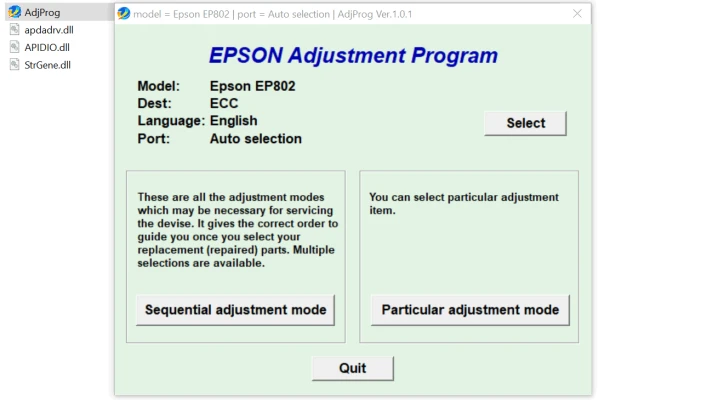
- Run the Resetter Tool: Launch the Epson EP-802A Resetter software on your computer. The tool will automatically detect your printer.
- Reset the Counter: Follow the on-screen instructions in the software to reset the waste ink counter.
- Restart the Printer: After the reset is complete, restart your printer to apply the changes.
Important Considerations
While the Epson EP-802A Resetter can be a lifesaver, it’s important to keep a few things in mind:
- Legal and Warranty Concerns: Using third-party software to reset the waste ink counter may void your printer’s warranty. Always check with Epson if you are concerned about this.
- Waste Ink Pads: Resetting the counter does not physically empty the waste ink pads. If the pads are indeed full, you may need to have them replaced. Resetting the counter is only a temporary solution.
- Overuse: Relying too much on the resetter without addressing the actual waste ink pad issue could eventually lead to printer malfunctions. It’s essential to monitor the condition of the ink pads regularly.
How to Avoid the Epson EP-802A Error Without the Resetter
If you prefer to avoid using a resetter or want a more permanent solution, consider these alternatives:
- Replace the Ink Pads: You can replace the waste ink pads when they become full. This involves disassembling your printer, so it’s best to have a professional handle this task.
- Use Printer Maintenance: Regularly use your printer’s built-in maintenance features, such as head cleaning, to minimize the amount of waste ink produced during use.
Conclusion
The Epson EP-802A Resetter is an invaluable tool for users experiencing the “ink pad full” error. It provides an easy way to reset the waste ink counter, allowing you to continue printing without costly repairs. However, it’s important to remember that this tool only resets the counter and does not address the physical waste ink pads themselves. For long-term reliability, monitor your printer’s condition and ensure you address the ink pads when necessary.
By understanding how the resetter works and using it wisely, you can extend the life of your Epson EP-802A printer and keep it running smoothly for years to come.
Rate the App
User Reviews


Popular Apps








