
Latest Version
More About Epson EP-904A Adjustment Program
Epson EP-904A Adjustment Program: A Comprehensive Guide for Users
The Epson EP-904A is a popular photo printer, known for its high-quality printouts and exceptional color reproduction. Like any sophisticated printer, regular maintenance and calibration are crucial to ensure optimal performance. One of the essential tools for Epson printers, including the EP-904A, is the "Adjustment Program." This program allows users to perform various printer maintenance tasks, such as resetting ink counters, adjusting print head alignment, and cleaning the printer’s components. In this article, we’ll explore what the Epson EP-904A Adjustment Program is, why it is essential, and how users can effectively use it.
What Is the Epson EP-904A Adjustment Program?
The Epson EP-904A Adjustment Program is a software utility that is designed specifically for Epson printers. It provides users with access to advanced printer maintenance functions that are not readily available through the standard printer interface. With the adjustment program, users can perform tasks like resetting ink waste counters, aligning print heads, adjusting paper feed settings, and conducting thorough cleaning cycles to prevent clogs or other printing issues.
Unlike basic printer utilities, the adjustment program allows users to bypass limitations typically set by the printer’s regular settings and helps fix specific issues that might arise from frequent use, such as ink overflow or misalignment.
Why Is the Epson EP-904A Adjustment Program Important?
Regular use of the Epson EP-904A Adjustment Program helps to maintain the printer's efficiency and longevity. Here are some reasons why this program is crucial for users:
Resetting Ink Counters: Over time, Epson printers keep track of the amount of ink used and waste generated. If the printer detects excessive waste ink, it can trigger an error message or stop printing altogether. Using the adjustment program, users can reset the ink waste counters and avoid these interruptions.
Print Head Alignment and Cleaning: Misalignment of print heads can result in poor print quality, such as streaks or color inconsistencies. The adjustment program offers precise control for aligning the print heads and cleaning the nozzles to maintain print quality.
Paper Feed Adjustment: If your printer frequently jams or prints with irregular margins, you can adjust the paper feed settings through the adjustment program, reducing these issues and improving the overall print experience.
Cost-Effective Maintenance: Instead of sending the printer for professional servicing, users can perform maintenance tasks themselves using the program. This not only saves on repair costs but also gives users more control over their printer’s performance.
How to Use the Epson EP-904A Adjustment Program
Using the Epson EP-904A Adjustment Program involves several steps. It’s important to follow these steps carefully to avoid causing any damage to the printer.
Step 1: Download and Install the Adjustment Program
The Epson EP-904A Adjustment Program is not typically available through the official Epson website but can be found on third-party websites. Be cautious when downloading software from third-party sources to ensure it's legitimate and free of malware. After downloading the program, install it on your computer.
Step 2: Launch the Adjustment Program
Once installed, open the adjustment program. You will be asked to connect your printer to the computer via USB or wireless connection, depending on your setup.
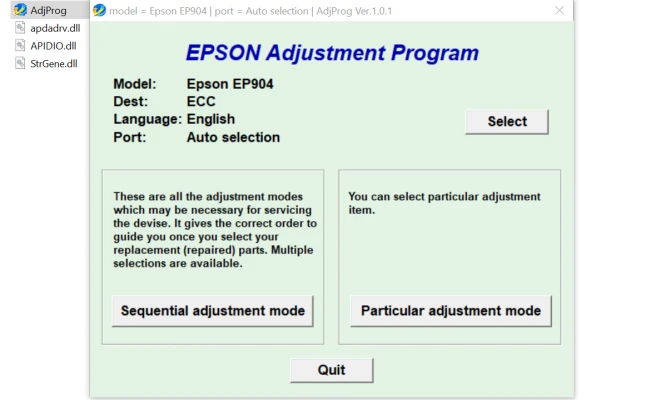
Step 3: Select the Printer Model
Choose your printer model (EP-904A) from the list in the program. This ensures that the program recognizes the correct settings and functions tailored to your specific model.
Step 4: Perform Necessary Maintenance Tasks
You will now see a menu of available functions. Here are some common tasks you can perform:
- Ink Waste Reset: Reset the ink waste counter if you encounter error messages or your printer refuses to print due to waste ink.
- Print Head Alignment: Choose this option if you notice issues with print quality, such as misaligned text or blurry images.
- Cleaning Functions: Perform nozzle cleaning or deep cleaning if you observe printing problems like streaking or missing colors.
- Paper Feed Adjustment: Modify the paper feed settings if you experience paper jams or misfeeds.
Step 5: Follow On-Screen Instructions
For each task, the program will guide you through the process with on-screen instructions. Be sure to follow the directions carefully to avoid errors or interruptions during the process.
Step 6: Finish and Test the Printer
After completing the maintenance tasks, finish the program and test your printer. Print a test page or an image to ensure that the adjustments have resolved any issues you were experiencing.
Tips for Using the Epson EP-904A Adjustment Program Safely
- Backup Important Data: Before using the adjustment program, it's advisable to back up your printer settings and any important print jobs. This helps to avoid data loss in case something goes wrong during the adjustment process.
- Use Genuine Ink Cartridges: To avoid issues with the print head or other internal components, always use genuine Epson ink cartridges. Using third-party ink can cause clogging or other performance issues.
- Avoid Overusing the Program: While the adjustment program is an essential tool for maintenance, using it excessively for tasks like head cleaning can waste ink and lead to unnecessary wear on the printer.
Conclusion
The Epson EP-904A Adjustment Program is an indispensable tool for keeping your printer in top working condition. With the ability to reset counters, clean print heads, adjust paper feed settings, and perform other vital maintenance tasks, this program empowers users to solve common printing problems and maintain optimal performance. By following the necessary steps and precautions, you can ensure that your Epson EP-904A printer continues to produce high-quality prints for years to come.
Rate the App
User Reviews


Popular Apps








