
Latest Version
More About Epson EP-904F Adjustment Program
Epson EP-904F Adjustment Program: A Comprehensive Guide
The Epson EP-904F is a high-performance inkjet printer that is often used in both home and professional environments. It offers impressive features, such as high-quality printing, scanning, and copying, along with advanced connectivity options. However, like all printers, it may require adjustments and maintenance from time to time to keep it functioning at its best. The Epson EP-904F Adjustment Program is a useful tool for performing specific repairs, maintenance, and adjustments that are not typically available through the standard printer settings. This article delves into the purpose of this program, how to use it, and why it's important for maintaining the longevity of your Epson EP-904F printer.
What is the Epson EP-904F Adjustment Program?
The Epson EP-904F Adjustment Program is a software utility designed to provide advanced diagnostic and maintenance functions for Epson printers. It allows users to perform operations such as resetting the ink pad counter, cleaning print heads, and aligning the printer, which are essential for the printer's optimal performance. These tasks are crucial, especially when the printer begins showing signs of wear and tear or when there are issues that cannot be fixed through the standard interface.
Typically, these adjustments are needed after extended usage of the printer or when specific error codes appear that indicate the printer's internal counters or components need resetting.
Key Features of the Epson EP-904F Adjustment Program
Resetting the Ink Pad Counter:
- One of the most common functions of the Adjustment Program is resetting the ink pad counter. Ink pads accumulate excess ink during printing, and when these pads reach their capacity, the printer may stop functioning to prevent ink leakage. The Adjustment Program can reset this counter, ensuring the printer continues to operate smoothly.
Print Head Cleaning:
- Over time, the print heads in an inkjet printer can become clogged with dried ink or debris. The Adjustment Program includes a tool that helps clean the print heads, improving print quality and preventing errors caused by blocked nozzles.
Printer Head Alignment:
- Misalignment of the print head can result in blurry prints or color discrepancies. The Adjustment Program offers a way to perform automatic or manual alignment to ensure that the print heads are perfectly aligned for optimal printing accuracy.
Service Mode Activation:
- The program enables service mode, allowing access to functions that are not normally available in the regular user interface. This includes more advanced diagnostics and repairs.
Resetting Printer Error Codes:
- If the printer shows certain error codes related to internal mechanisms, the Adjustment Program can clear these errors, which might otherwise prevent the printer from working properly.
Waste Ink Reset:
- Waste ink pads are responsible for absorbing excess ink during printing. Once these pads become full, they can cause the printer to display error messages or stop working. The Adjustment Program can reset the waste ink counter to allow for continued use, although it’s important to physically check the pads to ensure they aren’t full.
How to Use the Epson EP-904F Adjustment Program
Using the Epson EP-904F Adjustment Program is relatively straightforward, but it does require some technical knowledge. Below are the general steps to follow:
Download the Program:
- The Adjustment Program is not officially available on Epson’s website but can be found from third-party sources. Be sure to download it from a reputable website to avoid malicious software.
Install the Program:
- After downloading the software, run the installer and follow the on-screen instructions to complete the installation process. Ensure your printer is connected to the computer via USB or network.
Run the Program:
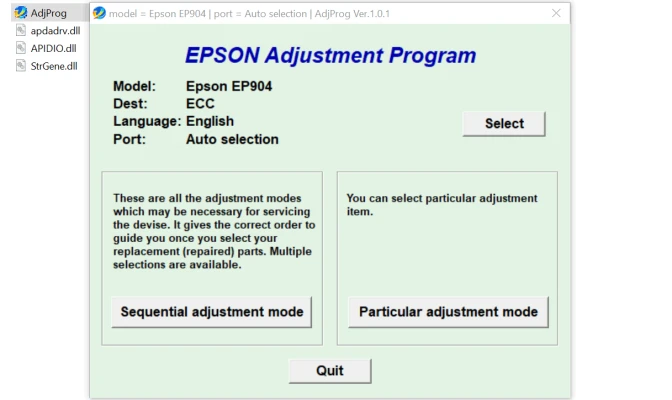
- Open the Adjustment Program after installation. Select your printer model (Epson EP-904F) from the list.
Choose the Required Function:
- From the available options, select the specific adjustment you need, such as ink pad counter reset or print head cleaning.
Follow the On-Screen Instructions:
- The program will provide step-by-step instructions. It’s important to follow these carefully to avoid making any errors.
Check Printer’s Performance:
- After the adjustments have been completed, check the printer’s performance. Perform a test print to verify that the print head is working well and that the ink pad counter has been reset successfully.
Why is the Epson EP-904F Adjustment Program Important?
Extended Printer Lifespan:
- Regular maintenance and adjustments can significantly extend the life of your printer. By addressing issues such as ink pad overflow, head alignment, and print quality problems, the printer remains in top condition for a longer period.
Cost-Effective:
- Repairing or servicing an Epson printer can be expensive if done through official channels. The Adjustment Program allows you to perform many maintenance tasks yourself, saving you money on service fees.
Fix Printer Errors:
- The Epson EP-904F Adjustment Program can resolve issues that might otherwise require a technician to address, making it a valuable tool for troubleshooting.
Avoid Printer Downtime:
- If your printer stops functioning due to errors or worn-out components, it can lead to costly downtime, especially in a professional environment. With the Adjustment Program, you can resolve many issues quickly and keep your printer operational.
Final Thoughts
The Epson EP-904F Adjustment Program is an essential tool for maintaining the performance of your Epson printer. Whether you need to reset the ink pad counter, clean the print heads, or align the printer heads, this software offers a range of functions that can be carried out at home or in the office. Regular use of the program will help maintain print quality, prevent costly repairs, and extend the lifespan of your printer. However, it's essential to use this tool carefully and ensure that all maintenance tasks are performed according to the program’s instructions to avoid potential issues.
Rate the App
User Reviews


Popular Apps








