
Latest Version
More About Epson EP-976A3 Adjustment Program
Epson EP-976A3 Adjustment Program: A Comprehensive Guide
The Epson EP-976A3 is a highly regarded multifunction printer, known for its superior printing capabilities, impressive performance, and ease of use. However, like any sophisticated machine, it may occasionally require maintenance or recalibration to maintain optimal performance. One tool that can assist in this process is the Epson EP-976A3 Adjustment Program.
The Epson Adjustment Program, also known as the Epson Service Adjustment Program, is a specialized software designed to help users manage printer maintenance, fix certain malfunctions, and restore factory settings. This program provides access to various essential functions that are typically reserved for authorized service technicians.
Key Features of the Epson EP-976A3 Adjustment Program
Waste Ink Pad Resetter: One of the most significant features of the Adjustment Program is its ability to reset the waste ink pad counter. Over time, ink waste pads in the printer fill up with excess ink, which can cause the printer to stop working if not properly reset. The program allows users to reset the counter and continue printing without worrying about potential damage from overflowing ink pads.
Printer Head Cleaning: The Adjustment Program offers a more advanced level of head cleaning compared to the standard cleaning utility provided with the printer's regular software. This function helps to remove ink clogs in the printer’s nozzle, which can affect print quality. By using the Adjustment Program, users can execute a more thorough cleaning to restore crisp, sharp prints.
Resetting the Ink Cartridge Counter: If the printer continues to indicate that an ink cartridge is empty even after replacing it, the Adjustment Program can reset the ink cartridge counter. This ensures that the printer accurately tracks ink levels and prevents unnecessary warnings.
Adjusting the Printer’s Firmware: Sometimes, the printer may experience minor software glitches or need minor adjustments in the firmware. The Adjustment Program allows users to update or reset the printer’s firmware to ensure it runs efficiently and without errors.
Print Head Alignment: Misalignment of the print head can lead to poor print quality, including blurry text and lines. The Adjustment Program allows for precise adjustments to the print head alignment, helping users achieve perfect prints every time.
Resolving Paper Jams and Misfeeds: The Adjustment Program provides diagnostic tools to identify and resolve paper jams or misfeed issues. This feature enables users to troubleshoot and clear any obstructions in the printer’s paper path.
How to Use the Epson EP-976A3 Adjustment Program
Using the Epson EP-976A3 Adjustment Program requires a few simple steps. However, it’s important to note that this tool is typically not included with the standard printer software and must be obtained separately. Follow these steps for proper usage:
Obtain the Software: The first step is to obtain the Epson EP-976A3 Adjustment Program. It is essential to download the software from a reputable source to avoid malware or counterfeit versions.
Install the Program: After downloading the software, install it on your computer by following the on-screen instructions. The installation process may vary slightly depending on your operating system.
Connect the Printer: Ensure the Epson EP-976A3 printer is connected to your computer via USB or Wi-Fi, depending on your setup. The program requires a direct connection to the printer to access its internal settings.
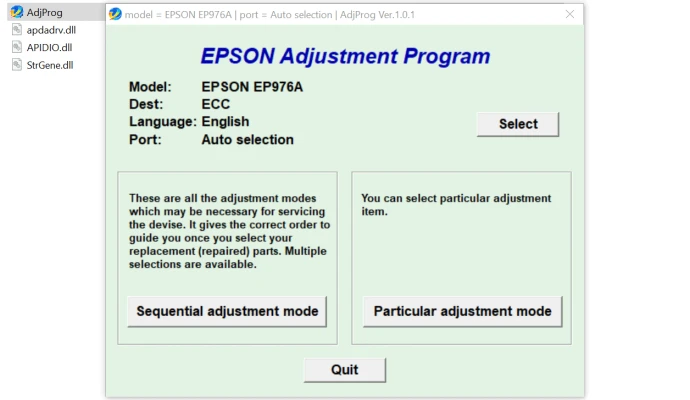
Launch the Adjustment Program: Open the program and select the printer model (EP-976A3) from the list of supported devices. If the printer is correctly connected, it should appear as an available option.
Select the Desired Function: Choose the function you need, such as resetting the waste ink pad counter, performing a print head cleaning, or aligning the print head. The program will guide you through the necessary steps.
Execute and Follow Instructions: Once you’ve selected a function, follow the on-screen instructions to complete the process. Depending on the function, the program may prompt you to turn the printer on or off, press specific buttons, or wait for the process to finish.
Check for Success: After completing the adjustment, run a test print or check the printer’s status to confirm that the problem has been resolved.
Precautions and Considerations
Warranty Implications: Using the Adjustment Program may void your printer’s warranty, especially if it involves resetting counters or altering internal settings. Always check your warranty terms before proceeding.
Accuracy of Actions: The Adjustment Program provides powerful tools that can potentially cause issues if misused. Ensure you follow instructions carefully to avoid damaging your printer.
Backup Important Settings: Before using the Adjustment Program, back up any important printer settings or configurations to avoid losing them during the reset process.
Conclusion
The Epson EP-976A3 Adjustment Program is an essential tool for those who want to maintain their printer’s performance and troubleshoot common issues. With features like waste ink pad resetting, print head alignment, and advanced cleaning options, this software ensures that your Epson printer remains in optimal condition for high-quality prints. However, it’s important to use the program cautiously to avoid inadvertently affecting your printer’s functionality or voiding its warranty.
By understanding how to utilize the Epson Adjustment Program properly, you can extend the lifespan of your Epson EP-976A3 printer and continue producing sharp, reliable prints for years to come.
Rate the App
User Reviews


Popular Apps








