

Latest Version
More About Epson B-300 Adjustment Program
Epson B-300 Adjustment Program: A Comprehensive Guide
The Epson B-300 is a reliable workhorse for office and professional environments, renowned for its high-speed printing and robust performance. However, like any printer, it requires periodic maintenance and calibration to ensure optimal functioning. This is where the Epson B-300 Adjustment Program becomes invaluable. In this article, we explore the features, uses, and benefits of the adjustment program while providing actionable insights on its application.
What is the Epson B-300 Adjustment Program?
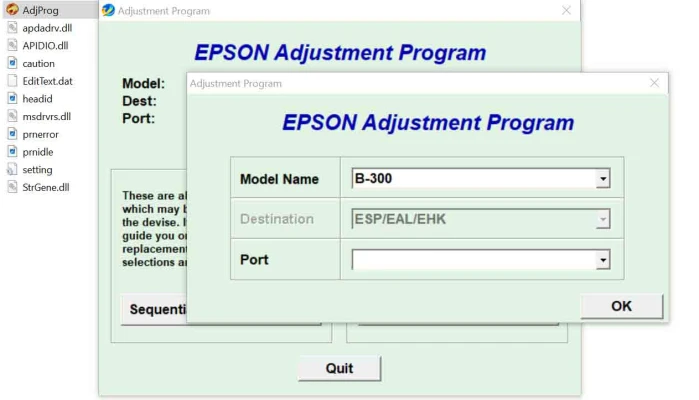
The Epson B-300 Adjustment Program is a specialized utility software designed to help users perform maintenance and diagnostic tasks on the Epson B-300 printer. This program addresses common issues such as resetting waste ink pad counters, calibrating printhead alignment, and troubleshooting various error messages. By using this software, users can extend the printer's lifespan and maintain high-quality performance.
Key Features of the Adjustment Program
- Waste Ink Pad Counter ResetOver time, the Epson B-300 accumulates waste ink during cleaning cycles. Once the waste ink pad reaches its limit, the printer stops functioning to avoid spillage. The adjustment program allows you to reset the waste ink pad counter, restoring printer operation without needing immediate pad replacement.
- Printhead AlignmentMisaligned printheads can cause blurry or distorted prints. The adjustment program provides tools for recalibrating the printhead alignment, ensuring sharp and accurate outputs.
- EEPROM Reset and BackupThe program enables users to reset and back up the printer's internal memory (EEPROM), which stores essential operational data. This feature is helpful for troubleshooting and restoring default settings.
- Ink Charge and Cleaning OptionsUsers can initiate deep cleaning cycles and ink charge processes directly through the software. These options are crucial for addressing print quality issues like streaks or faded colors.
- Error Code DiagnosticsThe adjustment program helps identify and resolve error codes displayed by the printer. This saves time and reduces the need for professional service visits.
Benefits of Using the Epson B-300 Adjustment Program
- Cost-Effective Maintenance: Avoid expensive service center visits by performing basic repairs and resets at home or in the office.
- Time-Saving: Quickly resolve common issues without long waiting times for external technicians.
- Enhanced Printer Longevity: Regular use of the program ensures your printer operates efficiently for years.
- Improved Print Quality: By calibrating the printer's functions, you can achieve consistently high-quality results.
How to Use the Epson B-300 Adjustment Program
- Download and InstallObtain the program from a trusted source. Ensure compatibility with your operating system and install the software on your computer.
- Connect Your PrinterUse a USB cable to connect your Epson B-300 to the computer. Ensure the printer is powered on and recognized by the system.
- Run the Adjustment ProgramOpen the software and navigate the user-friendly interface to select the desired function, such as resetting the waste ink pad counter or aligning the printhead.
- Follow On-Screen InstructionsCarefully follow the prompts provided by the program. Incorrect actions could lead to further printer issues.
- Test the PrinterAfter completing the adjustments, run a test print to confirm that the issues have been resolved.
Precautions and Best Practices
- Backup Data: Always back up printer settings before making adjustments.
- Use Official Sources: Download the program only from reliable and verified sources to avoid malware.
- Follow Instructions: Incorrect usage of the program can cause more harm than good. Consult the printer manual if needed.
- Professional Assistance: If problems persist, seek help from certified Epson technicians.
Conclusion
The Epson B-300 Adjustment Program is a powerful tool that empowers users to manage and maintain their printers efficiently. By leveraging its features, you can save money, reduce downtime, and enjoy optimal printer performance. Whether you're resetting the waste ink counter or aligning the printhead, this software ensures your Epson B-300 remains a dependable asset for all your printing needs.
Use it wisely, and your printer will thank you with years of seamless operation.
Rate the App
User Reviews


Popular Apps








