

Latest Version
More About Epson B-310N Adjustment Program
Epson B-310N Adjustment Program: A Comprehensive Guide
The Epson B-310N is a high-performance business printer celebrated for its speed, reliability, and cost-efficient operations. However, like many printers, it occasionally requires maintenance or troubleshooting to ensure optimal functionality. This is where the Epson B-310N Adjustment Program comes into play. In this article, we’ll dive into what this program is, why it’s essential, and how it can help users manage their printer effectively.
What Is the Epson B-310N Adjustment Program?
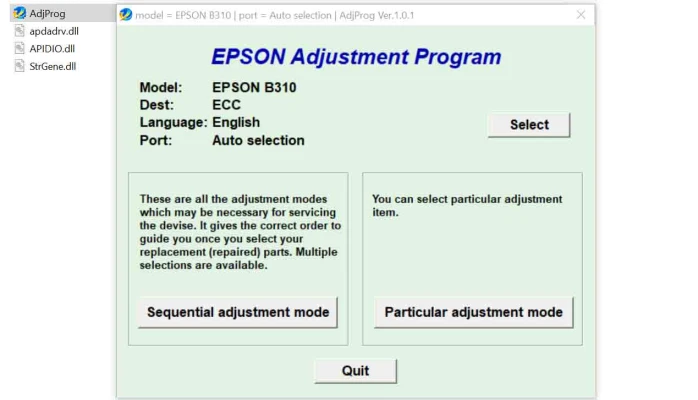
The Epson Adjustment Program is a specialized utility tool designed for Epson printers, including the B-310N model. It allows users to execute advanced maintenance and configuration tasks that are otherwise inaccessible through standard printer settings. This software is primarily used by technicians and advanced users to address issues such as resetting waste ink counters, calibrating hardware settings, and performing specific diagnostics.
Key Features of the Adjustment Program
Waste Ink Pad Counter Reset
Every Epson printer, including the B-310N, has a built-in waste ink pad that collects excess ink during cleaning cycles. Over time, the printer’s firmware locks operations when it detects the ink pad is nearing its limit. The adjustment program helps reset the waste ink counter, enabling continued use without requiring immediate replacement.EEPROM Data Management
The tool can access and modify the EEPROM data stored in the printer. This is particularly useful for recalibrating settings or resolving firmware glitches.Printer Diagnostics
The program allows users to diagnose issues such as nozzle clogs, paper feed alignment errors, and communication problems between the printer and the PC.Head Cleaning and Alignment
While basic cleaning functions are available via the printer’s default software, the adjustment program provides deeper cleaning options and precise head alignment, ensuring the best print quality.
Why Do You Need the Adjustment Program?
Epson printers, while robust, can occasionally encounter issues requiring technical intervention. The adjustment program serves as a cost-effective and efficient solution, allowing users to perform these actions without needing professional repair services.
- Extended Printer Lifespan: Regular maintenance using the adjustment tool can extend the printer’s operational life.
- Cost Savings: Resetting the waste ink counter and performing diagnostics at home eliminates the need for costly repairs.
- Improved Performance: Fine-tuning settings ensures consistent and high-quality output.
How to Use the Epson B-310N Adjustment Program
Step 1: Download the Program
To get started, download a legitimate version of the Epson B-310N Adjustment Program. Ensure you obtain the software from a trusted source to avoid compatibility issues or malware risks.
Step 2: Install the Software
- Unzip the downloaded file (if required).
- Run the installation file and follow the on-screen instructions.
Step 3: Connect Your Printer
Connect the Epson B-310N to your computer using a USB cable. Ensure the printer is powered on and recognized by your operating system.
Step 4: Execute Maintenance Tasks
- Open the adjustment program.
- Select your printer model and the required maintenance task (e.g., waste ink reset).
- Follow the program’s instructions carefully.
Step 5: Restart the Printer
Once the process is complete, restart your printer to apply the changes.
Precautions When Using the Adjustment Program
- Compatibility: Always verify that the software version matches your printer model.
- Data Backup: If you plan to modify EEPROM settings, create a backup to prevent accidental data loss.
- Usage Frequency: Avoid overusing the tool as excessive resets can lead to hardware damage.
Final Thoughts
The Epson B-310N Adjustment Program is a valuable tool for maintaining and troubleshooting your printer. By understanding its capabilities and following the proper steps, you can enhance your printer’s performance and extend its lifespan. However, always exercise caution and seek professional assistance if you’re unsure about performing advanced adjustments.
For businesses relying on the Epson B-310N, this program can be a game-changer, ensuring smooth operations and minimal downtime. Keep your printer running efficiently, and let the adjustment program do the heavy lifting!
Rate the App
User Reviews


Popular Apps








