

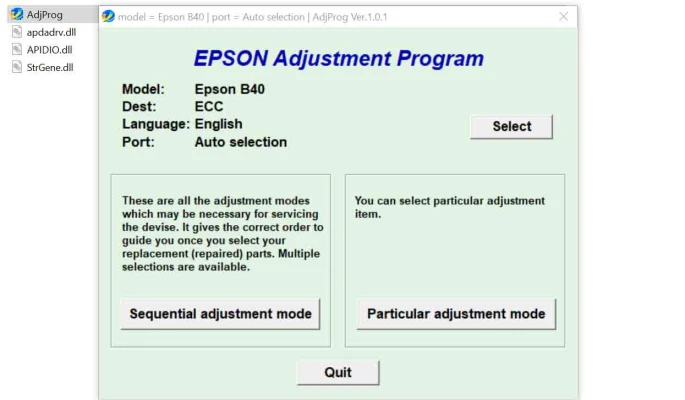
Latest Version
More About Epson B-40 Adjustment Program
Epson B-40 Adjustment Program: A Comprehensive Guide
The Epson B-40 is a powerful and efficient printer designed for high-volume, high-quality printing, especially in business and commercial environments. However, like all advanced printers, it occasionally requires adjustments to maintain optimal performance and ensure longevity. The Epson B-40 Adjustment Program is a specialized utility used to fine-tune the printer, resolving various issues such as ink overflow, head alignment, and print quality degradation. This program is crucial for keeping your printer in top shape without needing to replace expensive parts or seek professional servicing.
In this article, we will walk you through what the Epson B-40 Adjustment Program is, why it is needed, and how to use it effectively.
What is the Epson B-40 Adjustment Program?
The Epson B-40 Adjustment Program is a software tool designed to help users manage and adjust various printer settings that affect the print head, ink usage, and other internal components of the Epson B-40. The program can address several issues that commonly arise with high-volume inkjet printers, including ink pad counter reset, print head alignment, and maintenance of the waste ink system.
By running this adjustment program, users can ensure that the printer operates at peak efficiency, avoiding errors such as “ink pad full” messages and improving overall print quality.
Why You Might Need the Epson B-40 Adjustment Program
The Epson B-40, like many other inkjet printers, uses ink pads to absorb excess ink during printing. Over time, these pads can become saturated, leading to potential leakage or the printer ceasing to function properly. The adjustment program helps reset the waste ink counter, allowing the printer to continue operating without the need for immediate physical maintenance.
Additionally, if the printer is showing signs of poor print quality, such as misaligned colors or streaks, the program can help reset the print head alignment. This can save you from costly repairs or needing to replace the printhead prematurely.
Key Features of the Epson B-40 Adjustment Program
Ink Pad Counter Reset: One of the most common uses of the adjustment program is to reset the waste ink pad counter. This prevents the printer from halting its operation due to ink pad saturation warnings.
Print Head Alignment: If you notice uneven or blurry prints, the adjustment program allows you to realign the print head, improving overall print quality.
Nozzle Check and Cleaning: The program provides a utility for checking the print head nozzles and performing automated cleaning, which can help eliminate clogged nozzles that affect print quality.
Waste Ink Tank Management: By resetting the waste ink counter, the program ensures the printer doesn’t show errors related to the ink tank. This helps prolong the printer’s lifespan and maintain smooth operation.
Other Adjustments: The program offers several other functions for fine-tuning various settings, including paper feed adjustments and print head position calibration.
How to Use the Epson B-40 Adjustment Program
Step 1: Download the Program
First, you need to download the Epson B-40 Adjustment Program from a trusted source. Be cautious, as many websites offer counterfeit or outdated versions of the software that may harm your device. Always ensure that you are downloading from a reputable website or an official source.
Step 2: Install the Program
Once downloaded, extract the files and run the installation process. You may need administrative permissions to install the software on your computer.
Step 3: Connect the Printer
Ensure that your Epson B-40 is connected to the computer via USB or network. Power on the printer and make sure there are no active print jobs or errors.
Step 4: Launch the Adjustment Program
Open the Epson B-40 Adjustment Program. The software will detect the connected printer and display a range of options.
Step 5: Select the Desired Function
Select the adjustment function you wish to perform, such as the ink pad counter reset or print head alignment. The program will walk you through a series of prompts to guide you through the process.
Step 6: Follow the On-Screen Instructions
For each function, follow the on-screen instructions carefully. Depending on the task, the program may require the printer to complete a series of tasks like cleaning the print head or testing the nozzles.
Step 7: Complete the Process
Once the program completes its adjustments, the printer should return to normal operation. You may need to restart the printer for the changes to take effect.
Caution and Maintenance Tips
Use the Program Sparingly: While the Epson B-40 Adjustment Program can help resolve many issues, it is not a substitute for regular maintenance. Avoid overusing the reset functions, especially the ink pad reset, as this can lead to unnecessary wear and tear on internal components.
Regular Cleaning: Perform periodic cleaning and maintenance on your printer to keep it running smoothly. This includes checking for clogged nozzles and clearing dust from the print head.
Waste Ink Pads: If your printer’s ink pads are full or near saturation, it’s a good idea to replace them when prompted. Continuous use without proper maintenance can damage your printer.
Backup Your Settings: Before making any adjustments, it’s a good idea to back up your printer settings, especially if you’re adjusting advanced features or resetting internal counters.
Conclusion
The Epson B-40 Adjustment Program is a valuable tool for maintaining the functionality of your printer. It allows users to manage common issues such as waste ink accumulation, print head misalignment, and nozzle clogging, without the need for costly repairs or professional services. By following the proper steps and using the program responsibly, you can extend the life of your Epson B-40 and continue producing high-quality prints for your business or personal use.
Rate the App
User Reviews


Popular Apps








