

Latest Version
Download NowMore About Epson Stylus C46 Adjustment Program
Epson Stylus C46 Adjustment Program: A Comprehensive Guide
The Epson Stylus C46 is a popular inkjet printer known for its reliable performance and high-quality prints. However, like all printers, it may encounter issues over time. One of the solutions to resolve these problems is using an "Adjustment Program." This program is a powerful tool that helps in diagnosing and fixing printer malfunctions, optimizing performance, and resetting various printer settings.
In this article, we’ll dive into the Epson Stylus C46 Adjustment Program, what it is, how it works, and why it's essential for your printer.
What is the Epson Stylus C46 Adjustment Program?
The Epson Stylus C46 Adjustment Program is a utility designed to reset and adjust specific components of the printer. These adjustments help users resolve issues such as print quality problems, maintenance errors, and counter resets. For example, the program can reset the waste ink pad counter, clear printhead clogs, and perform other vital tasks that are difficult to execute manually.
Epson does not provide this tool to the general public, but it is commonly available through third-party websites. It's important to download the program only from trusted sources to avoid malware or unwanted software.
Key Features of the Epson Stylus C46 Adjustment Program
-
Waste Ink Pad Reset: The most common function of the Adjustment Program is resetting the waste ink pad counter. Over time, ink pads accumulate excess ink, and the printer may stop functioning to prevent overflows. The Adjustment Program can reset this counter, allowing the printer to resume normal operation.
-
Head Cleaning: The tool can perform deep cleaning of the printhead, which can help improve print quality. If ink is clogged in the nozzles, the Adjustment Program can initiate a cleaning cycle to ensure optimal performance.
-
Printer Settings Reset: If the printer settings are misconfigured, the Adjustment Program can reset them to their default values. This is especially helpful if the printer is malfunctioning due to incorrect settings.
-
Ink Counter Reset: For those who use third-party ink cartridges, the ink counter reset feature can help the printer recognize the ink levels more accurately.
-
Alignment and Calibration: The program can also perform automatic alignment and calibration of the printer, ensuring that the printhead is correctly positioned and the prints are sharp.
Why You Need the Epson Stylus C46 Adjustment Program
The Epson Stylus C46 Adjustment Program is a valuable tool for several reasons:
-
Cost-Effective: Instead of purchasing a new printer or sending your printer to repair shops, this program allows you to fix common issues at home, saving you money on professional repairs.
-
Enhanced Printer Lifespan: Regular maintenance and adjustments can significantly extend the life of your printer by preventing wear and tear and ensuring that all components are functioning properly.
-
Quick Resolution: Many printer problems, such as poor print quality or error messages, can be resolved quickly using the Adjustment Program, saving you time and frustration.
-
Prevents Damage: The program helps prevent damage caused by ink pad overflows or printhead blockages, which could lead to more severe malfunctions if left untreated.
How to Use the Epson Stylus C46 Adjustment Program
Using the Adjustment Program is straightforward, but it's essential to follow the steps carefully to avoid causing further issues:
-
Download the Program: First, you need to download the Epson Stylus C46 Adjustment Program. Ensure you are getting it from a reputable source to avoid downloading malicious software.
-
Install the Software: Once downloaded, install the program on your computer. During installation, follow the on-screen instructions and select the appropriate settings for your operating system.
-
Connect the Printer: Ensure your Epson Stylus C46 is connected to your computer via USB or through a network.
-
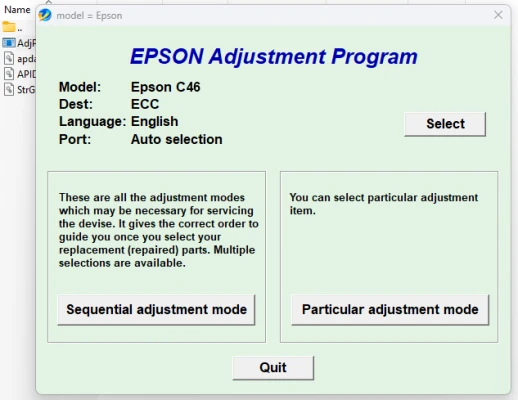
Run the Adjustment Program: Open the Adjustment Program, and you will see a menu with several options. Select the task you want to perform, such as resetting the waste ink pad counter or cleaning the printhead.
-
Follow the On-Screen Instructions: The program will guide you through the steps required to complete the adjustment or reset. Follow the instructions carefully to ensure proper functionality.
-
Restart the Printer: After completing the adjustment, restart your printer to apply the changes. Test the printer to ensure the issue is resolved.
Potential Risks and Considerations
While the Epson Stylus C46 Adjustment Program is a helpful tool, it's important to be aware of a few potential risks:
-
Void Warranty: Using third-party software may void your printer's warranty. Always check your warranty terms before using such programs.
-
Incorrect Usage: If used incorrectly, the Adjustment Program could cause further issues or damage the printer. It’s important to understand the function of each tool and only use the necessary adjustments.
-
Source of Download: Always download the program from a reliable source. Downloading from unreliable websites could expose your computer to viruses, malware, or unnecessary software.
Conclusion
The Epson Stylus C46 Adjustment Program is a handy tool for resolving common printer issues and extending the life of your device. It offers a range of features, such as waste ink pad reset, printhead cleaning, and more, all of which help ensure that your printer operates smoothly. While the program can be extremely beneficial, users should exercise caution and only download it from trusted sources to avoid potential risks. By using the Adjustment Program correctly, you can keep your Epson Stylus C46 in top condition for years to come.
Rate the App
User Reviews


Popular Apps








