

Latest Version
Download NowMore About Epson Stylus Color 1160 Adjustment Program
Epson Stylus Color 1160 Adjustment Program: A Comprehensive Guide
The Epson Stylus Color 1160 is a well-regarded inkjet printer known for its high-quality prints and impressive performance. However, like any other electronic device, it may experience various issues over time, from alignment problems to ink cartridge errors. One effective way to resolve such problems is through the Epson Stylus Color 1160 Adjustment Program. This software provides an essential tool for maintaining and fixing common printer issues. In this article, we will explore what the adjustment program is, how to use it, and its benefits.
What is the Epson Stylus Color 1160 Adjustment Program?
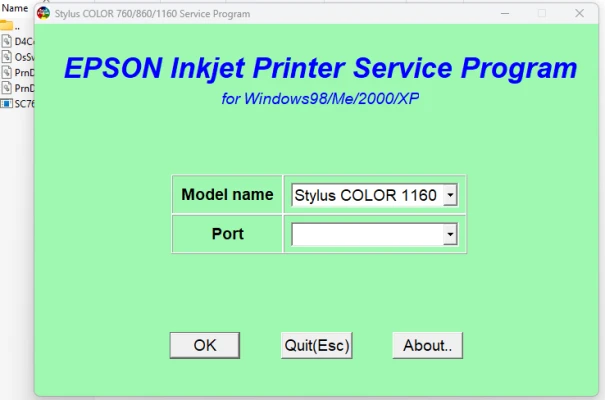
The Epson Stylus Color 1160 Adjustment Program is a diagnostic and maintenance software designed to help users reset and calibrate their printers. It serves as a comprehensive solution for dealing with several common issues such as ink waste counter resets, print head alignment, cleaning cycles, and fixing paper feed problems. With this software, users can bypass some of the limitations set by the printer’s default settings, allowing for more control over the maintenance process.
Why Use the Adjustment Program?
The primary purpose of the Epson Stylus Color 1160 Adjustment Program is to assist users in troubleshooting and maintaining the printer without requiring technical expertise. The program is ideal for users experiencing the following issues:
-
Ink Counter Reset: Over time, printers accumulate data about ink usage. When this counter reaches a certain threshold, the printer may stop working, thinking that the ink cartridge is full or empty. The adjustment program can reset this counter, restoring the printer’s normal functionality.
-
Print Head Alignment: Misalignment of the print head can cause blurry or incorrect prints. The adjustment program includes tools to recalibrate the print head for accurate and sharp prints.
-
Cleaning and Maintenance: If the print quality deteriorates, the adjustment program offers functions for cleaning clogged print heads and improving ink flow.
-
Paper Feed Issues: The program can help resolve problems related to paper jams and improper feeding, ensuring smooth and continuous printing.
-
Waste Ink Reset: The printer may accumulate ink in a waste tank, which can fill up after extensive use. The adjustment program can reset the waste ink counter and prevent errors related to waste ink overflow.
How to Use the Epson Stylus Color 1160 Adjustment Program
Using the Epson Stylus Color 1160 Adjustment Program is straightforward. Follow these simple steps to get started:
-
Download and Install the Program: The first step is to download the Epson Stylus Color 1160 Adjustment Program from a reliable source. Ensure you are downloading the correct version for your printer model and operating system.
-
Connect Your Printer: Before running the program, ensure your Epson Stylus Color 1160 is properly connected to your computer via USB or network.
-
Run the Program: Once the program is installed, open it. You will typically see several options related to printer diagnostics and maintenance.
-
Select the Desired Adjustment: The program’s interface will display various adjustment options. Choose the specific issue you are facing (e.g., reset ink counter, print head alignment) and follow the on-screen instructions.
-
Apply the Adjustment: After selecting the adjustment, click on the "Execute" button. The program will carry out the necessary actions to resolve the issue.
-
Test Your Printer: Once the adjustments are made, it’s a good idea to run a test print to verify that the problem has been fixed.
Benefits of the Epson Stylus Color 1160 Adjustment Program
-
Cost-Effective: By using the adjustment program, users can resolve many printer issues without the need for professional repair services, which can be costly.
-
Convenience: The program allows users to address multiple printer problems from the comfort of their home or office, without having to visit a service center.
-
Improved Print Quality: Proper maintenance and calibration of your printer can improve overall print quality, ensuring crisp and vibrant prints.
-
Extended Printer Lifespan: Regular use of the adjustment program helps keep your Epson Stylus Color 1160 in optimal condition, extending its lifespan and reducing the likelihood of hardware failures.
Conclusion
The Epson Stylus Color 1160 Adjustment Program is an invaluable tool for any owner of this printer. It empowers users to troubleshoot and resolve various issues quickly, efficiently, and cost-effectively. Whether it’s resetting the ink counter, realigning the print head, or performing maintenance tasks, the adjustment program helps ensure your printer operates at its best. For those who want to keep their Epson printer in peak condition, this program is an essential piece of software.
Rate the App
User Reviews


Popular Apps








