

Latest Version
Download NowMore About Epson Stylus Color 400 Adjustment Program
Epson Stylus Color 400 Adjustment Program: A Complete Guide
The Epson Stylus Color 400 is an older model that was popular for home and office use due to its reliability and color print quality. However, like any other printer, it can face some issues over time, especially with ink head alignment, print quality, and error codes. The Epson Stylus Color 400 Adjustment Program is a software tool designed to help users perform maintenance and troubleshooting tasks to keep their printer in optimal condition. This guide will explain what the Adjustment Program is, how it works, and how you can use it to solve common problems.
What is the Epson Stylus Color 400 Adjustment Program?
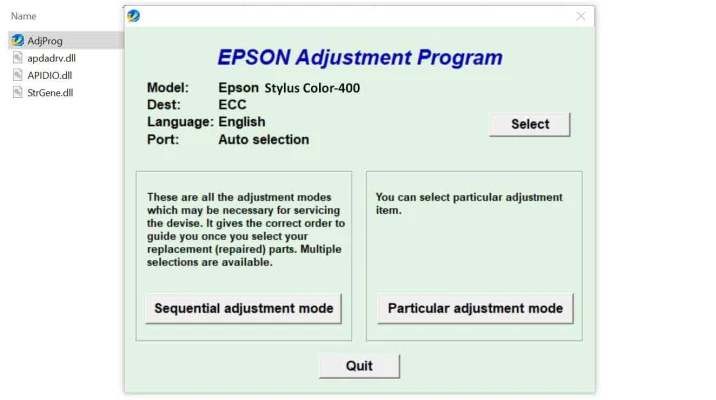
The Epson Stylus Color 400 Adjustment Program is a diagnostic and maintenance tool that helps users perform various adjustments and repairs to their Epson printer. It is typically used by service centers or advanced users to reset internal counters, fix ink flow issues, adjust print head alignment, and clean the printer's mechanisms.
While the tool is not intended for regular use, it can be a lifesaver when the printer shows error codes like "waste ink pad full" or if the print quality degrades significantly over time.
Key Features of the Adjustment Program
-
Resetting the Waste Ink Counter: Over time, the Epson printer accumulates waste ink in a pad, which can trigger an error code when full. The Adjustment Program can reset the waste ink counter, allowing you to continue printing without interruptions.
-
Print Head Alignment: Misalignment of the print head can cause blurred or uneven prints. The program helps align the print head to restore clear and sharp prints.
-
Nozzle Check and Cleaning: If you notice missing lines or color issues in your prints, the Adjustment Program can run a nozzle check to identify clogged nozzles. It can then initiate a cleaning cycle to restore print quality.
-
EEPROM Reset: EEPROM (Electrically Erasable Programmable Read-Only Memory) stores certain printer settings. Resetting this can fix some error codes related to printer settings or configurations.
-
Service Mode: This mode allows you to access advanced features such as print head cleaning, ink charging, and motor testing, which can resolve hardware issues affecting performance.
How to Use the Epson Stylus Color 400 Adjustment Program
Before starting, make sure to back up any important printer settings, as the reset and adjustment processes may alter configurations.
-
Download the Program: The Epson Stylus Color 400 Adjustment Program is typically not available from the official Epson website, so users often download it from third-party sources. Be cautious when downloading from unofficial sites to avoid malware.
-
Install the Program: After downloading, extract the program files and run the installation wizard. Follow the on-screen instructions to complete the setup.
-
Connect the Printer: Ensure that your Epson Stylus Color 400 is connected to your computer via USB. Turn on the printer before proceeding.
-
Launch the Adjustment Program: Open the Adjustment Program on your computer. The interface is simple, with various maintenance functions listed.
-
Select the Desired Function: Choose the maintenance or adjustment function you need. For example, if you're dealing with an error code related to the waste ink pad, select the “Waste Ink Pad Reset” option.
-
Follow the On-Screen Instructions: Each function will have specific steps that guide you through the process. For example, you may be asked to confirm your printer model, ensure the printer is powered on, or run a cleaning cycle.
-
Complete the Adjustments: Once you've completed the necessary adjustments, restart the printer and test it by printing a test page or performing a nozzle check.
Common Issues and Troubleshooting
-
Printer Not Recognizing the Adjustment Program: Make sure the printer is correctly connected to the computer and powered on before starting the program. Also, check if the printer driver is installed properly.
-
Program Crashes or Errors: If the program crashes or doesn’t load, ensure you're running it as an administrator. In some cases, running compatibility mode for an older version of Windows can help.
-
Waste Ink Pad Still Full Error: If the program resets the counter but the error persists, it might be time to replace the waste ink pad physically. This task may require disassembling the printer, so it's recommended to consult a service manual or technician.
Precautions When Using the Epson Stylus Color 400 Adjustment Program
-
Backup Settings: Before making any changes, it’s essential to back up your printer settings and data.
-
Use Only When Necessary: The Adjustment Program is designed for maintenance and troubleshooting. Using it excessively can result in unnecessary changes to your printer’s configuration.
-
Service Assistance: If you’re unsure about making any adjustments, it’s best to contact a professional technician, as performing the wrong adjustments could lead to further issues or hardware damage.
Conclusion
The Epson Stylus Color 400 Adjustment Program is a powerful tool for maintaining and troubleshooting your printer. While it's primarily intended for advanced users or service centers, it can help resolve common problems like print quality issues, error codes, and waste ink pad errors. By following the steps above, you can use the program to extend the life of your Epson printer and keep it performing at its best. Always use caution and consult a professional if you're unsure about using the program for more advanced adjustments.
Rate the App
User Reviews
Other Apps in This Category


Popular Apps








