

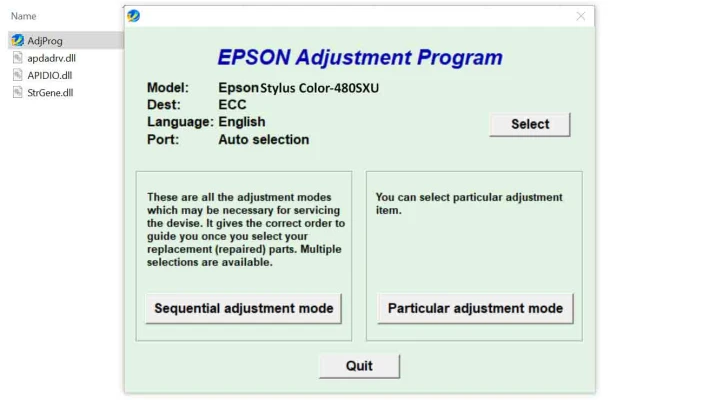
Latest Version
Download NowMore About Epson Stylus Color 480 SXU Adjustment Program
Epson Stylus Color 480 SXU Adjustment Program: A Comprehensive Guide
The Epson Stylus Color 480 SXU printer, known for its quality print outputs and robust design, is a popular choice for home and small office use. However, like all devices, regular maintenance is essential to ensure longevity and maintain its high-level performance. One key maintenance tool for this printer is the Epson Stylus Color 480 SXU Adjustment Program, which allows users to adjust various settings, reset the printer's counters, and resolve common issues related to ink overflow, waste pad errors, and print quality problems.
What is the Epson Stylus Color 480 SXU Adjustment Program?
The Epson Stylus Color 480 SXU Adjustment Program is a specialized software designed to help users perform maintenance tasks on their printer. It offers a series of adjustments and troubleshooting tools that can fix common issues like ink wastage errors, cleaning cycles, and printhead misalignments. The program also enables users to reset the printer's internal counters, which is particularly useful after completing a series of print jobs that might lead to over-counting or waste pad full errors.
Key Features of the Epson Stylus Color 480 SXU Adjustment Program
-
Resetting the Waste Ink Pad Counter: One of the primary functions of the adjustment program is to reset the waste ink pad counter. The printer keeps track of the amount of ink absorbed by the waste pad during regular operation. If this counter reaches a critical level, the printer will stop functioning to prevent ink leakage. The adjustment program can reset this counter, allowing the printer to continue its operation without triggering unnecessary errors.
-
Printhead Alignment: For improved print quality, the program can help in fine-tuning the alignment of the printhead. Misalignment often leads to blurry or inconsistent prints, and by using the adjustment program, users can perform precise adjustments to restore the quality of their prints.
-
Ink System Cleaning: The Epson Stylus Color 480 SXU can experience clogged nozzles, especially if it has not been used in a while. The adjustment program includes a tool to run through a series of cleaning cycles, ensuring that the nozzles are free from dried ink that could cause print defects.
-
Paper Feed Adjustment: Another valuable feature is the ability to calibrate the paper feed system. Paper jams and uneven paper feeding can be frustrating issues, and the adjustment program allows users to tweak the feed settings to ensure smooth operation.
-
Error Diagnosis: The program can detect various errors, such as communication failures, ink cartridge issues, and mechanical malfunctions. It helps identify the root cause of the problem and suggests potential fixes, saving users time and effort in troubleshooting.
-
General Printer Reset: If the printer is facing persistent issues that cannot be resolved by typical troubleshooting methods, the adjustment program provides a way to reset the printer to its factory settings. This can help eliminate software-related problems and restore the printer's functionality.
How to Use the Epson Stylus Color 480 SXU Adjustment Program
Using the adjustment program is fairly straightforward, but it does require some technical knowledge. Follow these steps for smooth operation:
-
Download the Program: Start by downloading the Epson Stylus Color 480 SXU Adjustment Program from a reputable source. Make sure to get the correct version compatible with your operating system.
-
Install the Program: After downloading, run the installation file and follow the on-screen instructions to install the program on your computer. Ensure that the printer is connected and powered on during installation.
-
Launch the Adjustment Program: Open the program and select your Epson Stylus Color 480 SXU from the list of connected devices.
-
Select the Desired Function: Choose the maintenance task you wish to perform, such as resetting the waste ink counter or performing a printhead alignment.
-
Follow the Instructions: The program will provide step-by-step instructions for completing the selected task. Be sure to follow them carefully to avoid errors.
-
Confirm and Finish: Once the adjustments have been made, the program will prompt you to confirm the changes. You can then proceed with normal printing tasks.
Important Considerations
- Warranty Void: Some users may be concerned that using the adjustment program could void the warranty of their printer. It’s important to check the terms and conditions of your warranty before using third-party software.
- Backup: Always back up important files before resetting or making significant changes to your printer's settings. Although the adjustment program is generally safe, data loss or settings issues can occasionally occur.
- Compatibility: Ensure the adjustment program is compatible with your operating system and the specific model of your Epson printer to avoid errors during the process.
Conclusion
The Epson Stylus Color 480 SXU Adjustment Program is a powerful tool that helps maintain the printer’s performance and addresses common issues like waste ink pad errors, printhead misalignment, and ink system cleaning. By following the instructions carefully and using the program as needed, users can ensure their printer stays in top condition, saving on expensive repairs or replacements. Regular use of this program not only improves print quality but also extends the lifespan of the printer, making it a valuable tool for any Epson Stylus Color 480 SXU owner.
Rate the App
User Reviews
Other Apps in This Category


Popular Apps








