

Latest Version
Download NowMore About Epson Stylus Color 600 Adjustment Program
Epson Stylus Color 600 Adjustment Program: A Comprehensive Guide
The Epson Stylus Color 600 is a reliable inkjet printer that has served a multitude of home and office users over the years. However, like all printers, it may require occasional adjustments to maintain optimal performance. The Epson Stylus Color 600 Adjustment Program is a vital tool for this purpose, designed to troubleshoot, recalibrate, and restore various aspects of the printer's functionality. This article delves into the Epson Stylus Color 600 Adjustment Program, providing a detailed overview of its features, how it works, and its potential benefits.
What is the Epson Stylus Color 600 Adjustment Program?
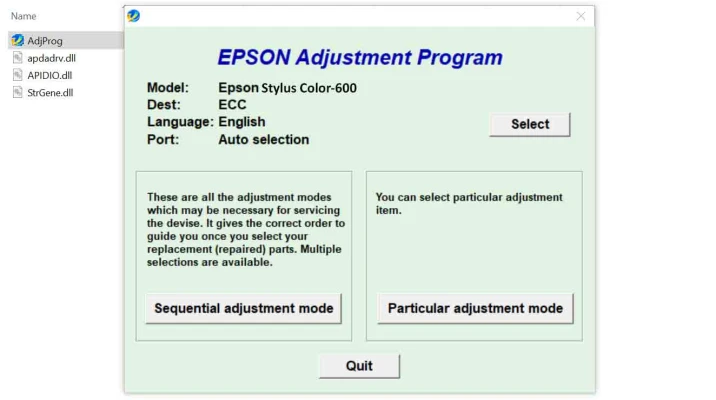
The Epson Stylus Color 600 Adjustment Program is a diagnostic and maintenance tool created to help users maintain the performance of their printer. This software allows users to perform tasks like resetting the waste ink counter, cleaning the print head, adjusting ink levels, and improving print quality. The program also gives users access to various settings that can be adjusted for optimal printer operation.
While this adjustment tool is not officially provided by Epson for everyday consumer use, it is accessible through third-party sources, typically for users experiencing issues with the printer's operation. It can be used to reset the printer after certain errors occur, ensuring it continues to work properly without needing to be replaced prematurely.
Key Features of the Epson Stylus Color 600 Adjustment Program
-
Resetting the Ink Waste Counter: Over time, your printer's waste ink counter may fill up, leading to errors or a halt in printing. The adjustment program allows you to reset this counter, preventing these interruptions. This is crucial for avoiding unnecessary service calls or repairs.
-
Print Head Cleaning: The program can initiate a print head cleaning cycle, clearing out any ink clogs that may cause print quality issues such as streaks or faded prints. This is a simple and effective way to restore the printer's performance without the need for physical disassembly.
-
Print Quality Adjustments: If your prints appear faded, blurry, or misaligned, the adjustment program provides tools to realign the print head and recalibrate the printer. This ensures that your documents are printed clearly and accurately.
-
Paper Feed Adjustments: In cases where the printer is having difficulty picking up paper or misfeeding it, the program can adjust the paper feed settings. This can minimize paper jams and improve the printer's reliability.
-
General Maintenance: The program can perform other maintenance tasks, such as head alignment, nozzle checks, and ink level adjustments. These functions help ensure that the printer operates smoothly, with minimal manual intervention.
How to Use the Epson Stylus Color 600 Adjustment Program
To use the Epson Stylus Color 600 Adjustment Program, follow these steps:
-
Download and Install the Program: First, you will need to download the adjustment program. Make sure to obtain it from a trusted source to avoid malware or corrupted files. Once downloaded, follow the installation prompts to install the software on your computer.
-
Connect the Printer to Your Computer: Ensure that the Epson Stylus Color 600 is connected to your computer via USB or a network, depending on your setup. The program requires an active connection to communicate with the printer.
-
Launch the Adjustment Program: Open the adjustment program and select the appropriate model (Epson Stylus Color 600) from the list. The program should automatically detect the printer if it is properly connected.
-
Choose the Desired Function: The adjustment program will offer various options, such as resetting the waste ink counter, cleaning the print head, or performing maintenance tasks. Select the function that corresponds to the issue you're facing.
-
Follow the On-Screen Instructions: The program will guide you through each step, including confirming settings, initiating cleaning cycles, and resetting counters. It's essential to follow the on-screen instructions carefully to avoid making incorrect adjustments.
-
Restart the Printer: Once the adjustments are complete, restart your printer to ensure that the changes take effect.
Common Issues Resolved by the Adjustment Program
-
Waste Ink Counter Full Error: The most common issue that users face with the Epson Stylus Color 600 is the "waste ink counter full" error, which prevents the printer from printing. This issue can be easily resolved by resetting the waste ink counter through the adjustment program.
-
Print Head Clogs: Print head clogs are a common problem that can lead to poor print quality. The adjustment program allows you to perform a cleaning cycle, which can restore the print head to its proper functioning state.
-
Misalignment and Poor Print Quality: If you notice misalignment, uneven color printing, or faded prints, the program’s head alignment and calibration features can restore print quality, ensuring sharper, more accurate output.
-
Paper Feed Problems: For printers that frequently misfeed or have trouble picking up paper, the adjustment program can optimize the paper feed settings, reducing the occurrence of paper jams.
Conclusion
The Epson Stylus Color 600 Adjustment Program is an indispensable tool for maintaining the performance of your printer. It offers a range of features that allow users to resolve common issues and keep their printer functioning like new. By using this program, users can prolong the life of their printer and ensure that it consistently delivers high-quality prints.
While the program is not officially supported by Epson for regular consumer use, it remains a valuable resource for those looking to troubleshoot and perform self-maintenance on their Epson Stylus Color 600 printer. Be sure to use the program responsibly, and always download it from a reputable source to ensure the safety of your device.
Rate the App
User Reviews
Other Apps in This Category


Popular Apps








