

Latest Version
Download NowMore About Epson Stylus NX305 Adjustment Program
Epson Stylus NX305 Adjustment Program: A Comprehensive Guide
The Epson Stylus NX305 is a popular all-in-one printer, known for its performance and cost-effectiveness. However, like all printers, it may occasionally encounter issues that require a reset or adjustment to restore optimal functionality. This is where the Epson Stylus NX305 Adjustment Program comes into play.
The Epson Adjustment Program is a specialized software tool designed to help users fix various printer problems that occur over time. It allows for maintenance tasks such as resetting counters, clearing errors, and recalibrating printer components. If your Epson Stylus NX305 starts exhibiting error codes or malfunctions, this program can offer a straightforward solution.
Here’s everything you need to know about the Epson Stylus NX305 Adjustment Program:
1. What Is the Epson Stylus NX305 Adjustment Program?
The Epson Adjustment Program is a diagnostic tool developed by Epson for servicing their printers. It is typically used by technicians but can also be used by end-users to resolve minor issues and perform necessary adjustments to the printer’s performance. The software enables users to perform a variety of maintenance tasks that cannot be accessed through standard printer menus.
2. Common Issues That Can Be Fixed
The Adjustment Program addresses several common issues found in the Epson Stylus NX305:
-
Ink pad reset: Over time, the printer’s ink pads can accumulate waste ink, leading to an error message and reduced print quality. The Adjustment Program helps reset this counter to prevent ink overflow.
-
Printer error codes: The program can help clear common error codes related to ink cartridge problems, paper jams, or mechanical failures.
-
Alignment and calibration issues: If the printer’s alignment or ink distribution becomes skewed, the Adjustment Program can assist in recalibrating the device for better print quality.
3. How to Download and Install the Adjustment Program
While the official Epson Adjustment Program is generally available only to authorized service technicians, users can find versions online through third-party websites. Be cautious when downloading software from unofficial sources, as it may not be safe or might harm your computer. Ensure that the source is reputable and virus-free.
The installation steps are fairly straightforward:
- Download the program file to your computer.
- Extract the files from the downloaded folder.
- Run the installation file and follow the on-screen instructions.
4. Using the Epson Stylus NX305 Adjustment Program
Once the software is installed, follow these steps to use the program:
-
Step 1: Connect the Printer Ensure your Epson Stylus NX305 is connected to your computer via USB cable and turned on.
-
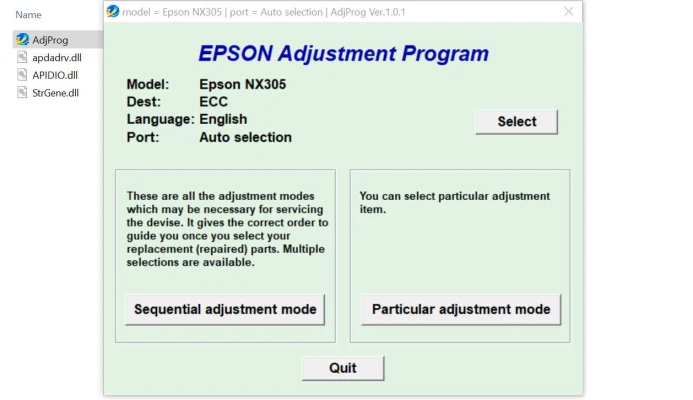
Step 2: Launch the Program Open the Epson Adjustment Program and select the connected printer model (Epson Stylus NX305) from the drop-down menu.
-
Step 3: Choose a Function The program will offer multiple options, including:
- Waste Ink Pad Reset
- Print Head Cleaning
- Nozzle Check
- EEPROM Reset (if needed)
Select the function that corresponds to the issue you're experiencing.
-
Step 4: Execute the Task Once you’ve selected a function, follow the on-screen instructions. For example, if you are resetting the ink pads, the program will prompt you to follow the steps carefully to avoid any malfunction.
5. Precautions When Using the Adjustment Program
Using the Epson Adjustment Program requires some level of caution, especially when resetting the ink pad or performing a waste ink reset. Incorrect use could cause further damage to the printer. Therefore, follow the instructions carefully and only perform the necessary adjustments.
6. Alternatives to the Epson Stylus NX305 Adjustment Program
If you’re not comfortable using third-party software, you can always reach out to an authorized Epson service center to have the adjustments made professionally. However, the Adjustment Program offers a convenient and cost-effective way to maintain your printer at home.
7. Conclusion
The Epson Stylus NX305 Adjustment Program is a valuable tool for printer maintenance, allowing users to fix common printer issues and ensure their device continues to function smoothly. Whether you’re dealing with error codes, ink pad issues, or alignment problems, this program can help you resolve the problem quickly. Just be sure to follow all instructions carefully and consider professional assistance if you are unsure about using the program on your own.
By performing regular maintenance with the Epson Stylus NX305 Adjustment Program, you can extend the lifespan of your printer and continue to enjoy high-quality prints for years to come.
Rate the App
User Reviews


Popular Apps








