

Latest Version
Download NowMore About Epson Stylus NX330 Adjustment Program
Epson Stylus NX330 Adjustment Program: A Comprehensive Guide
The Epson Stylus NX330 is a popular all-in-one inkjet printer known for its compact design and reliable performance. However, like any other printer, it may occasionally face issues that hinder its optimal functioning. This is where the Epson Stylus NX330 Adjustment Program comes into play. It is a tool designed to fix specific problems and restore your printer’s performance, especially when it comes to issues such as ink waste, print quality problems, or error messages. In this article, we'll guide you through the purpose, functionality, and installation process of the Epson Stylus NX330 Adjustment Program.
What is the Epson Stylus NX330 Adjustment Program?
The Epson Stylus NX330 Adjustment Program is a specialized software tool designed to help users maintain their printer. It works by adjusting various internal settings of the printer, such as resetting counters for ink usage, cleaning the printer heads, and addressing mechanical issues. The program can also fix error messages related to ink overflow or waste ink pads that have reached their capacity.
When the printer’s waste ink pad is full, it can cause the printer to stop working or display error codes. The Adjustment Program allows you to reset the waste ink pad counter, which can extend the life of your printer. It is important to note that this tool is meant for advanced users or those with a specific understanding of printer maintenance, as improper usage can lead to unintended consequences.
Key Features of the Epson Stylus NX330 Adjustment Program
-
Waste Ink Pad Reset: The most common issue with the Epson Stylus NX330 is the waste ink pad getting full. The Adjustment Program can reset the waste ink pad counter, allowing your printer to continue functioning without triggering an error.
-
Print Head Cleaning and Alignment: The software can perform a series of maintenance tasks like cleaning the print heads, which can help fix issues with poor print quality, such as streaks or fading. It also allows you to align the print heads for better color accuracy and sharpness.
-
Ink Usage and Reset: The Adjustment Program helps manage ink usage, preventing errors related to ink cartridge recognition. It can reset the ink counters after cartridge replacement, ensuring that the printer properly recognizes and tracks ink usage.
-
Error Fixing: Many error codes that appear on your printer’s screen can be resolved using the Adjustment Program. This includes errors related to the printer’s mechanical components or issues with communication between the printer and the computer.
How to Download and Install the Epson Stylus NX330 Adjustment Program
To begin using the Epson Stylus NX330 Adjustment Program, follow these steps:
-
Download the Program:
- Visit trusted websites that offer the official Epson Stylus NX330 Adjustment Program download. Make sure to choose a reliable source to avoid downloading malware or counterfeit software.
- Once downloaded, extract the files if necessary. The program is usually available in a compressed format (ZIP or RAR).
-
Install the Software:
- After extracting the files, look for the installer and double-click to begin the installation process.
- Follow the on-screen instructions. Make sure to read all the prompts carefully and grant necessary permissions for the program to run properly.
-
Connect Your Printer:
- Ensure that your Epson Stylus NX330 printer is connected to your computer via USB or Wi-Fi (depending on your printer’s setup).
- Turn on the printer and make sure it is ready for use.
-
Running the Program:
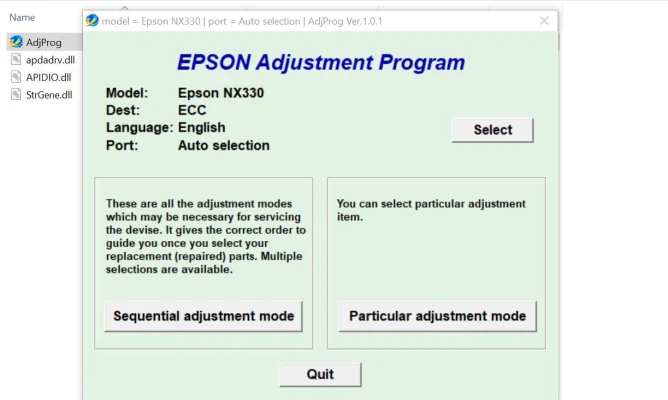
- Once the software is installed, launch the Epson Stylus NX330 Adjustment Program.
- Select your printer model from the list provided in the program.
- You’ll be presented with a menu that includes various options such as waste ink pad reset, print head cleaning, and ink usage reset.
- Select the desired option and follow the on-screen instructions.
Caution and Precautions
While the Epson Stylus NX330 Adjustment Program is a helpful tool, it’s important to use it with caution:
-
Incorrect Usage: If used incorrectly, the program could cause issues like improper resetting or malfunctioning of the printer’s components. It is highly recommended to read the manual carefully and proceed step-by-step.
-
Backup and Documentation: Before using the program, it’s a good idea to back up any important data and documents, just in case something goes wrong during the process.
-
Legal Considerations: Ensure that you are using the Adjustment Program within the bounds of your local laws and Epson’s terms of service. In some cases, using third-party software could void your warranty.
Conclusion
The Epson Stylus NX330 Adjustment Program is an essential tool for maintaining your printer and resolving common issues. It can help extend the life of your printer, improve print quality, and resolve frustrating error codes. By following the proper installation and usage steps, you can ensure your Epson printer continues to perform at its best. However, always use caution and consult professional help if you are unsure about how to use the program safely.
Rate the App
User Reviews


Popular Apps








