

Latest Version
January 02, 2025
Artisan Series
Windows
8
Report a Problem
More About Epson Artisan 710 Adjustment Program
Epson Artisan 710 Adjustment Program: A Comprehensive Guide
The Epson Artisan 710 is a versatile all-in-one printer known for its high-quality photo prints, fast printing speeds, and scanning capabilities. Like many other Epson models, it can sometimes experience maintenance issues or errors that prevent it from functioning at its full potential. In these cases, using the Epson Artisan 710 Adjustment Program can help restore the printer to its optimal condition. This article will delve into the functionality and benefits of the adjustment program, as well as step-by-step instructions on how to use it effectively.
What Is the Epson Artisan 710 Adjustment Program?
The Epson Artisan 710 Adjustment Program is a specialized software tool designed to reset various printer settings and perform maintenance tasks. It is typically used to fix issues such as paper feed errors, print head misalignment, or the notorious "waste ink pad" problem. When the printer's waste ink pads reach their capacity, the printer may stop functioning properly, signaling a need for an adjustment program to clear the error and reset the printer's internal counters.
Why Do You Need the Adjustment Program?
There are several reasons why you might need to use the Epson Artisan 710 Adjustment Program:
Waste Ink Pad Reset: One of the most common reasons for using the adjustment program is when the printer indicates that the waste ink pads are full. The program can reset the ink counter and allow you to continue using your printer.
Fixing Printhead Issues: Over time, the printhead may become misaligned or clogged. The adjustment program allows you to perform a printhead alignment and cleaning, improving print quality.
Clearing Errors: The program can also help clear various error messages that may appear on the printer’s display, ensuring smooth operation.
Ink System Initialization: The adjustment tool can reset the printer’s ink system, making it ready for further printing tasks after refilling or replacing ink cartridges.
How to Download and Install the Epson Artisan 710 Adjustment Program
To use the Epson Artisan 710 Adjustment Program, you need to download it from a trusted source. Since this software is not officially provided by Epson for public download, you may need to find a third-party website offering it.
Here’s how to proceed:
Search for a Trusted Source: Search for "Epson Artisan 710 Adjustment Program" on a trusted software website. Ensure the site is reputable to avoid downloading potentially harmful files.
Download the Software: Once you find a safe download link, click on it and save the file to your computer.
Install the Program: Open the downloaded file and follow the on-screen instructions to install the software. You may need to restart your computer after installation.
How to Use the Epson Artisan 710 Adjustment Program
Once the Epson Artisan 710 Adjustment Program is installed, you can follow these steps to perform adjustments on your printer:
Connect the Printer: Ensure your Epson Artisan 710 is properly connected to your computer via USB cable.
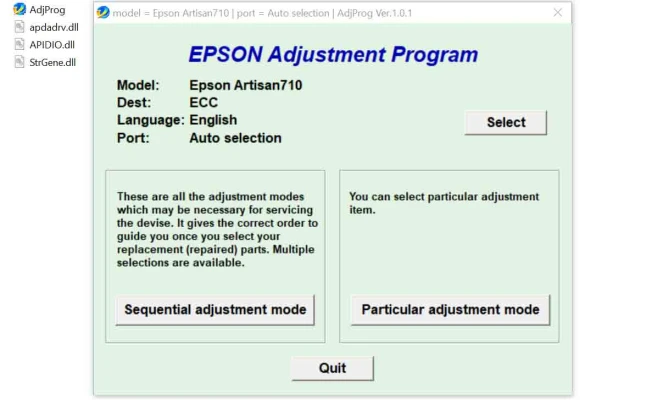
Launch the Program: Open the adjustment program by double-clicking its icon on your desktop or navigating to its folder. The program will display a list of options related to printer maintenance.
Select the Desired Function: Choose the function you want to use, such as "Waste Ink Pad Reset," "Printhead Alignment," or "Ink System Reset."
Follow On-Screen Instructions: The program will guide you through the necessary steps for each adjustment. For example, if you are resetting the waste ink pads, the program will prompt you to confirm the reset process.
Complete the Reset: Once the adjustment process is complete, the program will notify you that the task has been successfully finished. You can now restart your printer and perform a test print to verify that the issues have been resolved.
Important Considerations
Backup Data: Before using the adjustment program, it’s a good idea to back up your printer’s settings and any important data, just in case something goes wrong during the reset process.
Warranty: Using third-party adjustment programs may void the warranty on your printer. Ensure you’re comfortable with this before proceeding.
Waste Ink Pad Maintenance: While resetting the waste ink pad counter can help temporarily, it's essential to physically replace or clean the pads if they are truly full. If you neglect this, the printer could experience damage or ink leaks in the future.
Conclusion
The Epson Artisan 710 Adjustment Program is a valuable tool for users looking to fix common printer issues and reset various internal counters. Whether it’s addressing waste ink pad errors, printhead misalignments, or other maintenance tasks, the program can help extend the lifespan of your printer and improve its performance. Always be cautious when downloading third-party software, and remember to follow the instructions carefully to avoid complications.
Rate the App
User Reviews


Popular Apps








