

Latest Version
January 02, 2025
Artisan Series
Windows
8
Report a Problem
More About Epson Artisan 800 Adjustment Program
Epson Artisan 800 Adjustment Program: A Complete Guide
The Epson Artisan 800 is a popular all-in-one printer known for its impressive print quality, high-speed printing, and multifunctional features. However, like any other printer, it may encounter certain issues over time that require specific adjustments to ensure optimal performance. This is where the Epson Artisan 800 Adjustment Program comes into play.
The Epson Artisan 800 Adjustment Program is a software tool that allows users to adjust and reset the printer's internal settings. It is commonly used for maintaining the printer’s functionality and troubleshooting various common issues, such as ink pad errors, print head alignment, and printer calibration. The program can also help in resolving problems that occur due to excess ink accumulation, which can lead to waste ink pad errors.
In this article, we will explore what the Epson Artisan 800 Adjustment Program is, how it works, and the key features it provides to keep your printer running smoothly.
What is the Epson Artisan 800 Adjustment Program?
The Epson Artisan 800 Adjustment Program is a specialized utility designed to modify specific printer settings and perform maintenance functions that cannot be done through the printer’s default control panel. It is primarily used by technicians and advanced users who are comfortable working with printer settings at a deeper level.
The program allows users to reset error codes, fix ink pad issues, and carry out other essential maintenance tasks that can restore the printer’s performance and prevent costly repairs.
Key Features of the Epson Artisan 800 Adjustment Program:
Waste Ink Pad Reset: One of the most common issues with Epson printers, including the Artisan 800, is the waste ink pad error. This occurs when the printer detects that the waste ink pads, which collect excess ink during the printing process, are nearing full capacity. The Adjustment Program enables users to reset the ink pad counter, allowing the printer to continue functioning even after the pads are full, thus avoiding the error.
Print Head Alignment: Proper print head alignment is essential for achieving high-quality prints. Over time, the alignment may shift due to wear or improper use. The program allows users to adjust the print head alignment and ensure that the printouts remain sharp and accurate.
Cleaning the Print Heads: Clogged print heads can lead to poor print quality and streaks on the page. The Epson Artisan 800 Adjustment Program allows users to initiate a more thorough cleaning process, which goes beyond the normal cleaning function available through the printer’s control panel. This ensures that ink is properly flowing through the print heads.
Checking Printer Settings: The program allows users to check various internal settings of the printer, ensuring that everything is configured correctly. It can be used to modify settings like ink levels, print modes, and even reset the printer to its factory defaults if necessary.
Improving Ink Efficiency: Users can fine-tune the ink usage through the adjustment program to reduce waste and improve efficiency. This feature is especially useful for those who do a lot of printing and wish to conserve ink.
Resolving Paper Feed Errors: If the printer is frequently jamming or not feeding paper properly, the Epson Artisan 800 Adjustment Program can assist in resolving these issues. It helps optimize the paper feed mechanism to prevent misfeeds and paper jams.
Ink Counter Reset: The program allows users to reset the ink counter, which helps in eliminating errors related to ink usage, especially when switching to third-party ink cartridges or refilling existing cartridges.
How to Use the Epson Artisan 800 Adjustment Program
To use the Epson Artisan 800 Adjustment Program, follow these steps:
Step 1: Download the Adjustment Program
First, you need to download the Epson Artisan 800 Adjustment Program. It is important to download the software from a trusted source, as there are many third-party websites that offer it. Be cautious when downloading and installing software from unknown sites.
Step 2: Install the Program
Once downloaded, install the Adjustment Program on your computer. You may need to disable your antivirus software temporarily during the installation process, as some antivirus programs may mistakenly flag the file as a potential threat.
Step 3: Connect Your Printer
Ensure that your Epson Artisan 800 printer is properly connected to your computer via USB or network connection. Power it on before proceeding with the next steps.
Step 4: Run the Program
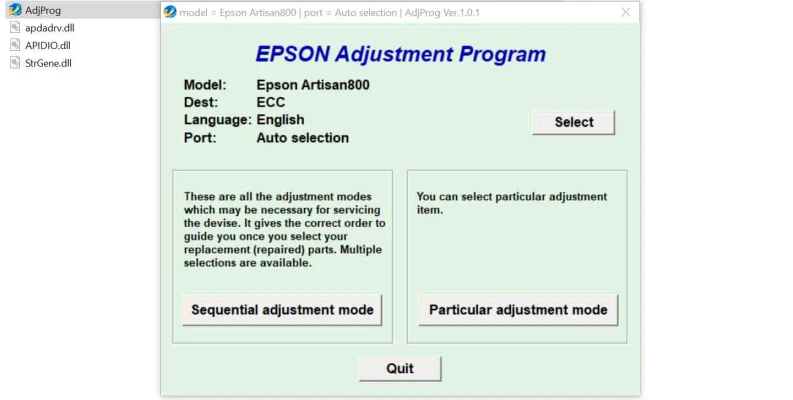
Launch the Epson Artisan 800 Adjustment Program. The program will ask you to select the printer model (Epson Artisan 800), and it may prompt you to select the port that the printer is connected to.
Step 5: Choose the Adjustment Mode
The program will offer several options, including waste ink pad reset, print head cleaning, and alignment. Choose the appropriate function based on the issue you're experiencing with the printer. You may need to enter the correct key or password to access certain features (such as resetting the waste ink pad counter).
Step 6: Perform the Adjustment
Once you’ve selected the desired adjustment, the program will prompt you to confirm your choice. Click "OK" to initiate the process. The printer will begin the required maintenance task, and you may see the printer's lights flash or hear it make sounds as it performs the function.
Step 7: Check Results
After the adjustment process is complete, check the printer’s performance. Run a test print to confirm that the issue has been resolved. If the issue persists, you may need to repeat the process or try other adjustments.
Benefits of Using the Epson Artisan 800 Adjustment Program
- Cost-Effective: Using the Adjustment Program is a cost-effective way to maintain your printer. It can save you from expensive repairs or service calls by allowing you to perform maintenance tasks on your own.
- Time-Saving: The program allows you to quickly address printer issues without the need to wait for professional technicians to intervene.
- Extended Printer Life: Regular maintenance with the Adjustment Program can extend the lifespan of your Epson Artisan 800 by addressing minor issues before they escalate into major problems.
- DIY Solution: The program offers a DIY solution to printer issues, giving you full control over the printer’s maintenance and operation.
Important Considerations
- Use with Caution: While the Epson Artisan 800 Adjustment Program can be very effective, it should be used carefully. Incorrect adjustments can lead to further problems, so it is recommended to follow instructions carefully and avoid making adjustments if you're unsure.
- Warranty Implications: Using third-party adjustment software may void the warranty on your printer, so it's essential to consider this before proceeding with any adjustments.
- Regular Backups: It’s a good idea to back up your printer settings before using the program, in case any unintended changes occur.
Conclusion
The Epson Artisan 800 Adjustment Program is a powerful tool for maintaining your printer and ensuring its long-term performance. It can resolve various issues, including waste ink pad errors, print head misalignment, and clogged nozzles. By following the steps outlined above, you can easily access and use the program to keep your Epson Artisan 800 in peak condition.
If you’re facing recurring printer issues, the Epson Artisan 800 Adjustment Program may just be the solution you need to restore functionality and avoid expensive repairs. However, as with any software, it’s crucial to exercise caution and ensure you're using the program correctly to prevent any mishaps.
Rate the App
User Reviews


Popular Apps








