

Latest Version
January 02, 2025
Artisan Series
Windows
2
Report a Problem
More About Epson Artisan 735 Adjustment Program
Epson Artisan 735 Adjustment Program: A Comprehensive Guide
The Epson Artisan 735 is a versatile all-in-one printer that combines high-quality photo printing with the functionality of scanning, copying, and faxing. However, like any printer, it may encounter issues over time that affect its performance. This is where the Epson Artisan 735 Adjustment Program comes into play. Designed to help users troubleshoot and resolve a variety of problems, this software tool is essential for maintaining optimal functionality.
What Is the Epson Artisan 735 Adjustment Program?
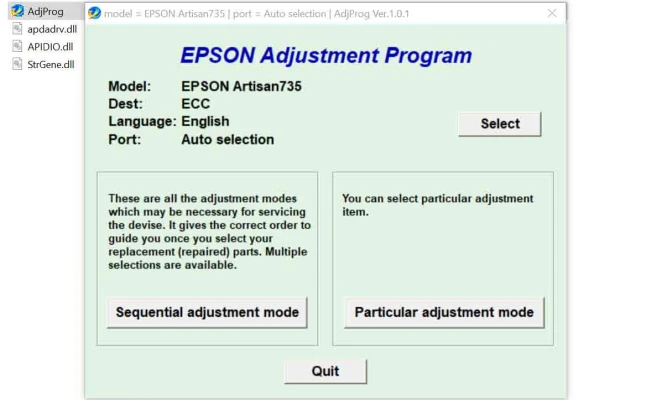
The Epson Artisan 735 Adjustment Program is a specialized utility software that allows users to perform a series of maintenance tasks on their printer. This tool is typically used for resetting the printer's internal counters, clearing error codes, and adjusting various printer settings to ensure smooth operation. It's particularly helpful when dealing with issues such as ink pad overflows, print head alignment problems, or paper jams that seem persistent despite regular troubleshooting.
Key Features of the Adjustment Program
Ink Pad Reset: One of the most common reasons for using the adjustment program is to reset the printer’s ink pad counter. Over time, the ink pad accumulates excess ink during cleaning cycles, and when it reaches its limit, the printer may display an error message. The program resets this counter, allowing you to continue using your printer without having to replace the ink pads prematurely.
Print Head Cleaning and Alignment: The program provides options for cleaning and realigning the print head. Misaligned or clogged print heads can result in poor print quality, including streaks, faded prints, or color inconsistencies. The adjustment program ensures the print heads are properly aligned and functioning at peak efficiency.
Error Code Clearing: The Artisan 735 may display error codes during normal operation, signaling various issues such as paper jams, misprints, or connection problems. The adjustment program can help reset these error codes, giving the user a fresh start without having to manually troubleshoot each issue.
Waste Ink Reset: The program allows you to reset the waste ink counter, which is crucial for preventing the printer from halting operation due to the ink waste storage reaching its limit.
Firmware and Software Updates: Some versions of the adjustment program offer an option to check for firmware updates. Keeping your printer's firmware up to date ensures that any new features or bug fixes are implemented, helping to maintain the printer’s performance and stability.
How to Use the Epson Artisan 735 Adjustment Program
While the Epson Artisan 735 Adjustment Program can be a powerful tool for addressing printer issues, it should be used with caution. Improper usage can cause more harm than good, so it's essential to follow the instructions carefully.
Here’s a basic guide to using the program:
Download the Adjustment Program: The software can usually be downloaded from the Epson support website or a third-party site that hosts the official program. Ensure that you download the correct version that matches your operating system (Windows or Mac).
Install the Program: Once downloaded, install the adjustment program on your computer. This usually involves running the installation file and following the on-screen instructions.
Connect Your Printer: Ensure your Epson Artisan 735 is connected to your computer via USB or Wi-Fi. The program will need to communicate with the printer to perform adjustments.
Run the Program: Open the adjustment program and select your printer model. The software will guide you through the different options available, such as resetting ink pad counters, performing head cleaning, or clearing error codes.
Follow On-Screen Prompts: The adjustment program will provide clear instructions on how to proceed with each function. It’s crucial to follow these instructions closely to avoid making any mistakes that could cause issues with your printer.
Test the Printer: After performing the necessary adjustments, run a test print or cleaning cycle to ensure that everything is functioning properly. If the printer is still not working as expected, repeat the process or consult the user manual for additional troubleshooting tips.
Precautions and Considerations
While the Epson Artisan 735 Adjustment Program is a useful tool, it’s important to use it cautiously. Here are some key considerations:
Warranty Concerns: Using the adjustment program may void your printer’s warranty, especially if it leads to damage or misuse. It’s advisable to check your warranty terms before proceeding.
Professional Help: If you're unsure about using the program, consider seeking help from a professional technician. Incorrect adjustments can cause your printer to malfunction further.
Backup Data: Before making any major changes, ensure you back up any important documents or printer settings that may be affected.
Conclusion
The Epson Artisan 735 Adjustment Program is an invaluable tool for maintaining your printer’s performance and resolving common issues that arise over time. Whether you're dealing with ink pad errors, alignment issues, or persistent error codes, this program can help you restore your printer to its optimal state. However, always exercise caution and follow the instructions carefully to avoid potential complications.
Rate the App
User Reviews


Popular Apps








