


Latest Version
Download NowMore About Epson DX3800 Resetter
Epson DX3800 Resetter: Unlocking the Full Potential of Your Epson Printer
If you've been using an Epson DX3800 printer for a while, you might have encountered the frustrating issue of the printer's ink pad reaching its limit. The Epson DX3800, like many other Epson printers, is equipped with a waste ink counter that tracks the amount of ink absorbed by the printer's pads during regular printing. Once this counter hits a specific threshold, the printer will stop working and display an error, urging you to replace the ink pads. While replacing the pads may be necessary eventually, it's often an expensive and time-consuming process. However, there's a solution: the Epson DX3800 Resetter.
The Epson DX3800 Resetter is a software tool that allows you to reset the waste ink counter, essentially clearing the error and giving your printer a second lease on life. By resetting the counter, you can continue to use the printer without the need for expensive repairs or replacements. In this article, we'll take a deep dive into what an Epson DX3800 Resetter is, how it works, and the steps you need to follow to use it.
What is an Epson DX3800 Resetter?
An Epson DX3800 Resetter is a specialized software tool designed to reset the ink waste counter on your Epson printer. This counter tracks the amount of ink absorbed by the waste pads during the printing process. As the printer continues to print, the pads gradually accumulate ink, eventually reaching the point where the printer's built-in mechanism detects that the waste pads are nearing their limit. At this stage, the printer will typically display an error code and stop functioning.
By using a Resetter tool, you can reset the waste ink counter to zero, tricking the printer into thinking that the pads have been replaced, thus restoring its normal operation. This process doesn't actually clean or replace the waste ink pads, but it allows the printer to continue functioning until you're ready to address the issue properly.
Why Do You Need an Epson DX3800 Resetter?
There are several reasons why the Epson DX3800 Resetter can be a valuable tool for any user of this printer model:
-
Avoid Expensive Repairs: Replacing the waste ink pads can be costly, especially if you're not comfortable doing it yourself. By resetting the waste ink counter, you can avoid this cost and keep your printer running smoothly.
-
Time-Saving: Instead of waiting for an official repair or service appointment, you can reset the counter yourself in a matter of minutes, saving both time and effort.
-
Environmental Benefits: Resetting the ink waste counter allows you to extend the life of your printer, which in turn reduces e-waste and saves resources.
-
Cost-Effective Solution: Rather than investing in a new printer, using a Resetter tool offers an inexpensive solution to keep your current Epson DX3800 running.
How to Use the Epson DX3800 Resetter
Using the Epson DX3800 Resetter is a simple process that doesn’t require any special technical knowledge. Here’s a step-by-step guide to help you get started:
Step 1: Download the Epson DX3800 Resetter Software
The first thing you'll need to do is download the Epson DX3800 Resetter software. There are several websites and forums where you can find this tool, but make sure you're downloading from a reputable source to avoid any potential security risks.
Step 2: Install the Software
Once you've downloaded the Resetter software, install it on your computer by following the on-screen instructions. This typically involves unpacking the files and running the setup file.
Step 3: Connect Your Printer
Make sure your Epson DX3800 printer is connected to your computer and powered on. The software will need to communicate with the printer to perform the reset.
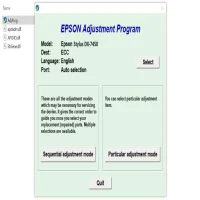
Step 4: Launch the Resetter Tool
After installation, launch the Epson DX3800 Resetter tool. The software interface should be simple, with a button labeled something like "Reset Waste Ink Counter" or "Reset Ink Pad Counter." Click this button to begin the process.
Step 5: Complete the Reset
The software will communicate with your printer and reset the waste ink counter. This process typically takes just a few seconds to complete. Once the reset is successful, the printer should no longer display the ink pad error.
Step 6: Test the Printer
After resetting the counter, perform a test print to ensure the printer is functioning properly. If the reset was successful, you should be able to print without any issues.
Important Considerations
-
Waste Ink Pads Still Need Attention: While the Epson DX3800 Resetter can clear the error message, it does not address the underlying issue of the waste ink pads being full. Over time, this can lead to ink overflow or other printer issues. It’s advisable to replace or clean the ink pads as soon as possible.
-
Use with Caution: Resetting the waste ink counter does not fix any mechanical or hardware issues. It’s a temporary solution, and if you continue to ignore the ink pads, it can lead to more serious problems down the road.
-
Printer Warranty: Keep in mind that using a Resetter tool might void your printer’s warranty. Be sure to check the warranty conditions before using such a tool.
Conclusion
The Epson DX3800 Resetter is a handy tool for anyone looking to extend the life of their printer and avoid costly repairs. By resetting the waste ink counter, you can keep your Epson printer running smoothly for a longer time. However, it’s important to remember that the tool is not a permanent fix and that the waste ink pads will eventually need to be replaced. Nonetheless, for those who want a quick and cost-effective solution, the Epson DX3800 Resetter offers a valuable and practical option.
Always ensure you follow the instructions carefully and be mindful of the printer's ongoing maintenance needs.
Rate the App
User Reviews


Popular Apps








