


Latest Version
Download NowMore About Epson Stylus DX6000 Adjustment Program
Epson Stylus DX6000 Adjustment Program: A Comprehensive Guide
The Epson Stylus DX6000 is a versatile inkjet printer that offers high-quality printing for both home and office use. However, like all printers, it may require occasional adjustments to ensure optimal performance. One of the most useful tools for maintaining the Epson Stylus DX6000 is the Adjustment Program, a software utility designed to help users calibrate and troubleshoot their printers. In this article, we will explore the Epson Stylus DX6000 Adjustment Program, its features, and how to use it effectively.
What is the Epson Stylus DX6000 Adjustment Program?
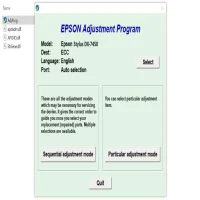
The Epson Stylus DX6000 Adjustment Program is a specialized software designed to assist users in maintaining their printer's functionality. It allows you to perform a variety of essential tasks that can help resolve common printer issues such as printhead alignment, ink waste pad reset, and waste ink counter reset. These adjustments are crucial for prolonging the life of the printer and ensuring it continues to produce high-quality prints.
Key Features of the Epson Stylus DX6000 Adjustment Program
-
Print Head Alignment: Over time, printheads can become misaligned, leading to poor print quality. The Adjustment Program helps to realign the printhead, ensuring that colors are accurately reproduced and the printouts are crisp.
-
Ink Waste Pad Reset: Ink waste pads collect excess ink during printing, which can eventually fill up and cause the printer to stop functioning. The Adjustment Program can reset the ink waste pad counter, allowing the printer to continue operating.
-
Waste Ink Counter Reset: The printer keeps track of the amount of ink used, and when the counter reaches a certain threshold, it may trigger an error message. The Adjustment Program allows you to reset the waste ink counter, preventing unnecessary error messages and improving printer efficiency.
-
Cleaning and Maintenance: The program also provides options to clean printheads and perform other maintenance tasks, which can help maintain optimal print quality.
-
Resetting Epson Printers: If your printer experiences issues like error codes or general malfunctions, the Adjustment Program can help reset various settings and restore the printer to its default configuration.
How to Use the Epson Stylus DX6000 Adjustment Program
Before using the Adjustment Program, ensure that you have the correct version of the software for your operating system. The program is compatible with Windows, but users of macOS will need to explore alternative solutions, as the Adjustment Program is not natively supported on macOS.
Step-by-Step Guide:
-
Download the Adjustment Program: The first step is to download the Epson Stylus DX6000 Adjustment Program from a trusted source. Be cautious about downloading software from unreliable websites to avoid malware.
-
Install the Program: Once downloaded, run the installation file and follow the on-screen instructions to install the program on your computer.
-
Connect the Printer: Ensure that your Epson Stylus DX6000 is properly connected to the computer via USB or Wi-Fi (depending on your setup).
-
Launch the Program: Open the Adjustment Program and select your printer model (Epson Stylus DX6000) from the list.
-
Select the Desired Adjustment: Choose the adjustment task you wish to perform, such as print head alignment or ink waste pad reset. Follow the on-screen instructions to complete the process.
-
Perform the Adjustment: Depending on the task, the program may ask you to perform a test print or perform certain steps to complete the adjustment. Follow the instructions carefully.
-
Exit and Test the Printer: After completing the adjustment, exit the program and perform a test print to ensure that the changes have been successfully applied.
Benefits of Using the Epson Stylus DX6000 Adjustment Program
-
Improved Print Quality: The print head alignment and cleaning features of the Adjustment Program help maintain the high-quality output that the Epson Stylus DX6000 is known for.
-
Extended Printer Lifespan: By regularly using the Adjustment Program, you can ensure that your printer operates efficiently and lasts longer, reducing the need for costly repairs or replacements.
-
Cost-Effective Maintenance: Using the Adjustment Program helps you avoid expensive service calls by allowing you to troubleshoot and resolve issues on your own.
-
Convenience: The program offers an easy-to-use interface that makes it simple to perform printer adjustments without requiring specialized technical knowledge.
Important Considerations
-
Use with Caution: While the Adjustment Program can be a helpful tool, it's important to follow the instructions carefully to avoid causing any unintended issues with your printer. Misusing the program may lead to malfunction or permanent damage.
-
Backup Settings: Before performing any adjustments, it's a good idea to back up your printer's settings to avoid losing important configurations.
-
Compatibility: Ensure that the software version you download is compatible with your operating system and printer model. Using an incorrect version may cause errors or fail to run properly.
Conclusion
The Epson Stylus DX6000 Adjustment Program is an invaluable tool for users who want to maintain their printer’s performance and extend its lifespan. By using the program for tasks such as printhead alignment, ink waste pad resetting, and cleaning, you can ensure that your printer continues to deliver top-quality prints. However, it's important to use the program with caution and follow the instructions to avoid any potential issues. With regular maintenance, your Epson Stylus DX6000 can provide years of reliable service, making it a worthwhile investment for both home and office use.
Rate the App
User Reviews


Popular Apps








