


Latest Version
Download NowMore About Epson Stylus DX5050 Adjustment Program
Epson Stylus DX5050 Adjustment Program: A Comprehensive Guide
The Epson Stylus DX5050 is a versatile inkjet printer that has garnered attention for its efficient printing capabilities. However, like any printer, it can encounter various issues over time. To address these challenges, users often rely on the Epson Stylus DX5050 Adjustment Program. This powerful tool allows users to reset, clean, and adjust settings within the printer to maintain its optimal performance.
What is the Epson Stylus DX5050 Adjustment Program?
The Epson Stylus DX5050 Adjustment Program is a specialized software designed to help users reset their printers to factory defaults and perform necessary maintenance tasks. It is particularly useful for dealing with issues such as ink pad counter overflow, which can cause the printer to stop working. With this program, users can clear errors, reset counters, and optimize print quality without needing to consult customer service or visit a repair shop.
Key Features of the Epson Stylus DX5050 Adjustment Program
-
Ink Pad Reset: The most common reason for using the Epson Stylus DX5050 Adjustment Program is to reset the ink pad counter. Over time, the ink pads inside the printer absorb excess ink, leading to potential overflow and error messages. This software allows users to reset the counter, enabling the printer to resume normal functionality.
-
Print Head Cleaning: To ensure optimal print quality, the program includes a print head cleaning feature. This helps remove any blockages in the print head, preventing issues such as faded or streaked prints. Regular cleaning can extend the life of the printer and maintain sharp, crisp output.
-
Resetting Waste Ink Counter: The Adjustment Program enables users to reset the waste ink counter, which tracks the amount of ink the printer uses during the cleaning process. If this counter reaches its limit, the printer will stop functioning. The reset ensures the printer continues to operate smoothly.
-
Configuration Adjustments: In addition to resetting counters and performing maintenance tasks, the Epson Stylus DX5050 Adjustment Program allows users to adjust various configuration settings. This includes modifying printer parameters, customizing print options, and making fine-tuned adjustments to improve performance.
How to Use the Epson Stylus DX5050 Adjustment Program
Using the Epson Stylus DX5050 Adjustment Program is relatively straightforward. Follow these steps to perform necessary adjustments:
-
Download the Program: First, ensure you download the correct version of the Epson Stylus DX5050 Adjustment Program from a reputable source. The program is typically available for both Windows and macOS.
-
Install the Software: Once downloaded, run the installer and follow the on-screen instructions to complete the installation. Ensure that your printer is connected to the computer via USB before proceeding.
-
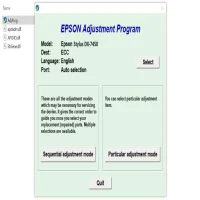
Launch the Program: Open the Epson Stylus DX5050 Adjustment Program on your computer. You will be prompted to select your printer model from a list of available devices.
-
Select the Desired Function: After selecting your printer, the program will display several options. Choose the function you wish to perform, such as resetting the ink pad counter, cleaning the print head, or resetting the waste ink counter.
-
Execute the Task: Once you have chosen your desired function, click on the corresponding button to execute the task. The program will guide you through the process, providing instructions and progress updates.
-
Restart the Printer: After completing the necessary adjustments, restart your printer to apply the changes and ensure everything is working properly.
Troubleshooting Common Issues
While the Epson Stylus DX5050 Adjustment Program is a powerful tool, users may encounter a few common issues during use:
-
Compatibility Issues: Ensure that you are using the correct version of the program for your operating system. If you encounter any errors, try updating the program or reinstalling it.
-
Error Messages: If the printer displays error messages after using the program, double-check the selected function. Make sure the printer is properly connected and all tasks have been executed correctly.
-
Program Not Recognizing Printer: This issue can occur if the printer is not properly connected to the computer or if there is a driver issue. Reconnect the printer and check if the drivers are up to date.
Conclusion
The Epson Stylus DX5050 Adjustment Program is an essential tool for maintaining the longevity and efficiency of your printer. Whether you're dealing with ink pad overflow, print quality issues, or configuration adjustments, this program offers a simple and effective solution. By using it regularly, you can ensure that your printer continues to deliver high-quality prints without the need for costly repairs or replacements.
Rate the App
User Reviews


Popular Apps








