


Latest Version
Download NowMore About Epson Stylus DX4050 Adjustment Program
Epson Stylus DX4050 Adjustment Program: A Comprehensive Guide
The Epson Stylus DX4050 is a versatile and reliable inkjet printer, commonly used for home and office tasks. Over time, as with any printer, users may experience issues such as ink cartridge errors, print quality problems, or general malfunctions that can be frustrating. This is where the Epson Stylus DX4050 Adjustment Program comes into play. The program is a powerful tool designed to help users reset the printer’s internal counters, adjust print settings, and resolve common issues.
What is the Epson Stylus DX4050 Adjustment Program?
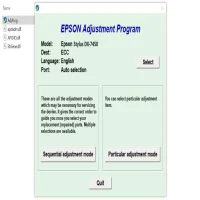
The Epson Stylus DX4050 Adjustment Program is a software utility used to perform various maintenance functions on the printer. This program allows users to reset the printer’s waste ink counter, perform head cleaning, adjust alignment, and more. It essentially provides a way to correct problems that might not be easily solvable through the printer’s built-in menu options.
Why Do You Need the Adjustment Program?
Over time, printers accumulate waste ink during their normal operation. For example, every time the printer performs a cleaning cycle or when ink is ejected from the printhead, some ink is left behind and stored in a small reservoir within the printer. The waste ink counter tracks the amount of ink in this reservoir. When the counter reaches a certain limit, the printer will display an error, prompting users to replace the waste ink pad or take corrective action.
This is where the Epson Stylus DX4050 Adjustment Program can be extremely helpful. By using the program, you can reset the waste ink counter, avoid unnecessary replacement costs, and prevent printer downtime. Additionally, it can address print quality issues, improve alignment, and ensure that your printer is functioning optimally.
Features of the Epson Stylus DX4050 Adjustment Program
-
Reset Waste Ink Counter: One of the most useful features of the program is its ability to reset the waste ink counter. When the waste ink pad fills up, this counter triggers an error message. Resetting it can help avoid costly repairs and ensure your printer continues to operate smoothly.
-
Print Head Cleaning: The program can initiate printhead cleaning cycles to remove clogs and ensure consistent print quality. This is especially useful if you’ve noticed ink smudging or faded prints.
-
Print Head Alignment: Misalignment of the printhead can lead to poor print quality. The program includes a tool for aligning the printhead to ensure that the printer produces sharp, clear prints every time.
-
Ink Cartridge Reset: If your printer has trouble recognizing your ink cartridges, the adjustment program can help reset the cartridge status, eliminating issues related to empty or faulty cartridges.
-
Clear Printer Errors: Sometimes, printers will display error messages that are difficult to resolve. The program allows users to clear certain errors without the need for costly repairs.
How to Use the Epson Stylus DX4050 Adjustment Program
Using the Epson Stylus DX4050 Adjustment Program is relatively simple, but it’s important to follow the steps carefully to avoid causing any damage to the printer.
-
Download the Program: First, you will need to find a reliable source to download the Epson Stylus DX4050 Adjustment Program. Make sure to download it from a trusted website to avoid malware or other issues.
-
Install the Program: Once downloaded, follow the on-screen instructions to install the software on your computer. The installation process is usually straightforward, requiring only a few clicks.
-
Connect the Printer: Ensure that your Epson Stylus DX4050 printer is properly connected to your computer via USB or network connection.
-
Open the Program: Launch the Epson Stylus DX4050 Adjustment Program on your computer. You will be prompted to select your printer model.
-
Perform the Desired Function: Choose the function you wish to perform, such as resetting the waste ink counter or cleaning the printhead. Follow the on-screen prompts to complete the process.
-
Restart the Printer: After completing the necessary adjustments, restart your printer to apply the changes.
Precautions and Considerations
While the Epson Stylus DX4050 Adjustment Program is a powerful tool, it should be used with caution. Here are a few things to keep in mind:
-
Warranty Concerns: Using third-party software like the adjustment program may void your warranty. Be sure to check the terms of your warranty before using the program.
-
Accuracy: Only perform tasks that you are familiar with. Incorrectly resetting the waste ink counter or performing a head cleaning could lead to further issues.
-
Backup Data: Make sure to back up any important data before using the program, especially if it involves resetting the printer settings.
Conclusion
The Epson Stylus DX4050 Adjustment Program is an invaluable tool for users who want to extend the life of their printer, resolve common issues, and maintain print quality. By resetting the waste ink counter, cleaning the printhead, and performing other adjustments, you can keep your printer running smoothly without having to spend money on repairs. However, always use the program carefully and responsibly to ensure the best results.
Rate the App
User Reviews


Popular Apps








