
Latest Version
Download NowMore About Epson L110 Reset Utility Adjustment Program
Epson L110 Reset Utility Adjustment Program: A Complete Guide
The Epson L110 is a popular inkjet printer that offers reliable performance and high-quality printing for both personal and office use. However, like most printers, it may occasionally encounter errors or issues that affect its functionality. One common issue with Epson printers is when the printer reaches its internal waste ink counter limit, which can trigger error messages such as "Service required" or "Waste ink pad counter is full." In such cases, the Epson L110 Reset Utility Adjustment Program can be used to resolve these errors and reset the printer to normal operating condition.
What is the Epson L110 Reset Utility Adjustment Program?
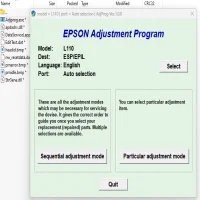
The Epson L110 Reset Utility Adjustment Program is a software tool specifically designed to reset certain parameters in Epson printers, including the waste ink counter. This program is crucial for addressing problems caused by the accumulation of waste ink in the printer’s waste pads. Over time, ink waste pads become saturated with ink during regular printing processes, and once the printer detects that these pads are full, it will halt the printing process to prevent potential damage.
The reset utility helps clear this error by resetting the waste ink counter, allowing you to continue printing without needing to replace the waste ink pads immediately. It can also fix other common issues such as print head alignment, cartridge recognition errors, and more.
How to Use the Epson L110 Reset Utility Adjustment Program
-
Download the Reset Utility: First, you need to download the Epson L110 Reset Utility from a trusted source. Be cautious about downloading software from unverified sites, as some may contain malware or viruses.
-
Install the Software: After downloading the utility, install it on your computer by following the on-screen instructions. The installation process is typically straightforward, and you can select your language preferences during installation.
-
Connect the Printer: Make sure your Epson L110 printer is connected to your computer via USB and turned on. If the printer is off, the utility may not be able to detect it.
-
Run the Reset Utility: Open the Epson L110 Reset Utility program and select the model of your printer from the list of available devices. Once selected, click the "Check" button to initiate the software's diagnostic check.
-
Perform the Waste Ink Reset: In the utility menu, navigate to the "Waste Ink Counter Reset" option. This is the primary function for fixing the waste ink error. Click on "Reset" and wait for the program to complete the process. The printer will likely reboot itself once the reset is finished.
-
Check the Printer: After resetting the waste ink counter, check your printer for any error messages or issues. Try printing a test page to ensure that the printer is functioning properly.
Other Features of the Epson L110 Reset Utility Adjustment Program
Apart from resetting the waste ink counter, the Epson L110 Reset Utility Adjustment Program offers several other useful features:
- Ink Pad Replacement: If you’re unable to physically replace the waste ink pads, the program can help clear the error temporarily.
- Printer Head Cleaning: The utility can initiate a cleaning cycle to resolve print quality issues caused by clogged nozzles.
- Cartridge Resetting: In case the printer fails to recognize your ink cartridges, the utility can reset cartridge data and resolve related errors.
Is Using the Epson L110 Reset Utility Safe?
The Epson L110 Reset Utility is a legitimate tool for resolving certain printer issues, especially for users who do not have access to authorized repair centers. However, it’s important to note that excessive use of the reset program may lead to long-term damage to the printer, as the waste ink pads will still be filling up, potentially causing ink spillage. Ideally, after using the reset program, the waste ink pads should be inspected and replaced if necessary.
Additionally, always ensure that you’re using a trusted version of the software to avoid potential risks to your printer or computer.
Conclusion
The Epson L110 Reset Utility Adjustment Program is a powerful tool for users facing common Epson printer issues, such as waste ink pad errors, ink cartridge recognition problems, and print head issues. By following the steps outlined above, you can use this program to reset the printer and resume normal operation. However, it is recommended to use the program with caution, as resetting the waste ink counter should be done with the understanding that the ink pads may need physical replacement to prevent future damage.
For long-term printer maintenance, make sure to regularly clean your printer, replace ink pads when necessary, and follow all maintenance procedures recommended by Epson.
Rate the App
User Reviews





Popular Apps








