
Latest Version
Download NowMore About Epson-L111 Maintenance Reset Utility Adjustment Program
Epson L111 Maintenance Reset Utility Adjustment Program: A Comprehensive Guide
The Epson L111 is a reliable and efficient inkjet printer widely used in homes and offices. While it offers excellent performance, like any printer, it may occasionally run into issues that can disrupt its functionality. One common problem is the "Waste Ink Pad Counter" reaching its limit, causing the printer to stop working and display an error message.
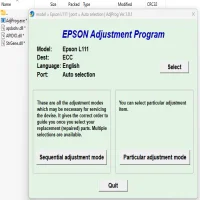
To resolve this issue, users often turn to the Epson L111 Maintenance Reset Utility Adjustment Program. This tool is designed to reset the waste ink pad counter and perform other necessary maintenance tasks, ensuring your printer continues to operate smoothly.
What is the Epson L111 Maintenance Reset Utility?
The Epson L111 Maintenance Reset Utility is a software tool developed by Epson to help users maintain their printers. It’s primarily used for resetting the printer's waste ink pad counter, a feature that is crucial to avoid overflows from ink pads. Over time, the waste ink pads absorb excess ink from cleaning and printing processes. Once these pads reach their maximum capacity, the printer may stop functioning and display an error message.
This reset utility is part of Epson’s broader effort to ensure that printers continue to operate efficiently, even after long periods of use. By resetting the maintenance counters, it can help to extend the lifespan of your Epson L111 printer.
Why Use the Epson L111 Maintenance Reset Utility?
When the waste ink pad counter reaches its limit, the printer will not print until the issue is resolved. The Epson L111 Maintenance Reset Utility addresses this by resetting the counter, allowing you to use your printer again without needing to replace the waste ink pads. Here are the primary reasons you might want to use this program:
-
Reset Waste Ink Pad Counter: The most common use of this tool is to reset the waste ink pad counter when it reaches its limit.
-
Save Money: Instead of sending the printer for repairs or replacing the entire waste ink pad assembly, users can simply use the reset utility to continue printing, saving both time and money.
-
Prevent Printer Shutdown: The utility ensures that your printer does not stop working due to the waste ink pad error, avoiding unnecessary downtime.
-
Convenience: With the utility, users can perform this maintenance task at home, saving on professional servicing costs.
How to Use the Epson L111 Maintenance Reset Utility?
Using the Epson L111 Maintenance Reset Utility is a straightforward process, but it requires careful attention to avoid issues. Here’s a step-by-step guide to using the program:
Step 1: Download and Install the Utility
- First, download the Epson L111 Maintenance Reset Utility from a reliable source. The tool may not be readily available on the official Epson website, so you might need to rely on trusted third-party websites.
- Once downloaded, install the utility on your computer by following the on-screen instructions.
Step 2: Connect the Printer to Your Computer
- Ensure that your Epson L111 printer is connected to the computer via USB and is powered on. This is necessary for the reset utility to communicate with the printer.
Step 3: Run the Maintenance Reset Utility
- Open the program after installation. It will detect the connected Epson L111 printer.
- Select the “Waste Ink Pad Counter” option or similar (depending on the version of the utility you have).
Step 4: Reset the Waste Ink Pad Counter
- Click on the “Reset” or “Initialization” button to begin the process.
- The utility will reset the waste ink pad counter, and the printer should now be ready to use again.
Step 5: Restart the Printer
- Once the reset is complete, restart the printer to ensure the changes take effect.
- Test the printer by printing a page to verify that everything is functioning properly.
Precautions When Using the Reset Utility
While the Epson L111 Maintenance Reset Utility is a handy tool, it’s important to use it carefully:
-
Backup Your Work: Always ensure that you have backed up any important work before performing the reset, as it may affect ongoing print jobs.
-
Avoid Overuse: The waste ink pad counter reset is meant to be used as a temporary solution. It’s essential to eventually replace the waste ink pads to prevent ink overflow and other potential issues.
-
Verify Printer Health: After performing the reset, check if the printer is functioning normally. If problems persist, there may be other underlying issues that require professional servicing.
Conclusion
The Epson L111 Maintenance Reset Utility Adjustment Program is a powerful tool that can help you maintain your printer without the need for costly repairs. It’s a quick and simple solution to reset the waste ink pad counter and get your printer back in action. However, it's essential to use the program responsibly, as it should only be a temporary fix until the waste ink pads can be replaced. By using this tool wisely, you can extend the life of your Epson L111 printer and continue enjoying high-quality prints for years to come.
Rate the App
User Reviews





Popular Apps








