
Latest Version
Download NowMore About Epson L120 Adjustment Program ( Resetter )
Epson L120 Adjustment Program (Resetter)
The Epson L120 is a popular inkjet printer, known for its efficiency and low-cost printing, especially in home and small-office settings. Like most printers, the L120 has a built-in counter that tracks the printer's printhead usage and ink waste. Over time, this counter can accumulate, and the printer may stop functioning correctly, prompting an error message indicating that the waste ink pad is full or that the printer has reached its maximum print count. To solve this issue, users often turn to an Epson L120 adjustment program (also known as a resetter).
This article will explain the purpose of the Epson L120 adjustment program, how to use it, and why it's a useful tool for Epson printer users.
What is an Epson L120 Adjustment Program?
The Epson L120 Adjustment Program is a software tool designed to reset the internal counter of the printer, which keeps track of various printer functions such as the waste ink pad status and print count. When the printer reaches a specific limit, the adjustment program helps to reset the printer’s settings, allowing it to function normally again. This reset process doesn't involve any hardware changes, but it ensures that the printer continues to operate as intended without triggering error messages related to ink pad usage or print limits.
In essence, the adjustment program is a software-based reset mechanism, often referred to as a "resetter," that restores the printer's internal settings to their factory default state.
Why Do You Need the Epson L120 Adjustment Program?
Over time, printers accumulate waste ink in their internal waste ink pads. The Epson L120 has a counter that tracks this accumulation, and once the limit is reached, the printer may stop working, displaying error messages like "Waste ink pad full." This is a preventive measure to avoid ink overflow that can damage the printer or cause spills.
The adjustment program helps you reset this counter, clearing the error and extending the life of your printer. By using the resetter, you can continue printing without the need to physically replace or clean the waste ink pads, which can be costly or time-consuming.
How Does the Epson L120 Adjustment Program Work?
To use the Epson L120 adjustment program, you will need to download the software from a reliable source and connect the printer to your computer. The process involves the following steps:
-
Download and Install the Program:
- You can find the Epson L120 Adjustment Program on various websites, though it's important to download it from a trusted source to avoid malware or other security risks. After downloading, install the program on your computer.
-
Connect the Printer to Your Computer:
- Ensure your Epson L120 is connected to the computer via USB. Turn the printer on before proceeding.
-
Run the Adjustment Program:
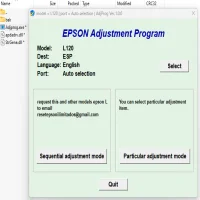
- Open the installed adjustment program. Select the correct model (Epson L120) and click on the “Particular Adjustment Mode” option. This opens up several options that can be adjusted, including waste ink pad and print count.
-
Reset the Waste Ink Pad Counter:
- Select the option to reset the waste ink pad counter. This will clear the error related to the waste ink pad being full. The program will also prompt you to perform a head cleaning process to ensure the printer’s heads are functioning correctly.
-
Test the Printer:
- Once the reset is complete, test the printer by printing a document to ensure that it works correctly and the error message is gone.
Is It Safe to Use the Epson L120 Adjustment Program?
The Epson L120 adjustment program is safe to use as long as you download it from a trusted source. It's a legitimate tool used by many users and technicians to resolve printer issues caused by waste ink pad overflow or other internal counters. However, it's important to be cautious when downloading third-party software, as some sources may contain viruses or malware.
Potential Risks and Considerations
While the Epson L120 adjustment program can be highly effective in resetting your printer, there are some considerations to keep in mind:
-
Not a Permanent Fix for Waste Ink Pads:
- Resetting the counter does not fix the actual issue of the waste ink pads being full. If you continue to use the printer without replacing or cleaning the pads, the waste ink could eventually cause a leak or damage the printer.
-
Repeated Usage:
- If the adjustment program is used repeatedly without addressing the underlying issue (full waste ink pads), it may result in a buildup of waste ink, causing further issues down the line.
-
Warranty Concerns:
- Using a third-party adjustment program might void your printer’s warranty. Always check the warranty terms before performing any adjustments.
-
Limited Features:
- The adjustment program may not offer all the functionalities that professional repair services provide, such as replacing or physically cleaning the waste ink pads.
Conclusion
The Epson L120 adjustment program is a handy tool for users who encounter error messages related to the waste ink pad or printer limits. It allows you to reset the internal counters, clearing error messages and enabling continued printing. While it's a great solution for temporary relief, users should also be mindful of the importance of maintaining their printer by regularly servicing the waste ink pads. As with any tool, caution is necessary when using the Epson L120 adjustment program, so always download it from reliable sources and ensure you are using it responsibly.
Rate the App
User Reviews





Popular Apps








