
Latest Version
Download NowMore About Epson L121 Adjustment Program ( Resetter )
Epson L121 Adjustment Program (Resetter): A Comprehensive Guide
The Epson L121 printer is a popular model designed for home and office use due to its affordability and reliable performance. However, like all printers, it can eventually encounter issues such as ink pad overflow, which can lead to the printer malfunctioning or being locked. When this happens, you may need to reset the printer using an Epson L121 Adjustment Program, commonly known as a "resetter." This article will explore what the Epson L121 Adjustment Program is, why it’s necessary, and how to use it properly without causing damage to your printer.
What is the Epson L121 Adjustment Program (Resetter)?
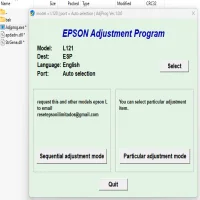
The Epson L121 Adjustment Program is a software tool designed to reset the Epson L121 printer to its factory default settings. It is most commonly used when the printer's internal counters, such as the waste ink pad counter, are full. These counters track how much ink has been absorbed by the printer's waste pads during regular printing tasks. Once this threshold is reached, the printer may display an error message or stop printing altogether, even if the ink pads have not physically overflowed. The Adjustment Program clears these counters, allowing the printer to continue functioning without issues.
The resetter software works by interacting with the printer’s firmware and reset certain internal parameters, which might not be visible or accessible to users otherwise. It's a vital tool for users looking to extend the lifespan of their Epson L121 printers without paying for professional repair services.
Why Do You Need the Epson L121 Adjustment Program?
There are several reasons why you might need the Epson L121 Adjustment Program:
-
Waste Ink Pad Full: The primary reason for using the resetter is when the printer reports that its waste ink pads are full. The waste ink pads collect excess ink that is ejected during cleaning cycles and normal printing. If the printer continues to print without resetting, the ink pads could overflow, leading to potential damage to the printer.
-
Error Codes: Epson printers often display error codes such as "Ink Pad is Full," which signals that maintenance is needed. This error prevents the printer from working, and resetting it is a quick way to resolve the issue.
-
Printer Lock or Malfunction: Sometimes, the printer will lock itself due to internal counters being full. In such cases, the Epson L121 Adjustment Program can reset the counters, allowing the printer to return to normal operation.
-
Cost-Effective Solution: Instead of sending the printer to a service center or replacing it entirely, using the resetter software is a more cost-effective solution for users looking to fix the problem themselves.
How to Use the Epson L121 Adjustment Program (Resetter)
Before using the Epson L121 Adjustment Program, it’s essential to understand that it’s only available through third-party sources, as Epson does not officially provide this tool to consumers. While the process can be straightforward, it’s crucial to follow each step carefully to avoid damaging the printer.
Step 1: Download the Epson L121 Adjustment Program
The first step is to obtain the correct version of the Adjustment Program for your printer model. You can find this software from trusted third-party websites. Make sure to avoid downloading from unreliable sources to prevent malware or other software issues. After downloading the file, extract it from the compressed folder (if applicable).
Step 2: Install the Program
Once you’ve extracted the files, run the setup program to install the Adjustment Program on your computer. Follow the on-screen instructions and allow the program to complete the installation.
Step 3: Connect the Printer to the Computer
Ensure your Epson L121 printer is properly connected to your computer using a USB cable. If your printer is turned off, power it on before continuing.
Step 4: Run the Adjustment Program
After installing the software, run the Epson L121 Adjustment Program. You’ll be prompted to select your printer model from a list. Choose the Epson L121 and click on "OK" to proceed.
Step 5: Select the Function You Need
The software will present various options for different types of resets and adjustments. For most users, the key function will be "Waste Ink Pad Counter Reset." Click on this option, and the program will guide you through the steps to reset the internal waste ink pad counter.
Step 6: Perform the Reset
Once you’ve selected the reset option, the program will initiate the reset process. Follow the instructions on the screen and ensure that you do not interrupt the process. The program may prompt you to turn the printer off and on again to complete the reset.
Step 7: Confirm the Reset
Once the reset is complete, the software will display a confirmation message. Your printer should now be functioning normally, with the waste ink pad counter reset and the error code cleared.
Tips and Warnings
-
Backup Data: Always back up important documents and files before running the reset program, as there may be unforeseen risks involved in using third-party software.
-
Do Not Interrupt the Process: Never turn off the printer or computer during the reset process. Interrupting the process could result in the printer becoming damaged or unresponsive.
-
Use the Resetter Responsibly: While the resetter is a useful tool, it’s important to understand that it is a temporary solution. The waste ink pads can still fill up again over time, and you’ll need to perform another reset or replace the pads eventually.
-
Legality and Warranty Concerns: The use of third-party software may void your printer’s warranty, so be sure to consider the potential risks before using the resetter.
Conclusion
The Epson L121 Adjustment Program is a valuable tool for users looking to maintain their Epson printers, especially when facing issues like full waste ink pads or error codes. By using this resetter software, you can extend the life of your printer and avoid unnecessary repair costs. However, it’s essential to follow the instructions carefully and use the tool responsibly to ensure optimal performance. Always keep in mind that this is a temporary solution, and regular maintenance is key to keeping your printer in good condition for years to come.
Rate the App
User Reviews





Popular Apps








