
Latest Version
More About Epson l130 Reseter Adjustment Program Download
Epson L130 Resetter Adjustment Program Download: A Comprehensive Guide
Epson printers are known for their quality and reliability, but like any electronic device, they require maintenance to function optimally. One common issue faced by users of Epson printers, including the Epson L130, is the "Waste Ink Pad Full" error. This occurs when the ink waste pads in the printer reach their maximum capacity. In such cases, the printer may stop printing, leaving users frustrated. Fortunately, there is a solution: the Epson L130 Resetter Adjustment Program.
What is the Epson L130 Resetter Adjustment Program?
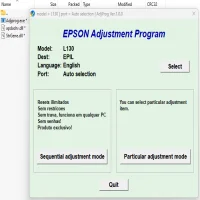
The Epson L130 Resetter Adjustment Program is a software tool designed to reset various internal counters in your Epson printer. Specifically, it helps in resetting the ink pad counter, which is crucial when you encounter the "Waste Ink Pad Full" error. By resetting this counter, the printer will resume its normal operation, preventing the need for expensive repairs or ink pad replacements.
Key Features of the Epson L130 Resetter Adjustment Program
-
Reset Ink Waste Pad Counter: The primary function of the adjustment program is to reset the waste ink pad counter. This counter tracks the amount of ink absorbed by the printer’s waste pads. When it reaches its limit, the printer stops working until the counter is reset.
-
Fix Printer Errors: In addition to the ink pad counter, the Epson Resetter program can also fix a variety of error codes related to the printer, improving overall performance.
-
Maintenance Functions: The program allows users to perform various maintenance tasks, such as nozzle checks and print head cleaning, which can help keep the printer running smoothly.
-
User-Friendly Interface: The software is designed with simplicity in mind, making it accessible even for those with minimal technical knowledge. The instructions are typically easy to follow.
-
No Need for Physical Repairs: By using the Epson L130 Resetter Adjustment Program, you can bypass the need to visit a service center, saving both time and money.
How to Download the Epson L130 Resetter Adjustment Program
Before you can use the Epson L130 Resetter Adjustment Program, you need to download the software. Here’s a step-by-step guide on how to do it:
-
Find a Trusted Source: Ensure that you download the program from a reputable website. This is important to avoid malicious software that may harm your computer or printer.
-
Download the Program: Once you’ve identified a trusted source, click the download link. The program is typically available in a compressed file format such as .zip.
-
Extract the Files: After downloading, extract the files from the compressed folder using a program like WinRAR or 7-Zip.
-
Install the Program: Open the extracted folder and run the installer. Follow the on-screen instructions to install the Epson L130 Resetter Adjustment Program on your computer.
-
Connect Your Printer: Make sure your Epson L130 printer is connected to your computer and turned on before proceeding with the reset.
How to Use the Epson L130 Resetter Adjustment Program
Once the program is installed, you can begin the reset process. Here’s how to do it:
-
Launch the Program: Open the Epson L130 Resetter Adjustment Program on your computer.
-
Select Your Printer Model: Ensure that the Epson L130 is selected as the model.
-
Choose the "Waste Ink Pad Counter" Option: Navigate to the section where you can reset the waste ink pad counter.
-
Reset the Counter: Follow the on-screen instructions to reset the counter. The program will likely prompt you to turn the printer off and on again to complete the reset.
-
Test the Printer: After resetting the counter, print a test page to ensure that the printer is functioning properly.
Important Considerations
-
Backup Your Data: Before using any software tools to reset or adjust your printer, make sure to back up important data. This includes documents and files related to printing jobs.
-
Use the Program Responsibly: Overusing the reset function or attempting to reset the ink pad counter repeatedly may not solve the root cause of the issue. If the waste ink pads are truly full, physical maintenance may be necessary.
-
Compatibility: Ensure that the Epson L130 Resetter Adjustment Program is compatible with your operating system (Windows or Mac).
Is It Safe to Use the Epson L130 Resetter Adjustment Program?
When downloaded from a trusted source and used according to the instructions, the Epson L130 Resetter Adjustment Program is generally safe. However, downloading from unreliable sources or using cracked versions may expose you to security risks. Always ensure you're using legitimate software.
Conclusion
The Epson L130 Resetter Adjustment Program is a valuable tool for Epson L130 printer owners facing the "Waste Ink Pad Full" error. By resetting the waste ink pad counter, users can continue to use their printer without the need for costly repairs. Always ensure that you download the program from a reliable source and follow the instructions carefully. Regular maintenance of your printer is essential for its longevity, and this reset tool is one of the most efficient ways to address common printer issues.
Rate the App
User Reviews





Popular Apps








