
Latest Version
Download NowMore About Epson L201 Adjustment Program Free Download
Epson L201 Adjustment Program Free Download: A Comprehensive Guide
The Epson L201 is a popular ink tank printer known for its efficient performance and cost-effective printing capabilities. As with any printer, maintaining it through regular servicing and adjustment is crucial for optimal operation. One of the most effective ways to handle maintenance tasks such as resetting the printer’s waste ink pad counter, clearing error codes, and performing general calibrations is by using the Epson L201 Adjustment Program.
What is the Epson L201 Adjustment Program?
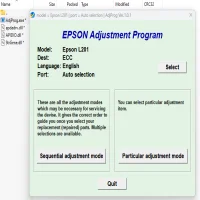
The Epson L201 Adjustment Program is a specialized software tool designed to perform various diagnostic and repair functions on Epson printers. This program allows users to access and modify the printer's internal settings, perform maintenance tasks, and troubleshoot common issues that might arise during printing. It is especially useful for dealing with error codes like "Service Required" or when the printer displays ink pad overflow warnings, as these are often related to the printer's waste ink system.
The program is intended for service professionals or advanced users who are familiar with printer mechanics and software. With the Epson L201 Adjustment Program, users can extend the lifespan of their printers and keep them functioning smoothly, avoiding the need for costly repairs or replacements.
Key Features of the Epson L201 Adjustment Program
-
Waste Ink Pad Counter Reset: One of the primary uses of the Adjustment Program is to reset the waste ink pad counter, which accumulates ink over time as the printer performs cleaning cycles. When this counter exceeds a certain threshold, the printer may stop functioning until it is reset.
-
Ink Pad and Cleaning Operations: The program helps manage the ink pads and perform regular cleaning and maintenance tasks, ensuring that the printer continues to produce high-quality prints.
-
Head Alignment: The Adjustment Program can be used to adjust the print head alignment, improving the accuracy of the printed documents.
-
General Diagnostics: It provides access to a series of diagnostic tools, helping users troubleshoot issues related to ink levels, paper jams, and other common printing problems.
-
Refilling Ink Tanks: If you use third-party ink or refill your own ink tanks, the Adjustment Program can be helpful in recalibrating the printer to recognize the new ink levels.
How to Download and Use the Epson L201 Adjustment Program
Before proceeding with the download, it is important to note that the Epson L201 Adjustment Program is not officially provided by Epson for public use, as it is primarily intended for authorized service centers. However, some third-party websites offer free downloads of this tool.
To download the Epson L201 Adjustment Program safely:
-
Search for a Trusted Source: Make sure to find a reliable website that offers the program. Be cautious about downloading software from unfamiliar sites, as it may contain harmful malware or viruses.
-
Download the Program: Once you find a trusted source, download the Adjustment Program file. It may be compressed in a ZIP file, so make sure you have an extractor tool like WinRAR or 7-Zip.
-
Install the Program: After extracting the file, run the installer and follow the on-screen instructions to install the Adjustment Program on your computer.
-
Connect Your Printer: Ensure that the Epson L201 printer is connected to your computer via USB or Wi-Fi, depending on your printer's configuration.
-
Launch the Program: Open the Adjustment Program and follow the on-screen prompts to reset the waste ink pad counter or perform other necessary adjustments.
-
Perform Maintenance Tasks: Choose the appropriate function (e.g., waste ink pad reset, head alignment, etc.), and let the program complete the task. This will help maintain your printer’s performance.
Important Considerations
-
Risk of Damage: Using the Epson L201 Adjustment Program comes with risks. If not used correctly, it can cause further damage to the printer. Make sure you understand each step before proceeding.
-
Legal Concerns: As the Adjustment Program is not officially supported by Epson, using it may void the warranty of your printer. Always weigh the benefits against the risks before deciding to use this tool.
-
Backup Data: It is a good idea to back up your important documents and printer settings before making any changes using the Adjustment Program.
Conclusion
The Epson L201 Adjustment Program is a powerful tool for anyone looking to maintain their printer and perform essential repairs. It provides valuable functions for managing ink pads, resetting counters, and aligning print heads. While the program is useful, it is important to exercise caution when downloading and using it, as it may void warranties and cause printer damage if used incorrectly.
If you are not confident in handling these tasks on your own, it may be best to consult a professional or visit an authorized Epson service center. For advanced users, however, the Epson L201 Adjustment Program can be a cost-effective way to extend the life of your printer and keep it running at its best.
Rate the App
User Reviews





Popular Apps








