
Latest Version
Download NowMore About Epson L210 Adjustment Program ( Resetter )
Epson L210 Adjustment Program (Resetter): A Complete Guide
The Epson L210 printer is a popular choice for home and office users due to its efficient ink tank system and high-quality prints. However, like most Epson printers, the L210 can encounter common issues over time, such as the infamous 'Service Required' error or blinking indicator lights. Fortunately, the Epson L210 Adjustment Program, commonly known as a resetter, can effectively resolve these problems.
What is the Epson L210 Adjustment Program?
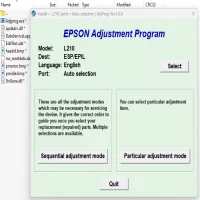
The Epson L210 Adjustment Program is a specialized utility software designed to reset and maintain the internal settings of your Epson L210 printer. It helps fix errors such as:
- Waste ink pad counter overflow
- Service required error
- Printhead alignment issues
- Ink level reset
This tool essentially restores your printer to factory settings, allowing it to function normally.
Why Do You Need the Epson L210 Adjustment Program?
Epson printers have an internal counter that tracks the number of prints. Once the printer reaches a predefined threshold, it triggers a 'Service Required' message, preventing further printing. This is primarily to ensure the waste ink pad doesn't overflow and cause damage. The resetter program resets this counter, enabling the printer to operate again.
Features of Epson L210 Adjustment Program
- Waste Ink Pad Counter Reset: Resets the ink pad counter to zero.
- EEPROM Reset: Resets internal printer settings.
- Head Cleaning: Performs thorough printhead cleaning.
- Ink Charge: Allows recharging of ink to maintain proper flow.
- No Special Technical Knowledge Required: User-friendly interface for easy operation.
How to Use the Epson L210 Adjustment Program
- Download the Software: Ensure you download the tool from a reliable source.
- Run the Program: Open the software and select the 'Particular Adjustment Mode.'
- Select Waste Ink Pad Counter: Choose 'Waste Ink Pad Counter' from the menu.
- Reset the Counter: Click on 'Check' and then 'Initialization.'
- Restart Your Printer: Turn off and restart your Epson L210.
After following these steps, your printer should return to normal operation.
Precautions Before Using the Adjustment Program
- Ensure your printer is properly connected to your computer.
- Use the tool responsibly; improper use may damage your printer.
- Always download the resetter from reputable sources.
Conclusion
The Epson L210 Adjustment Program is a valuable tool for resolving common printer errors and extending the life of your device. By understanding how to use this software correctly, you can save both time and money while keeping your printer in optimal condition. Remember to follow the instructions carefully to avoid complications.
Rate the App
User Reviews





Popular Apps








