
Latest Version
More About Epson L220 Adjustment Program ( Resetter )
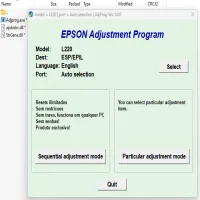
Epson L220 Adjustment Program (Resetter): A Comprehensive Guide
The Epson L220 is a popular multifunction inkjet printer widely used for its cost-efficiency and high-quality print output. However, like many printers, the Epson L220 can encounter issues over time, especially with its ink pad counter. When the ink pad reaches its limit, the printer stops functioning to prevent ink overflow, resulting in the "waste ink pad full" error. To resolve this, the Epson L220 Adjustment Program (often called the Resetter) is a vital tool to reset the printer’s ink pad counter and restore it to full working condition. Here’s everything you need to know about this reset procedure.
What is the Epson L220 Adjustment Program?
The Epson L220 Adjustment Program is a software tool designed specifically for Epson printers, including the L220 model. Its primary function is to reset the internal counters, including the waste ink pad counter, which tracks the amount of ink absorbed by the printer's waste ink pads. This program can also help perform other maintenance tasks like printhead cleaning, nozzle checks, and more.
The waste ink pad is essential in absorbing excess ink during the printing process. Over time, it can accumulate a significant amount of ink, leading to the aforementioned error. Resetting the printer using the Adjustment Program allows users to continue using their printers without replacing the waste ink pads prematurely.
Key Features of the Epson L220 Adjustment Program
- Waste Ink Pad Reset: Resets the waste ink pad counter and prevents the "waste ink pad full" error from halting the printer’s operation.
- Printhead Maintenance: Includes options for printhead cleaning, head alignment, and nozzle checks to maintain print quality.
- Ink Level Monitoring: Tracks ink levels and provides reports for monitoring printer health.
- Printer Test: Performs tests on the printer’s functions, ensuring all components are operating correctly.
- Compatible with Multiple Epson Models: The program works with various Epson printers, but the L220 model is specifically supported for adjustments and resets.
Why Do You Need the Epson L220 Adjustment Program?
The primary reason to use the Epson L220 Adjustment Program is to bypass the waste ink pad issue. As the ink pads fill up with absorbed ink, the printer may stop working to avoid potential spillage. The Adjustment Program helps reset the internal counter, allowing the printer to continue functioning without replacing the pads immediately. This is a cost-effective solution for many users, especially those who rely heavily on their printer for daily tasks.
Besides the waste ink pad reset, the program also ensures your printer remains in optimal condition by performing regular maintenance functions such as cleaning and alignment, preventing issues related to print quality.
How to Use the Epson L220 Adjustment Program
Before using the program, it's essential to download it from a reliable source. Since Epson doesn't officially distribute the adjustment software, it's important to find a trustworthy site. Here are the steps to use the Epson L220 Adjustment Program:
-
Download the Program:
- Search for a legitimate source offering the Epson L220 Adjustment Program for download.
- Ensure that the software is compatible with your operating system (Windows or Mac).
-
Install the Software:
- Once downloaded, install the software by following the on-screen instructions. Make sure you allow the program to make changes to your device if prompted.
-
Connect Your Printer:
- Ensure that the Epson L220 is properly connected to your computer via USB and powered on.
-
Open the Program:
- Launch the Epson L220 Adjustment Program on your computer.
- Choose the Epson L220 model from the program’s list if prompted.
-
Select the Reset Function:
- Navigate to the “Waste Ink Pad Reset” option in the software.
- Click on it and follow the on-screen prompts to reset the counter.
-
Complete the Reset:
- After completing the reset, the printer should show no further waste ink pad errors.
- Run a test print to ensure that the printer is functioning correctly.
Potential Risks and Considerations
- Risk of Ink Spillage: If you don't replace the waste ink pad soon, there is a risk of ink spillage, which could damage the printer.
- Software Legitimacy: Ensure you download the program from a reputable site to avoid malware or incompatible software.
- Temporary Solution: Resetting the ink pad counter is a temporary fix. Eventually, the waste ink pads will need to be replaced, and failure to do so could lead to permanent damage to the printer.
Conclusion
The Epson L220 Adjustment Program (Resetter) is an invaluable tool for maintaining your Epson L220 printer, allowing you to reset the waste ink pad counter and keep your printer running smoothly. By using this software, you can avoid costly repairs or replacements and extend the life of your printer. However, be mindful that the reset is only a temporary solution, and it’s important to replace the waste ink pads as soon as possible to avoid potential issues. Always use the software responsibly and follow the proper steps to ensure your printer’s optimal performance.
Rate the App
User Reviews





Popular Apps








