
Latest Version
Download NowMore About Epson L350 Adjustment Program ( Resetter )
Epson L350 Adjustment Program (Resetter): A Comprehensive Guide
The Epson L350 is a popular inkjet printer known for its cost-efficiency, especially in terms of its refillable ink tank system. However, like many inkjet printers, the L350 has a built-in counter that tracks the amount of ink used by the printer. Once this counter reaches its limit, the printer will stop working and display an error message, often related to the waste ink pad being full. This is where the Epson L350 Adjustment Program (also known as the resetter) comes into play.
What is the Epson L350 Adjustment Program?
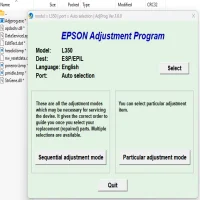
The Epson L350 Adjustment Program is a software tool designed to reset the printer’s internal counters. It is often used when the printer displays error codes such as “Service Required” or “Waste Ink Pad is Full.” These errors typically occur after prolonged usage when the waste ink pads in the printer are saturated with ink. This tool allows users to reset the printer’s waste ink counter and resume normal operation without needing to replace the waste ink pads.
The adjustment program is primarily intended for service technicians and advanced users, as improper use can cause damage to the printer. It’s crucial to understand its functionality before attempting a reset.
Why You Need the Adjustment Program
-
Waste Ink Pad Reset: As mentioned, the L350 has a waste ink pad that collects excess ink during printing. Over time, the ink pad becomes full, and the printer stops functioning as a precaution to prevent ink from leaking into other parts of the machine. The Adjustment Program allows you to reset the counter, which tricks the printer into thinking the ink pads have been replaced.
-
Overcome Error Messages: The printer may display various error codes when the waste ink pad reaches its limit. The adjustment program helps clear these error messages, allowing you to continue printing without needing to replace hardware components.
-
Save on Maintenance Costs: Instead of paying for professional repairs, the adjustment program provides a cost-effective solution to reset the printer and extend its lifespan.
How to Use the Epson L350 Adjustment Program
Before using the adjustment program, it's important to back up any important data and have the software downloaded from a trusted source. Follow these steps to use the Epson L350 Adjustment Program:
-
Download the Software: You can find the Epson L350 Adjustment Program on various online forums or trusted websites. Ensure that you download the version specific to the Epson L350 model to avoid compatibility issues.
-
Install the Program: Once the software is downloaded, install it on your computer. Make sure that no other Epson software is running on your PC during installation.
-
Connect the Printer: Ensure that your Epson L350 is connected to the computer via USB. Turn the printer on and ensure that there are no print jobs queued in the printer’s memory.
-
Run the Adjustment Program: Open the Epson L350 Adjustment Program. The software interface will display various options for printer maintenance.
-
Select the Waste Ink Pad Counter: In the adjustment program, select the option for resetting the waste ink pad counter. This option might be listed under “Maintenance” or “Waste Ink Pad Reset” depending on the software version.
-
Start the Reset Process: Follow the on-screen prompts to initiate the reset. The program will perform a series of checks, and once completed, the waste ink counter will be reset to zero.
-
Test the Printer: After completing the reset, print a test page to ensure the printer is functioning normally and the error message is no longer present.
Important Considerations
- Backup: Always back up important data and make sure the printer’s settings are saved. Some users may experience minor changes to default configurations after using the adjustment program.
- Ink Pad Replacement: While resetting the counter gives the illusion that the printer’s waste ink pad is empty, it is not. Eventually, the ink pads will need to be physically replaced to avoid further complications.
- Caution: The adjustment program is not officially supported by Epson, and using it incorrectly can result in damage to the printer. Only use it if you're comfortable with the procedure and understand the risks involved.
Conclusion
The Epson L350 Adjustment Program is a useful tool for resetting the waste ink pad counter, extending the life of your printer, and avoiding costly maintenance. However, it should be used with caution, as improper use may lead to further issues. By following the provided steps carefully, users can resolve common printer errors and continue printing without interruption.
Rate the App
User Reviews





Popular Apps








