
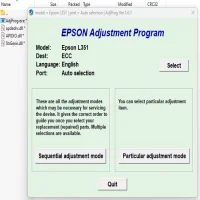
Latest Version
Download NowMore About Epson L351 Adjustment Program ( Resetter )
Epson L351 Adjustment Program (Resetter): A Comprehensive Guide
The Epson L351 printer, a popular model from the Epson EcoTank series, offers efficient and cost-effective printing for home and office use. One of the key advantages of EcoTank printers is their refillable ink tanks, which significantly reduce the overall cost of ink. However, like most printers, the Epson L351 can experience certain issues over time that may require maintenance or resetting. One of the most commonly used tools for resolving such issues is the Epson L351 Adjustment Program (also referred to as the Resetter).
This article will provide a thorough explanation of the Epson L351 Adjustment Program, its purpose, how to use it, and some important considerations to keep in mind.
What is the Epson L351 Adjustment Program (Resetter)?
The Epson L351 Adjustment Program is a specialized utility tool designed to reset or adjust various printer settings. This program is often used when the printer's internal counters reach their limit, which may trigger an error message or prevent the printer from functioning properly. The most common issue that users face is when the printer's ink pad counter reaches its limit. Ink pads are responsible for absorbing excess ink during printing, and when they become full, the printer may stop working.
The Adjustment Program essentially helps users reset these internal counters and restore the printer to its original state, allowing it to function normally again.
Common Issues that Can be Fixed with the Adjustment Program
-
Ink Pad Overflow Error: This is one of the most common issues that users face with their Epson L351. The printer will stop functioning, and an error message about ink pad overflow may appear. The Adjustment Program can reset the ink pad counter and clear the error.
-
Printer Not Responding: In some cases, the printer may stop responding to print commands or show a "waste ink pad" error. Running the Adjustment Program can help fix these issues.
-
Other Internal Counters: The Epson L351 has various internal counters for different functions such as head cleaning, print head usage, and more. If any of these counters are incorrectly set or reach their maximum value, the printer may stop working. The Adjustment Program allows you to reset these counters.
How to Use the Epson L351 Adjustment Program
Using the Epson L351 Adjustment Program is relatively straightforward, but it's important to follow the steps carefully to avoid causing any further issues. Here’s a general guide on how to use the program:
-
Download the Adjustment Program: The first step is to find and download the Epson L351 Adjustment Program. Please note that this program is not officially provided by Epson and may require searching online for a reliable source. Be cautious when downloading software from third-party websites to avoid malware or other unwanted programs.
-
Install the Program: After downloading the program, run the installer and follow the on-screen instructions to install it on your computer.
-
Connect Your Epson L351 Printer: Ensure that the printer is connected to your computer via USB and turned on.
-
Launch the Adjustment Program: Open the Adjustment Program on your computer. The interface will display various options related to the printer’s settings.
-
Select the Printer Model: Choose the correct printer model (Epson L351) from the list.
-
Choose the Desired Function: Depending on the issue you are facing, select the appropriate function, such as “Waste Ink Pad Counter” or “Head Cleaning.” You can also reset other internal counters if needed.
-
Perform the Reset: Follow the on-screen instructions to complete the reset. The program may prompt you to perform a head cleaning or other steps.
-
Restart the Printer: After the reset is completed, restart the printer. The error message should be gone, and the printer should resume normal operation.
Important Considerations When Using the Adjustment Program
While the Epson L351 Adjustment Program can be an effective tool for resolving certain issues, there are a few important things to keep in mind:
-
Risks of Overuse: The Adjustment Program resets internal counters, but overusing it could lead to further issues. For example, resetting the ink pad counter too frequently could result in ink spillage or improper functioning of the ink pads. Be cautious and only use the program when absolutely necessary.
-
Data Backup: Before using the program, it is a good idea to back up any important data or settings from your printer. Although the reset process should not erase any documents or configurations, it’s always better to be safe.
-
Legal Considerations: The Adjustment Program is not officially provided by Epson, and using third-party software can void your warranty. Ensure that you understand the risks involved before proceeding with this method.
-
Ink Pad Replacement: If the ink pad counter is full, it may indicate that the ink pads are nearing their maximum capacity and need to be replaced. Resetting the counter will not solve the underlying issue, and continued use without replacing the ink pads could cause further damage.
Conclusion
The Epson L351 Adjustment Program (Resetter) is a valuable tool for resolving certain printer issues, especially those related to ink pad overflow or internal counter errors. By following the steps outlined in this guide, you can reset your printer and restore it to its full functionality. However, it’s important to use the tool cautiously and be aware of the risks involved, including the potential voiding of warranties and the need for hardware replacement. If in doubt, consult an authorized Epson service provider to ensure your printer continues to work smoothly for the long term.
Rate the App
User Reviews





Popular Apps








