
Latest Version
Download NowMore About Epson L355 Adjustment Program ( Resetter )
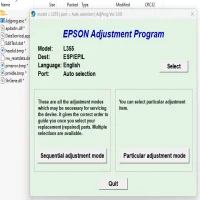
Epson L355 Adjustment Program (Resetter): A Comprehensive Guide
The Epson L355 is a popular model within Epson's EcoTank series, known for its efficient printing capabilities and cost-effective ink refills. However, like many other printers, the L355 may encounter issues such as a waste ink pad overflow or an error related to printer settings. This is where the Epson L355 Adjustment Program, often referred to as a "resetter," comes into play. In this guide, we will explain what the Epson L355 Adjustment Program is, why it’s essential, and how to use it safely to restore your printer’s functionality.
What is the Epson L355 Adjustment Program?
The Epson L355 Adjustment Program is a specialized software tool designed to reset various counters in Epson printers, particularly related to ink waste pads. Over time, as you print numerous pages, the printer's internal waste ink pads accumulate ink, and when these pads are full, the printer will trigger an error message, signaling that maintenance is needed. The Epson L355 Adjustment Program resets these counters and can clear the error, allowing the printer to continue working as normal.
The resetter tool addresses issues such as:
- Waste Ink Pad Full Errors: If the printer detects that the waste ink pads are full, it will stop working to prevent further spillage.
- Printer Maintenance Counter Reset: After numerous prints, the maintenance counter can reach its limit. This program resets the counter to ensure the printer functions properly.
- Printer Error Codes: The adjustment program can resolve error codes that prevent the printer from printing, such as the "Service Required" message.
Why Use the Epson L355 Adjustment Program?
Using the Epson L355 Adjustment Program comes with several key advantages:
- Cost-Effective: Instead of paying for expensive repairs or purchasing a new printer, using the resetter program allows you to continue using the printer without the added costs.
- Prevents Printer Downtime: By resetting the internal counters, you ensure that your printer remains operational, avoiding unnecessary delays in your printing tasks.
- Maintains Printer Efficiency: Regular resets ensure that the printer runs efficiently and that its components, such as the waste ink pad, are not prematurely worn out.
How to Use the Epson L355 Adjustment Program
Before using the Epson L355 Adjustment Program, make sure to back up important data or documents as the resetter can reset certain settings in the printer. Follow these steps to use the adjustment program:
-
Download the Epson L355 Adjustment Program:
- First, you’ll need to download the Epson L355 Adjustment Program from a trusted source. Be sure to avoid downloading from unofficial or dubious websites to prevent malware or harmful software.
-
Install the Program:
- After downloading the program, run the installer and follow the on-screen instructions to complete the installation process. Once installed, launch the program.
-
Connect Your Printer:
- Ensure that your Epson L355 printer is connected to your computer via USB or network connection.
- Power on the printer and ensure there are no ongoing print jobs.
-
Select the Correct Model:
- In the Epson Adjustment Program, choose your printer model, Epson L355, from the list of supported models.
-
Enter Service Mode:
- The adjustment program requires the printer to be in service mode. To enter this mode:
- Turn off the printer.
- Hold down the "Paper Feed" button (the button that typically starts the printing process).
- While holding the button, turn on the printer.
- Keep holding the button until the printer’s lights start flashing, indicating that the printer is in service mode.
-
Perform the Reset:
- Once the printer is in service mode and the program is running, navigate to the “Waste Ink Pad Counter” option in the software.
- Select “Reset Waste Ink Pad Counter” or a similar option, depending on your software version.
- The program will then reset the counter, allowing your printer to resume normal operation.
-
Test the Printer:
- After the reset is complete, restart the printer and test it by printing a test page. This ensures that the reset was successful and that the printer is working without error.
Precautions and Warnings
While the Epson L355 Adjustment Program can be a lifesaver, it's important to exercise caution when using it:
- Use the Program Responsibly: This program should only be used to clear legitimate issues like a full waste ink pad counter or maintenance counter. Overuse may damage the printer or its components.
- Backup Your Settings: The program resets certain configurations in the printer. Make sure to note any custom settings before using the tool.
- Proceed with Caution: If you’re unfamiliar with printer software or service modes, it’s recommended to seek guidance or professional help to avoid causing unintentional damage to your printer.
Conclusion
The Epson L355 Adjustment Program is a valuable tool for users looking to extend the life of their printers and resolve common maintenance issues. By resetting waste ink pad counters and clearing error codes, this software allows you to keep your printer in working condition without the need for expensive repairs or replacements. However, it should be used responsibly, and users should take care to avoid using the tool excessively to prevent unnecessary damage. When used correctly, the Epson L355 Adjustment Program is an essential tool for maintaining the efficiency and longevity of your printer.
Rate the App
User Reviews





Popular Apps








