
Latest Version
More About Epson L360 Adjustment Program ( Resetter )
Epson L360 Adjustment Program (Resetter): A Comprehensive Guide
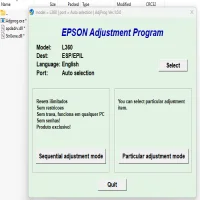
The Epson L360 is a popular all-in-one printer that combines affordability with functionality. Like many printers, it’s equipped with an ink absorption system that, over time, can fill up with excess ink. When this happens, the printer may stop functioning correctly, displaying an error related to the waste ink pad. To resolve this issue, the Epson L360 Adjustment Program (also known as the Resetter) can be used. This tool helps to reset the printer's internal waste ink counter, allowing the printer to function normally once again. Below, we will explore the Epson L360 Adjustment Program in more detail and guide you through its usage.
What is the Epson L360 Adjustment Program?
The Epson L360 Adjustment Program is a software tool specifically designed to reset various printer settings, including the waste ink counter. Printers like the Epson L360 have a counter that keeps track of the amount of ink absorbed by the waste ink pads during printing, cleaning, and maintenance cycles. Once the counter reaches its limit, the printer will display an error, often referring to the waste ink pads being full. The Adjustment Program resets this counter, effectively allowing the printer to continue operating without replacing the waste ink pads.
Why Do You Need the Epson L360 Adjustment Program?
The primary reason to use the Epson L360 Adjustment Program is when the printer shows an error about the waste ink pads. This error typically occurs after several months or years of heavy use. While the printer might still be working normally, it will refuse to print until the counter is reset, warning that the waste ink pad is full.
Using the Adjustment Program will:
- Reset the Waste Ink Counter: It clears the waste ink counter, making the printer think the waste ink pad is empty and ready for use again.
- Extend Printer Life: Resetting the waste ink counter can extend the printer’s life, as you avoid unnecessary maintenance or replacement.
- Save Money: Instead of servicing the printer at an authorized service center, the Adjustment Program allows you to perform the reset yourself, saving on costly repairs.
- Improve Printer Performance: Resetting the program can help restore your printer to its full operational capacity without any errors.
How to Use the Epson L360 Adjustment Program
Before starting, ensure that you have a computer running Windows, as the Adjustment Program is typically designed for Windows systems.
Step 1: Download the Epson L360 Adjustment Program
The first step is to download the Epson L360 Adjustment Program (Resetter). The software is available from various online sources, but make sure to download it from a trusted website to avoid potential risks like malware or viruses.
Step 2: Install the Adjustment Program
After downloading the program, you will need to extract the files (they typically come in a compressed folder). Install the software by following the on-screen instructions. During the installation, you may be prompted to disable any antivirus software, as some security programs flag the Adjustment Program as a potentially harmful file, even though it is not.
Step 3: Run the Adjustment Program
Once installed, open the Epson L360 Adjustment Program. You'll be asked to select your printer model and connect it to the computer. Make sure the printer is powered on and connected via USB cable.
Step 4: Select the Waste Ink Pad Reset Option
In the software interface, navigate to the "Waste Ink Pad" option. Choose the option to reset the waste ink counter. Follow the instructions carefully, as you may be asked to perform a test print or confirm specific actions on the printer.
Step 5: Confirm the Reset
After completing the reset process, the Adjustment Program will indicate whether the reset was successful. You can now check the printer’s status to confirm that the error has been cleared. Typically, after the reset, the printer will be operational again, and you should be able to print without encountering the waste ink pad error.
Precautions When Using the Epson L360 Adjustment Program
While the Epson L360 Adjustment Program is an effective solution to reset the waste ink counter, it’s essential to keep the following precautions in mind:
- Backup Data: Always back up your printer settings and data before using the Adjustment Program. Although it’s rare, issues can sometimes arise that could affect your printer’s configuration.
- Do Not Overuse: The waste ink pads are designed to absorb excess ink, and overusing the Adjustment Program without physically maintaining or replacing the waste ink pads can cause damage to your printer.
- Use Genuine Software: Ensure that you are using the official or reputable versions of the software to avoid security risks.
Alternative Solutions and Considerations
While the Adjustment Program is a useful tool for solving waste ink pad issues, it’s not a permanent solution. Over time, the waste ink pads may become saturated, requiring physical replacement. In such cases, it is best to take your printer to an authorized Epson service center for proper maintenance.
Conclusion
The Epson L360 Adjustment Program is a powerful tool for resetting the waste ink counter, allowing users to continue using their printers without the frustration of an error message. While it is an effective short-term solution, remember to take care of the printer’s waste ink pads for long-term performance. If you encounter difficulties during the process or the problem persists, seek professional assistance to ensure the longevity of your Epson L360 printer.
By following this guide, you can successfully use the Epson L360 Adjustment Program to restore your printer to full functionality and continue enjoying the benefits of your Epson L360 without interruptions.
Rate the App
User Reviews





Popular Apps








