
Latest Version
More About Epson L365 Adjustment Program ( Resetter )
Epson L365 Adjustment Program (Resetter): A Comprehensive Guide
The Epson L365 is one of the most popular all-in-one inkjet printers that offers printing, scanning, and copying functionalities. Known for its high-quality output and cost-effective printing due to its integrated ink tank system, the L365 can handle various print jobs with ease. However, like any other printer, the Epson L365 can sometimes encounter operational issues that may need resetting. This is where the Epson L365 Adjustment Program (commonly referred to as a "Resetter") comes in.
What is the Epson L365 Adjustment Program?
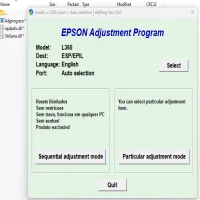
The Epson L365 Adjustment Program is a specialized software tool designed to fix errors and reset various parts of the Epson L365 printer. This program is often used when the printer displays specific error messages, such as "printer is in an error state" or "maintenance box is full." It is essential to use this tool only when necessary, as it allows users to reset important printer parameters, like ink counters, waste ink counters, and printhead adjustments.
This tool is not officially provided by Epson but can be found from third-party sources or trusted repair professionals. It is often required when a printer reaches certain error states that can’t be resolved through typical troubleshooting steps.
Common Reasons to Use the Epson L365 Adjustment Program
-
Waste Ink Pad Overflow Error: Over time, your Epson L365 will accumulate waste ink during the printing process, particularly when the printer performs cleaning cycles. If the waste ink pads reach their maximum capacity, the printer will stop working and display an error. The Adjustment Program can reset the waste ink counter, allowing the printer to continue working.
-
Ink Counter Reset: After replacing ink cartridges, sometimes the printer may not recognize the new ink levels. The adjustment tool helps reset the ink counter to reflect the new ink cartridges correctly.
-
Print Head Issues: If the printhead is misaligned or showing poor printing quality due to clogged nozzles, the tool can help realign the printhead or run cleaning cycles to restore print quality.
-
General Resetting: If your printer starts behaving erratically—showing strange error codes or unresponsive behaviors—using the adjustment tool to perform a general reset can help fix the problem.
How to Use the Epson L365 Adjustment Program (Resetter)?
Using the Epson L365 Adjustment Program involves several critical steps. Here’s a basic guide on how to use it:
Step 1: Download and Install the Adjustment Program
-
Find a Trusted Source: Download the Epson L365 Adjustment Program from a trusted website. Make sure to verify its authenticity before proceeding with the installation.
-
Extract the Files: Most versions of the adjustment program come in a compressed format (.zip). Extract the files to a folder on your computer.
-
Install the Software: Launch the extracted program file to start the installation. Follow on-screen instructions to install the software on your computer.
Step 2: Connect the Printer to Your Computer
Make sure that your Epson L365 is connected to your computer via USB or Wi-Fi, depending on your setup. It’s important that the printer is turned on during the reset process.
Step 3: Launch the Adjustment Program
-
Open the Adjustment Program by clicking on the application icon.
-
The program will prompt you to select the printer model. Make sure you select Epson L365 from the list of printers.
Step 4: Select the Desired Reset Function
Once the program opens, you will be presented with various reset options, such as:
- Waste Ink Pad Reset: Select this option if you are dealing with the waste ink pad overflow issue.
- Ink Counter Reset: Choose this if you are troubleshooting ink recognition errors.
- Print Head Cleaning: If your prints are showing signs of misalignment or ink smudging, use this feature to clean the printhead.
Step 5: Execute the Reset
Follow the on-screen instructions to execute the reset. The program will guide you through the process. Ensure you do not turn off the printer during this process, as interruptions may cause errors or damage the printer.
Step 6: Confirm the Reset
Once the reset process is complete, you will see a confirmation message. At this point, you can restart your printer and test it by printing a test page to ensure everything is working properly.
Risks and Precautions
While the Epson L365 Adjustment Program is a powerful tool, it must be used with caution. Here are some key things to keep in mind:
-
Void Warranty: Using third-party software tools like the Adjustment Program may void your printer's warranty. It’s recommended to check your warranty terms before proceeding.
-
Use Only When Necessary: Resetting the printer too frequently may not be necessary and can lead to issues down the line. Only use the tool when you face persistent errors.
-
Download from Trusted Sources: Avoid downloading the Adjustment Program from unofficial or dubious sources, as it might come bundled with malware or other harmful software.
-
Potential for Printer Malfunctions: Incorrect use of the resetter, or using it to reset parts of the printer that do not require resetting, could cause malfunctions. Always follow instructions carefully.
Conclusion
The Epson L365 Adjustment Program is a helpful tool that can assist in resolving common printer issues like waste ink pad errors, ink counter resets, and print head maintenance. When used properly, this program can extend the life of your printer and restore its full functionality. However, it’s important to exercise caution and use it only when absolutely necessary. Always ensure that you download the software from a trusted source, and avoid using it frequently to prevent potential damage to your printer.
Rate the App
User Reviews





Popular Apps








