
Latest Version
Download NowMore About Epson L375 Adjustment Program ( Resetter )
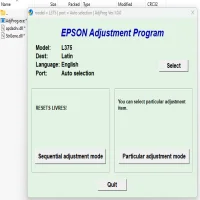
Epson L375 Adjustment Program (Resetter)
The Epson L375 is a popular multifunction inkjet printer that offers excellent performance for both home and office environments. However, like many inkjet printers, the Epson L375 may encounter issues such as the “ink pad is at the end of its service life” error, which requires resetting the printer’s internal waste ink counter. This is where the Epson L375 Adjustment Program, also known as a "resetter," comes into play.
What is the Epson L375 Adjustment Program?
The Epson L375 Adjustment Program is a software tool designed to reset certain maintenance counters in Epson printers, including the waste ink counter. Over time, as the printer operates, it stores information about how much ink has been used or accumulated in its waste ink pads. These counters are tracked internally to help the printer monitor its maintenance requirements.
When the printer detects that the waste ink pad is full or that the waste ink counter has reached its limit, it triggers the "end of service life" message and stops functioning. This can be frustrating, especially when the printer still has a significant amount of useful life left. The Epson L375 Adjustment Program essentially allows users to reset these counters, effectively bypassing the service life error and allowing the printer to continue functioning normally.
How Does the Epson L375 Adjustment Program Work?
The adjustment program works by communicating directly with the printer’s internal system. It allows the user to reset or adjust the printer’s waste ink counter, ink pads, and other maintenance-related settings. By doing this, the program "fools" the printer into thinking that the waste ink pads are still within their acceptable usage limits.
In addition to resetting the waste ink counter, the program can also be used to perform other maintenance functions, such as:
- Head Cleaning: Helps clear any clogged printhead nozzles to improve print quality.
- Ink Pad Initialization: Resets the printer’s ink pad data, clearing any accumulated waste ink information.
- Waste Ink Reset: This is specifically designed to reset the waste ink counter to zero.
- EEPROM Data Reset: Allows users to clear certain EEPROM data that may be causing problems.
How to Use the Epson L375 Adjustment Program
Before using the Epson L375 Adjustment Program, make sure you have the necessary tools and software. You will need a computer running Windows (or in some cases, Mac) and the adjustment program file itself. The software can typically be found through various third-party sources or from Epson support sites.
Here is a basic step-by-step guide on how to use the adjustment program:
-
Download and Install: Search for and download the Epson L375 Adjustment Program from a trusted source. After downloading, extract the files from the compressed folder and install the software on your computer.
-
Connect Your Printer: Ensure that your Epson L375 printer is properly connected to your computer via USB or over a network (if applicable).
-
Run the Program: Open the Epson L375 Adjustment Program. The software should detect your printer automatically if connected correctly.
-
Select the Reset Function: The program will display several options for maintenance and reset. Select the function you wish to perform, such as the waste ink counter reset.
-
Execute the Reset: After selecting the reset option, follow the on-screen instructions. The program will communicate with the printer and reset the counters accordingly.
-
Test Your Printer: Once the reset is complete, restart the printer and perform a test print to ensure that the issue has been resolved and the printer is functioning properly.
Precautions and Considerations
While the Epson L375 Adjustment Program can be a great tool for resolving error messages related to waste ink counters, there are a few important points to keep in mind:
-
Backup Your Data: Before using the adjustment program, it’s advisable to back up any important printer settings, as the reset process could potentially affect other configurations.
-
Use with Caution: The resetter tool is effective for bypassing service life errors, but it should be used cautiously. Resetting the waste ink counter does not physically replace or clean the waste ink pads, which can still fill up over time. If the pads become too full, it may result in ink leakage or other issues, so it’s important to perform proper maintenance when necessary.
-
Third-Party Software: Some third-party sources might offer the adjustment program for free or at a low cost, but be cautious when downloading software from unofficial websites. Always ensure that you’re using a legitimate and safe version of the adjustment program.
-
Warranty Void: Using adjustment software may void your printer’s warranty, so check with Epson or your service provider before using the resetter if you’re still under warranty.
Conclusion
The Epson L375 Adjustment Program (Resetter) is a valuable tool for users experiencing issues with the waste ink counter or other printer maintenance functions. By resetting internal counters, the program helps extend the lifespan of the printer and provides a solution to common error messages related to ink pads. However, it’s important to use the program responsibly and perform regular maintenance to avoid potential issues down the road.
If you’re looking for an effective way to manage your Epson L375 printer’s maintenance, the adjustment program can offer a cost-effective solution, but always remember to perform regular checks on your printer to ensure optimal performance.
Rate the App
User Reviews





Popular Apps








